
EasyManua.ls Logo

Generac Power Systems 006664-0 - User Manual

Generac Power Systems 006664-0
60 pages
Print Icon
To Next Page IconTo Next Page
Loading...
www.generac.com or 1-888-GENERAC
Instruction Manual
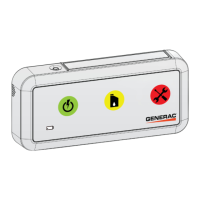
Wireless Local Monitor
Model: 006664-0
NOTE:
This display unit and it's generator transceiver are a matched pair. The included
display unit will only function with the included generator transceiver.

Table of Contents

Questions and Answers

  • A
    Angela FryeJul 31, 2025
    What to do if all lights are flashing on my Generac Power Systems Monitor display unit?
    • L
      Lauren MclaughlinJul 31, 2025
      If all the lights are flashing on the display unit, it indicates a loss of communication between the generator transceiver and the display unit. This could be due to several reasons: * The display unit might be out of range. Perform the Signal Strength Test and move the display unit closer to the generator until the range is acceptable. * The generator transceiver may not be communicating with the generator controller or is not receiving power. Check that the connection to the transceiver and the controller are properly made. * A fuse may have failed, been damaged, or removed from the generator controller. Check and replace the fuse. * The generator battery may be disconnected. Check the generator battery connections.
  • M
    Matthew MccoyAug 5, 2025
    Why is the signal strength low on my Generac Power Systems Monitor?
    • D
      Dakota WilliamsAug 5, 2025
      Low signal strength can occur because the signal is reduced when traveling through mediums such as metal siding, tinted or filtered windows, brick, multiple walls, or due to atmospheric conditions. Perform the Signal Strength Test and relocate to a location with higher signal strength, if necessary.
  • A
    Angela HerreraAug 9, 2025
    What to do if the generator transceiver light is not illuminated on my Generac Power Systems Monitor?
    • E
      esanfordAug 9, 2025
      If the generator transceiver light is not illuminated, it means the transceiver isn't receiving power. This could be due to: * The harness transceiver connection not being properly made at the transceiver and controller. Check these connections. * A failed, damaged, or removed fuse from the generator controller. Check and replace the fuse. * A disconnected generator battery. Check the generator battery connections.
  • W
    Wendy SnyderAug 13, 2025
    Why does the battery life is less than expected on my Generac Power Systems Monitor?
    • C
      Caitlyn ClaytonAug 14, 2025
      If the battery life is less than expected, it could be due to a low signal strength. Perform the Signal Strength Test and relocate to a location with higher signal strength, if necessary.
  • M
    Michael RichardsonAug 17, 2025
    What to do if yellow and red lights are flashing on my Generac Power Systems Monitor display unit?
    • L
      leahwilliamsAug 18, 2025
      If the yellow and red lights are flashing on the display unit, it indicates that the generator transceiver is not communicating with the generator. Check the wiring harness and connections between the Generator control panel and the transceiver.
  • D
    Daniel WhiteAug 22, 2025
    What to do if the generator transceiver light is flashing on my Generac Power Systems Monitor?
    • R
      Rachel HughesAug 22, 2025
      If the generator transceiver light is flashing, it indicates that the transceiver is not in communication with the display unit. Install or replace the batteries. The display unit may also be out of range.
  • J
    Joshua WilliamsAug 27, 2025
    What to do if no lights illuminate when button pressed on my Generac Power Systems Monitor display unit?
    • V
      Victoria CookAug 27, 2025
      If no lights illuminate when the button is pressed, the batteries are likely dead. Check and replace the batteries.

Summary

Safety Rules and Alert Definitions

Essential Safety Instructions

Emphasizes saving, reading, and understanding safety warnings, alert definitions, and instructions.

Safety Symbols and Hazard Identification

Safety Symbols and Hazards

Explains common safety symbols and identifies critical hazards like electrical shock and rotating parts.

Operational Safety and Hazard Prevention

Hazard Categories and Maintenance

Covers general, electrical, explosion hazards, and safe operation/maintenance practices.

Installation: Generator Compatibility and Transceiver Prep

Transceiver Installation Steps

Provides initial steps for installing the transceiver on air-cooled generators, including battery disconnection.

Installation: Transceiver Mounting (2008-2012)

Transceiver Mounting (2008-2012 Models)

Details how to mount the transceiver on the back of 2008-2012 generator models with LCD displays.

Installation: Transceiver Mounting (2013+) and Wiring

Transceiver Mounting (2013+)

Covers transceiver mounting for 2013+ models using a template and drilling.

Installation: Final Steps and Display Unit Setup

Installation: Signal Strength and Mounting

Operation: Red Light and Low Battery Alerts

Troubleshooting Common Issues

Common Troubleshooting Steps

Provides a guide to diagnose and fix common problems with the wireless monitor system.

Quick Reference: Status Indicators

Generac Power Systems 006664-0 Specifications

General IconGeneral
Model Number006664-0
BrandGenerac Power Systems
TypeMonitor
CompatibilityGenerac generators
FunctionRemote Generator Monitoring