EasyManua.ls Logo

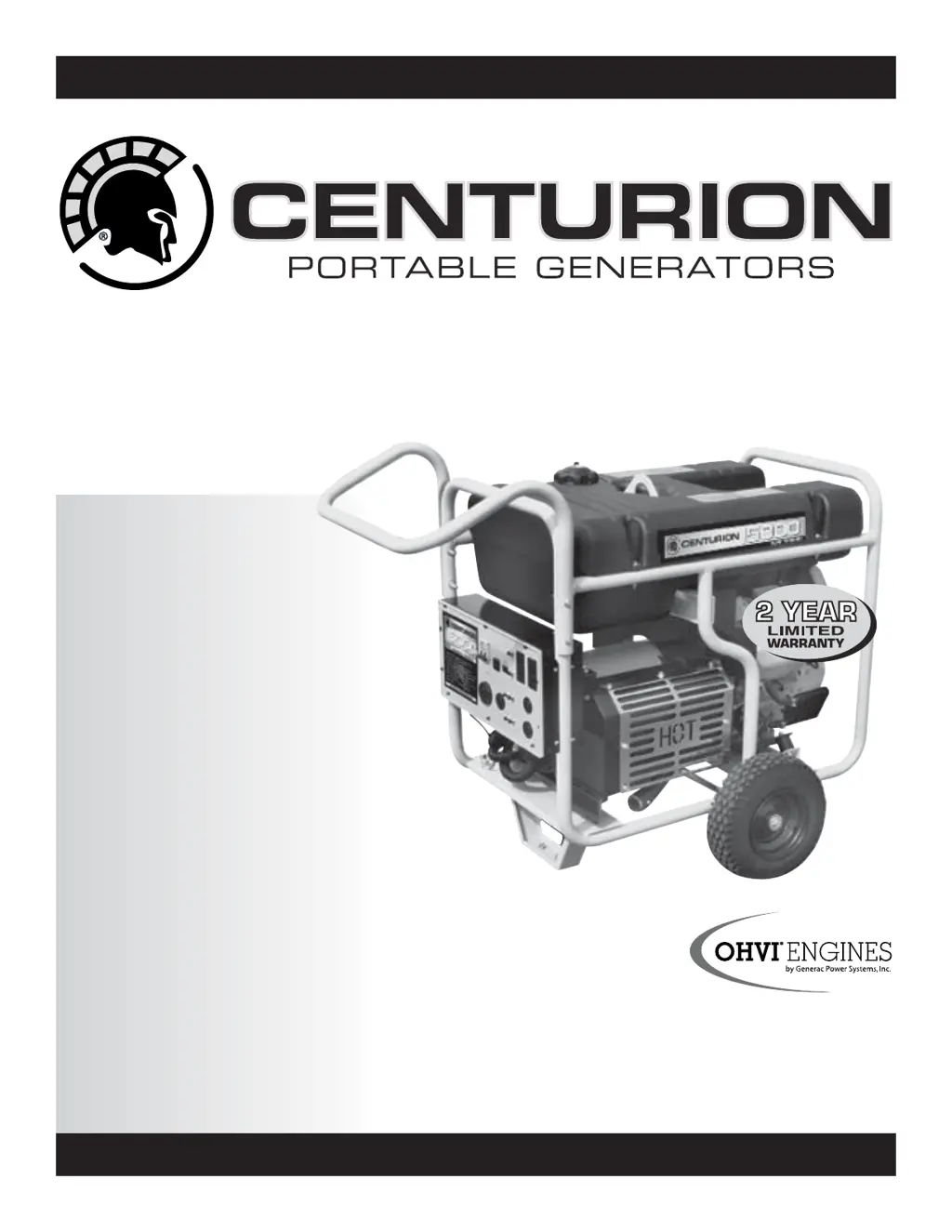
Generac Power Systems Centurion 004987-2, Centurion 005396-0 - User Manual

Generac Power Systems Centurion 004987-2, Centurion 005396-0
36 pages
Print Icon
To Next Page IconTo Next Page
Loading...
• Safety
• Assembly
• Operation
• Maintenance
• Troubleshooting
• Electrical Data
• Parts
• Warranty
FOR THE NEAREST
AUTHORIZED SERVICE
CENTER 1-800-333-1322
Owner’s
Manual
MODELS:
004987-2 (15,000 Watt)
005396-0 (17,500 Watt)
www.centuriongenerators.com
COMMERCIAL • INDUSTRIAL • RESIDENTIAL

Table of Contents

Questions and Answers

  • S
    sonyatrujilloAug 13, 2025
    How to fix Generac Power Systems Portable Generator with no AC output?
    • S
      Shane SawyerAug 13, 2025
      If your Generac Power Systems Portable Generator's engine is running but there's no AC output, try these steps: First, reset the circuit breaker. If that doesn't work, check and repair any potential issues. You can also connect another device that is in good condition to see if the generator functions properly. If none of these steps work, it is recommended to contact an authorized service facility.
  • L
    Lisa HunterAug 16, 2025
    What to do if Generac Power Systems Centurion 004987-2, Centurion 005396-0 Portable Generator bogs down under load?
    • K
      Katherine ButlerAug 16, 2025
      If the engine of your Generac Power Systems Portable Generator runs well but bogs down when electrical loads are connected, you can try disconnecting any shorted electrical loads. Also, consult the section on not overloading the generator. If the issue persists, it's recommended to contact an authorized service facility.
  • A
    Alan CamachoAug 20, 2025
    Why Generac Power Systems Portable Generator will not start?
    • M
      Margaret GoodmanAug 20, 2025
      If your Generac Power Systems Portable Generator engine will not start or starts and runs rough, you can try the following: * Clean or replace the air cleaner. * Fill the fuel tank. * Drain the fuel tank and fill it with fresh fuel. * Connect the wire to the spark plug. * Replace the spark plug. * Put the choke knob to the No Choke position. * Fill the crankcase to the proper level. If these steps do not resolve the issue, contact an authorized service facility.
  • M
    Maria AlexanderAug 25, 2025
    What to do if Generac Power Systems Centurion 004987-2, Centurion 005396-0 shuts down while running?
    • L
      Lori RayAug 25, 2025
      If your Generac Power Systems Portable Generator engine shuts down during operation, first, ensure the fuel tank is full. Next, check that the crankcase is filled to the proper level. If the problem continues, it's recommended to contact an authorized service facility.
  • V
    Valerie Ramirez DDSAug 28, 2025
    Why does Generac Power Systems Centurion 004987-2, Centurion 005396-0 lack power?
    • A
      Angela GrossAug 28, 2025
      If your Generac Power Systems Portable Generator engine lacks power, first, make sure you are not overloading the generator, referring to the section “Don’t Overload the Generator”. Also, replace the air filter. If the issue continues, contact an authorized service facility.
  • C
    Christopher JohnsonAug 31, 2025
    How to fix Generac Power Systems Portable Generator that won't crank?
    • J
      Jeffrey MorenoSep 1, 2025
      If your Generac Power Systems Portable Generator engine will not crank, replace the fuse with an identical 10-amp replacement fuse. Also, try to recharge or replace the battery.
  • N
    Nicholas HoldenSep 4, 2025
    What to do if Generac Power Systems Centurion 004987-2, Centurion 005396-0 engine falters?
    • M
      madeline53Sep 4, 2025
      If your Generac Power Systems Portable Generator engine “hunts” or falters, try moving the choke to the halfway position until the engine runs smoothly. If the problem persists, contact an authorized service facility.
  • Y
    Yvonne FergusonSep 8, 2025
    How to troubleshoot Generac Power Systems Centurion 004987-2, Centurion 005396-0 Portable Generator with no DC output?
    • W
      wmeyerSep 8, 2025
      If there's no battery charge DC output from your Generac Power Systems Portable Generator, try cleaning the battery posts. If that doesn't work, replace the cable. Check the battery condition and replace it if it's defective. If the issue persists, contact an authorized service facility.

Summary

Introduction and Safety Guidance

Manual Reading Importance

Emphasizes the importance of reading the manual for safe operation.

Safety Message and Symbol Definitions

Explains the meaning of DANGER, WARNING, CAUTION, NOTE symbols and text.

Generator Operation Hazards

Electrical Shock Hazards

Warns about high voltage and the risk of electric shock.

Fuel and Exhaust Hazards

Warns about gasoline flammability and carbon monoxide.

Safety Rules and Precautions

General Safety Instructions

Provides critical instructions for safe operation and maintenance.

Generator Operation Precautions

Lists conditions under which the generator should never be operated.

Engine Hazard Warnings

Details dangers from engine exhaust and moving parts.

Electrical and Fire Safety

Electrical Hazard Warnings

Warns about dangerous voltages and electrical shock risks.

Grounding and Electrical Safety

Reinforces NEC requirements for grounding and electrical safety.

Fire and Explosion Prevention

Advises on preventing fires and explosions around the generator.

Standards Index

Referenced Standards

Lists standards and handbooks as operational guidelines.

Section 1 - General Information

Unpacking and Accessory Check

Provides instructions for unpacking and checking accessories.

Generator Assembly Steps

Details the process for assembling the generator.

Wheel Kit and Handle Assembly

Guides on assembling the wheel kit and attaching the handle.

Battery Connection Procedure

Connecting Battery Cables

Details how to connect the positive and negative battery cables correctly.

Section 2 - Operation Guide

Know Your Generator Controls

Guides the user to familiarize themselves with generator controls.

Control Panel and Engine Controls

Identifies and describes the components of the control and engine panels.

Generator Receptacle Functions

Explains the function of each type of electrical receptacle.

Receptacle and Connection Details

120 V AC Receptacles

Describes duplex, GFCI, and 30 Amp receptacles.

GFCI Receptacle Testing

Provides monthly testing instructions for the GFCI outlet.

Generator Connection Types

120;240 V Receptacle Usage

Describes 30 Amp and 50 Amp 120/240V receptacles.

12 V DC Receptacle Function

Details the 12V DC receptacle for battery charging.

Generator Setup and Grounding

Grounding the Generator

Explains the importance and method of grounding the generator.

Connecting Loads and Avoiding Overload

Connecting Electrical Loads Safely

Guides on connecting loads and warming up the engine.

Preventing Generator Overload

Advises on calculating total wattage to avoid overloading.

Starting Wattage Considerations

Explains the need to account for motor starting wattage.

Wattage Reference Guide

Device Wattage Requirements

Provides a guide for common device wattage requirements.

Pre-Starting Generator Checks

Adding Engine Oil and Gasoline

Details procedures for adding engine oil and gasoline.

Frequent Oil Level Checks

Advises frequent oil level checks, especially in cold weather.

Fuel Tank Filling Precautions

Warns against overfilling the fuel tank to allow for expansion.

Engine Starting Procedure

Pre-Start Checklist and Starting

Lists checklist items and details the engine starting process.

Engine Starting Troubleshooting Tip

Offers a tip if the engine starts but does not continue to run.

Engine Stopping Procedure

Safely Shutting Down the Generator

Details the procedure for safely shutting down the generator.

Generator Operation and Safety Features

Idle Control, Cold Weather, and Shutdown Systems

Explains idle control, cold weather operation, and low oil shutdown.

Battery Charging Safety and Procedure

Warns about battery hazards and outlines charging steps.

Section 3 - Maintenance

Maintenance Schedule Overview

Provides a schedule for routine maintenance tasks.

Product Specifications

Lists technical specifications for the generator and engine.

General Maintenance and Cleaning

Offers general recommendations and cleaning advice for the generator.

Generator and Engine Maintenance

Cleaning Generator Exterior

Provides instructions for cleaning the generator's exterior.

Engine Maintenance Safety

Warns to disconnect the battery before performing engine maintenance.

Oil and Spark Plug Maintenance

Covers checking oil level, changing oil/filter, and replacing spark plugs.

Air Cleaner and Spark Arrestor Maintenance

Servicing Air Cleaner and Spark Arrestor

Explains how to service the air cleaner and clean the spark arrestor screen.

Valve Clearance Adjustment

Valve Clearance Check and Adjustment

Details how to check and adjust valve clearance.

Storage and Maintenance Tips

Periodic Starting and Storage Hazards

Recommends periodic starting and warns against indoor storage with fuel.

Long-Term Storage Preparation

Explains fuel system preparation and tank emptying for storage.

Additional Storage Recommendations

Provides tips on fuel storage and generator covering.

Section 4 - Troubleshooting

Troubleshooting Guide Overview

Provides a guide to diagnose and resolve common generator problems.

Common Engine Operation Problems

Addresses issues like no output, bogging, not cranking, rough running, shutdowns, and power loss.

Battery Charging System Issues

Covers troubleshooting for no DC battery charge output.

Section 5 - Notes

Section 6 - Electrical Data

Main Electrical Schematic and Legend

Presents the main electrical schematic diagram and its symbol legend.

Key Electrical Component Labels

Identifies specific electrical components like BCR1, CB1, F1, SCR, SW1.

Wiring Diagram Details

Engine and Receptacle Wiring

Shows engine wiring and identifies receptacle wiring connections.

Battery and Ground Connections

Shows the battery and ground connections in the wiring diagram.

Electrical Component Wiring

Governor, Regulator, and Stator Wiring

Illustrates wiring for governor, voltage regulator, and stator.

Electrical Diagram Legend

Provides a legend for symbols used in the electrical diagrams.

Section 7 - Exploded Views and Parts Lists

GT-990 Engine Exploded View Part 1

Displays the first part of the exploded engine view.

Engine Parts List Identification

Lists part numbers and corresponding item numbers for engine parts.

GT-990 Engine Parts List

Engine Component Descriptions

Lists engine parts with their part numbers and descriptions.

Specific Part Details

Describes specific parts like crankcase assembly, seals, and screws.

GT-990 Engine Exploded View Part 2

Detailed View Areas

Highlights specific detail areas in the exploded view.

Battery Tray Assembly Detail

Shows a detailed view of the battery tray assembly.

GT-990 Engine Parts List Details

Engine Part Number Listing

Lists engine parts with their quantity and description.

Airbox Component Details

Identifies components related to the airbox assembly.

Generator Exploded Views

Generator Assembly Diagram

Shows an exploded view of the overall generator assembly.

Frame, Handle, and Wheel Kit

Shows an exploded view of the frame, handle, and wheel kit.

Generator Parts List

Generator Component Listing

Lists generator parts with their part numbers and descriptions.

Stator Specifications

Identifies the 15KW and 17.5KW stators.

Control Panel Exploded View

Control Panel Diagram

Presents the exploded view of the control panel assembly.

Model-Specific Control Panel

Identifies the control panel for specific models.

Control Panel Parts List

Control Panel Component Listing

Lists control panel parts with quantities and descriptions.

Control Panel Box Details

Describes the control panel box for specific models.

Section 8 - Warranty Information

California Emission Control Warranty

Explains California's emission control warranty rights and obligations.

Emission Control System Warranty Coverage

Details the coverage period for emission control systems.

Owner Warranty Responsibilities

Outlines the owner's responsibilities for warranty maintenance.

Warranty Service Contact Number

Provides the toll-free number for warranty service.

Emission Control System Warranty Details

ECS Warranty Applicability and Coverage

Specifies applicability and general coverage of the ECS warranty.

Emission Related Parts List

Lists components covered under the emissions warranty.

Fuel Metering and Ignition System Parts

Lists parts related to the fuel metering and ignition systems.

Generac Two-Year Limited Warranty

Warranty Schedule and Application Types

Details warranty periods for different application types.

Consumer Application Warranty

Specifies warranty coverage for consumer use.

Warranty Exclusions and Limitations

Lists conditions and actions that void the warranty.

Warranty Disclaimer

States this warranty replaces all other implied warranties.

Emission Control System Warranty

ECS Warranty Applicability and Coverage

Specifies applicability and general coverage of the ECS warranty.

Emission Related Parts List

Lists components covered under the emissions warranty.

Fuel Metering and Ignition System Parts

Lists parts related to the fuel metering and ignition systems.

Generac Two-Year Limited Warranty

Warranty Schedule and Application Types

Details warranty periods for different application types.

Consumer Application Warranty

Specifies warranty coverage for consumer use.

Warranty Exclusions and Limitations

Lists conditions and actions that void the warranty.

Warranty Disclaimer

States this warranty replaces all other implied warranties.

Generac Power Systems Centurion 004987-2, Centurion 005396-0 Specifications

General IconGeneral
BrandGenerac Power Systems
ModelCenturion 004987-2, Centurion 005396-0
CategoryPortable Generator
LanguageEnglish

Related product manuals