EasyManua.ls Logo

Generac Power Systems G007000-0 - User Manual

Generac Power Systems G007000-0
20 pages
Print Icon
To Next Page IconTo Next Page
Loading...
Owner’s/Installation Manual for SMM i
Owner’s/Installation Manual
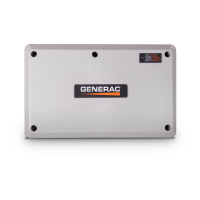
50A Smart Management Module
(SMM)
SAVE THIS MANUAL FOR FUTURE REFERENCE
MODEL: G007000-0
DATE PURCHASED:______________
WWW.GENERAC.COM
1-888-GENERAC
(1-888-436-3722)
®
Para español , visita: http://www.generac.com/service-support/product-support-lookup
Pour le français, visiter : http://www.generac.com/service-support/product-support-lookup
000922
(000209b)
WARNING
Loss of life. This product is not intended to
be used in a critical life support application.
Failure to adhere to this warning could result
in death or serious injury.
Question and Answer IconNeed help?

Do you have a question about the Generac Power Systems G007000-0 and is the answer not in the manual?

Summary

Introduction and Safety

Introduction

Explains the purpose and function of the Smart Management Module (SMM) and its installation.

Read This Manual Thoroughly

Emphasizes the importance of reading and understanding the manual before use to prevent injury or death.

Safety Rules

Discusses the importance of safety alerts and manufacturer recommendations for safe operation.

General Hazards

Highlights electrocution risk and the necessity to disconnect power sources before connecting lines.

General Information and Setup

Load Management Options

Describes SMMs and SACMs as options for managing generator loads effectively.

Application Considerations

Discusses factors like generator frequency and load shedding for optimal application setup.

Smart Management Module (SMM)

Explains SMMs manage 240V loads and can accommodate up to eight modules.

SMM and Carton Contents

Details SMM features, controls, and the contents found in the product carton.

Setting Lockout

Explains the lockout provision to disable non-essential loads during generator overload.

Jumper Locations

Identifies jumper locations for frequency and mode selection on the SMM control board.

Installation, Tests, & Troubleshooting

Electrical Specifications

Lists input voltage, current rating, motor rating, and other electrical parameters for the SMM.

Enclosure Specifications

Details enclosure type (Type 3R) and operating temperature range for the SMM unit.

Remove Contents from Carton

Provides steps to open the carton and verify all SMM contents are present.

Tools Needed For Installation

Lists the essential tools required for performing the SMM installation.

Mounting Instructions

Guides on turning off power, choosing a location, and removing knockouts for mounting.

Connections

Details the wiring diagram and connections for power source and load lines to the SMM.

Tests

Outlines procedures for utility tests and other performance checks on the SMM.

Setting Priorities

Explains how to set SMM priorities for load recovery timing during generator overload.

Troubleshooting

Provides a table of common problems, their causes, and corrections for the SMM.

Overview

The Generac 50A Smart Management Module (SMM) is a device designed to prevent home standby generators from being overloaded by large appliance loads. It operates without control wires, offering a cost-effective and quick installation solution. Up to eight SMMs can be used in an installation to protect various home appliances.

Function Description

The SMM manages electrical loads by shedding them when the generator's frequency drops below a preset value for a predetermined time, indicating an overload condition. This ensures the generator operates within its capacity, preventing damage and maintaining power to essential circuits. The SMM can be used individually or in conjunction with a Smart A/C Module (SACM) to manage a combined total of eight loads. SMMs operate independently when used with a SACM.

When setting up multiple modules, it is recommended to use Priorities A/C 1–4 on the SACM as the top priorities, followed by up to four SMMs as Priorities 5-8. Alternatively, specific A/C priorities on the SACM can be used as top priorities, with additional SMMs filling the remaining priority slots. To prevent all loads from returning to the generator simultaneously after a shed event, SMM priorities should be set to follow after the last HVAC load has returned. This gradual reintroduction of loads helps reduce the potential for subsequent overload events.

The SMM includes a lockout provision, allowing non-essential loads to be disabled during generator overload if they are not needed on backup power. This lockout mode is determined by generator frequency; if the generator has sufficient capacity, the load will be allowed to turn on even if the control is set to lockout mode. For digital thermostats where a 24 VAC thermostat wire is unavailable, an SMM can be used to interrupt power directly at the HVAC load.

Important Technical Specifications

  • Input Voltage: 240 VAC
  • Current Rating: 50A resistive, 40A inductive
  • Locked Rotor Amp Rating: 180A
  • Motor Rating: 3 HP
  • Contactor Coil Voltage: 240 VAC
  • Enclosure Type: Type 3R (suitable for indoor or outdoor installation, providing protection against rain, sleet, and ice formation)
  • Operating Temperature: -22 to 122 °F (-30 to 50 °C)
  • Wire Size Recommendation: At least 167 °F (75 °C) rated copper wire.
    • 14 AWG: 15A
    • 12 AWG: 20A
    • 10 AWG: 30A
    • 8 AWG: 50A (40A for Type NM cable)

Usage Features

  1. Priority Dial: Allows setting the module's priority (1-8). Each module in an installation must have a different priority. Priority 1 recovers after five minutes, with subsequent priorities adding 15 seconds to the recovery time.
  2. Lockout Switch: Enables or disables the lockout function. Positions are "LOCKOUT LOAD ON GENERATOR" (enabled) and "LOCKOUT DISABLED."
  3. Test Button: Temporarily disables the contactor output for testing purposes.
  4. LED Status Indicator: Provides visual feedback on the module's status:
    • 1-second flash (1 On - 1 Off): Shed (overload detected in generator mode or during initial utility power-up).
    • 3-second flash (3 On - 3 Off): Lockout (module detected overload during recovery, operation disabled for 30 minutes in generator mode).
    • 6-second flash (6 On - 6 Off): Lockout Switch Active (module output disabled in generator mode due to overload, lockout switch ON).
    • Solid ON: Normal (appliance has power in utility mode or no overload detected in generator mode with lockout switch ON).
    • 1-second flash (Test): Test mode (triggered by test button, actual test time varies based on priority setting).
  5. Contactor: Normally CLOSED. Opens to shed load when the generator overloads or when the test button is pressed.
  6. Mounting Holes: Internal holes for clean and sturdy mounting.
  7. Priority Decal: Provided for recording the priority of each module on the electrical panel.
  8. Frequency Jumper: Default for 60 Hz. Can be changed for 50 Hz power.
  9. Mode Selector Jumper ("Lock Out Jumper"): Position A is default for most applications. Position B is for areas with unstable frequency power, resulting in a longer "Return to Utility" timer.

Maintenance Features

  • Troubleshooting Guide: The manual includes a comprehensive troubleshooting table to diagnose common issues based on LED states and symptoms, providing corresponding causes and corrections.
  • Installation Summary: Instructions for installing covers on the electrical panel and modules after installation.
  • Wiring Connections: Clear diagrams and instructions for connecting line supply and load wiring to the SMM contactor field terminals.
  • Voltage Measurement: Recommends using a Digital Multimeter (DMM) with a LowZ low input impedance setting for accurate voltage measurements, eliminating ghost or phantom voltage readings.

The SMM is designed for ease of installation and reliable operation, ensuring efficient load management for home standby generator systems. Users are advised to read the manual thoroughly, consult an Independent Authorized Service Dealer (IASD) or Generac Customer Service for assistance, and save the manual for future reference.

Generac Power Systems G007000-0 Specifications

General IconGeneral
BrandGenerac Power Systems
ModelG007000-0
CategoryControl Unit
LanguageEnglish

Related product manuals