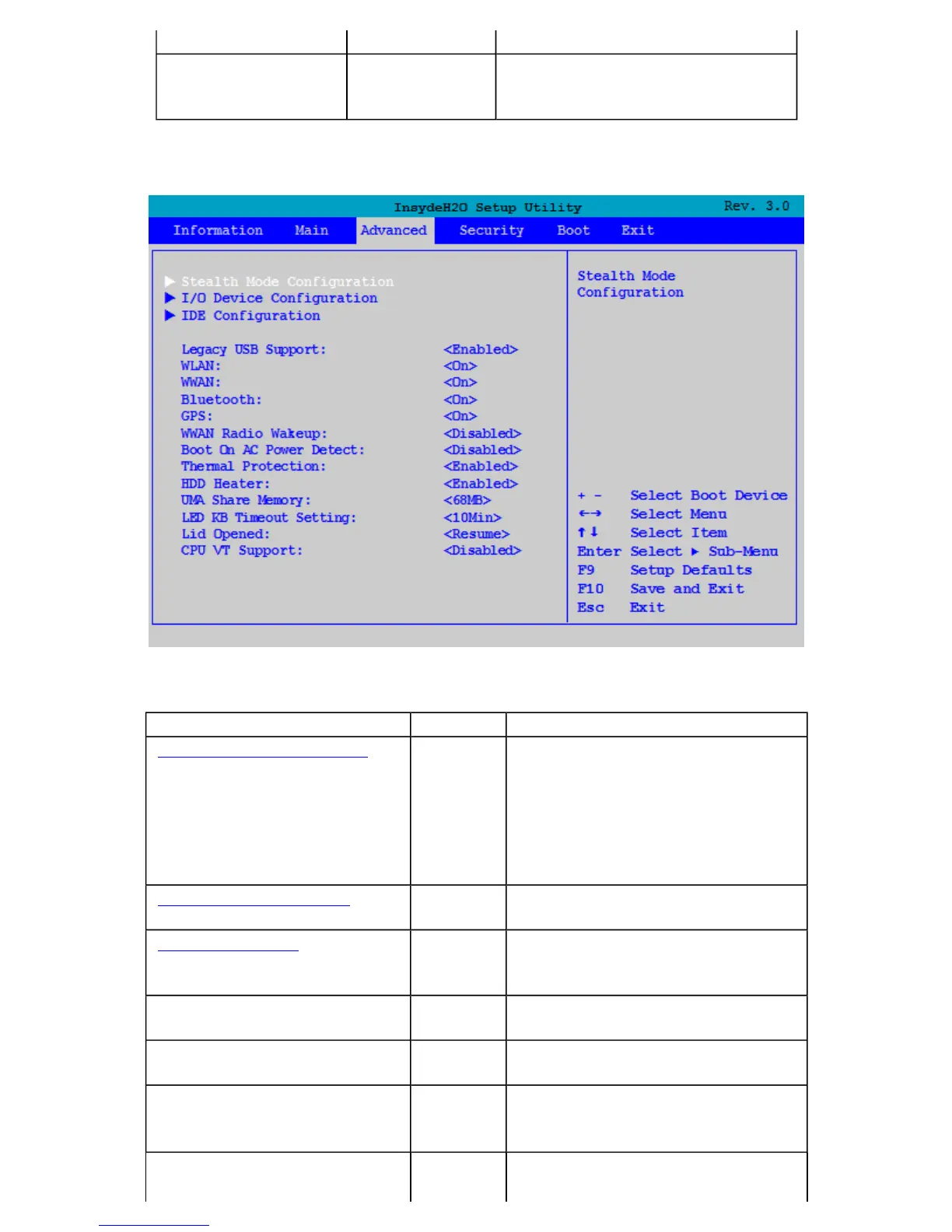
The Advanced Menu
power on
F12 Multi-Boot Menu
Enabled
Disabled
When enabled, the message "F12 to
enter Multi Boot Menu" displays
during POST
Field Setting Function
Stealth Mode Configuration sub-
menu
Configuring the stealth mode feature
enables you to turn off sound and
light such as the fan, beeps, and the
backlight. This allows you to use the
computer in an environment where
sound and light could be dangerous
or disruptive
I/O Device Configuration sub-
menu
Configure I/O Devices (serial and
parallel ports)
IDE Configuration sub-
menu
Selects the IDE controller and hard
disk drive type installed in your
system
Legacy USB Support Disabled
Enabled
When enabled, the system can
support legacy USB devices
WLAN Off
On
Wireless LAN devices are powered
on or off when the system reboots
WWAN Off
On
Wireless WAN devices are powered
on or off when the system reboots
Bluetooth Off Bluetooth devices are powered on or
off when the system reboots
Pa
e 45 of 70V
-2 Hel
4/26/2007file://C:\Documents and Settin
s\harwoodm\Local Settin
s\Tem
\~hh3F7F.htm



 To Next Page