Getting Familiar with Your Computer
Before you begin using your GoBook VR-2, read this section to familiarize yourself with its main features and
components.
Tour of Your Computer
This section shows all views of your computer with a summary of key features.
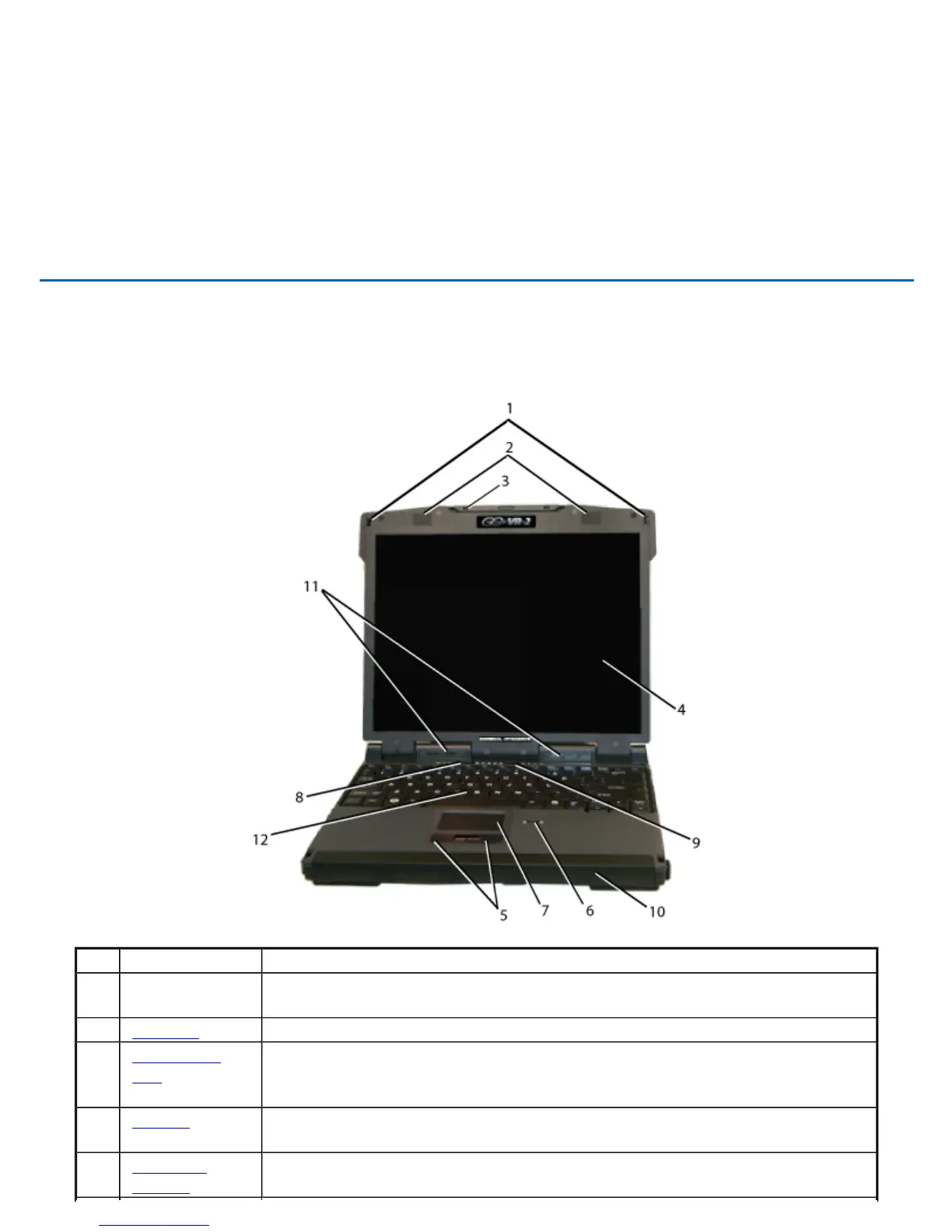
Front View
Hover the mouse over each number on the picture to see a description
# Feature Description
1 Display
Latches
Two display latches hold the display when closed.
2 Speakers Integrated Stereo speakers for audio output
3 Pen / Stylus
Slot
A custom touch screen pen (stylus) is supplied with each unit equipped with
the optional touch screen and is stored in a slot located on the left side of the
display
4 Display 13.3-inch, Enhanced XGA, outdoor-viewable, color display with an optional
integrated touch screen
5 Touchpad
Buttons
Use like the buttons on a mouse
GoBook VR-2 Help
Pa
e 6 of 70V
-2 Hel
4/26/2007file://C:\Documents and Settin
s\harwoodm\Local Settin
s\Tem
\~hh3F7F.htm



 To Next Page