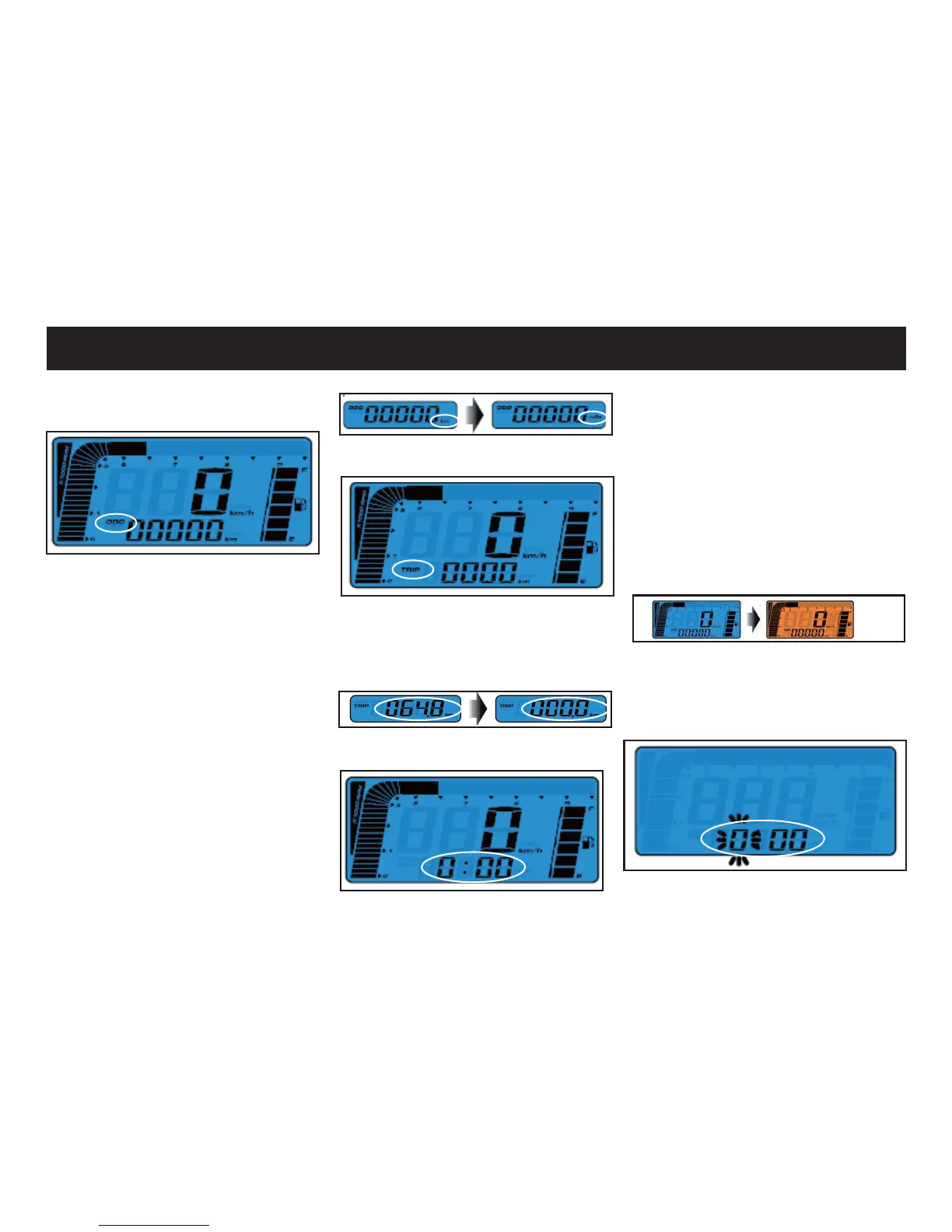
2.The trip screen
,QWULSVFUHHQSUHVVWKHDGMXVWEXW-
ton once to switch from trip to clock.
Press and hold the adjust for 3 sec
to reset the trip.
3. The clock screen
OPERATION INSTRUMENTS
1. Adjust button function instruc-
tion
1.The main screen
,QWKHPain screen press the adjust
button once to switch the function
from odometer to trip.
When the odometer display range
is over the Max it starts at zero.
When the display range of trip me-
ter is over the Max it will also start
at zero automatically but it can also
be reset manually by holding the
adjust button for 3 sec under the
trip screen.
,QWKHPDLQVFUHHQSUHVVDQGKROG
the adjust button for 3 sec to switch
from km to mile.
,Q FORFN VFUHHQ SUHVV WKH DGMXVW
button once to switch from clock to
the main screen.
4. Select button function instruc-
tion
,QPDLQVcreen press and hold the
select button for 3 sec to switch the
backlight color.
5. Enter the clock settings
,QPDLQVFUHHQSUHVVDQGKROGWKH
select and the adjust button for 3
sec to enter the clock settings.



 To Next Page