8
CONTROL FUNCTIONS
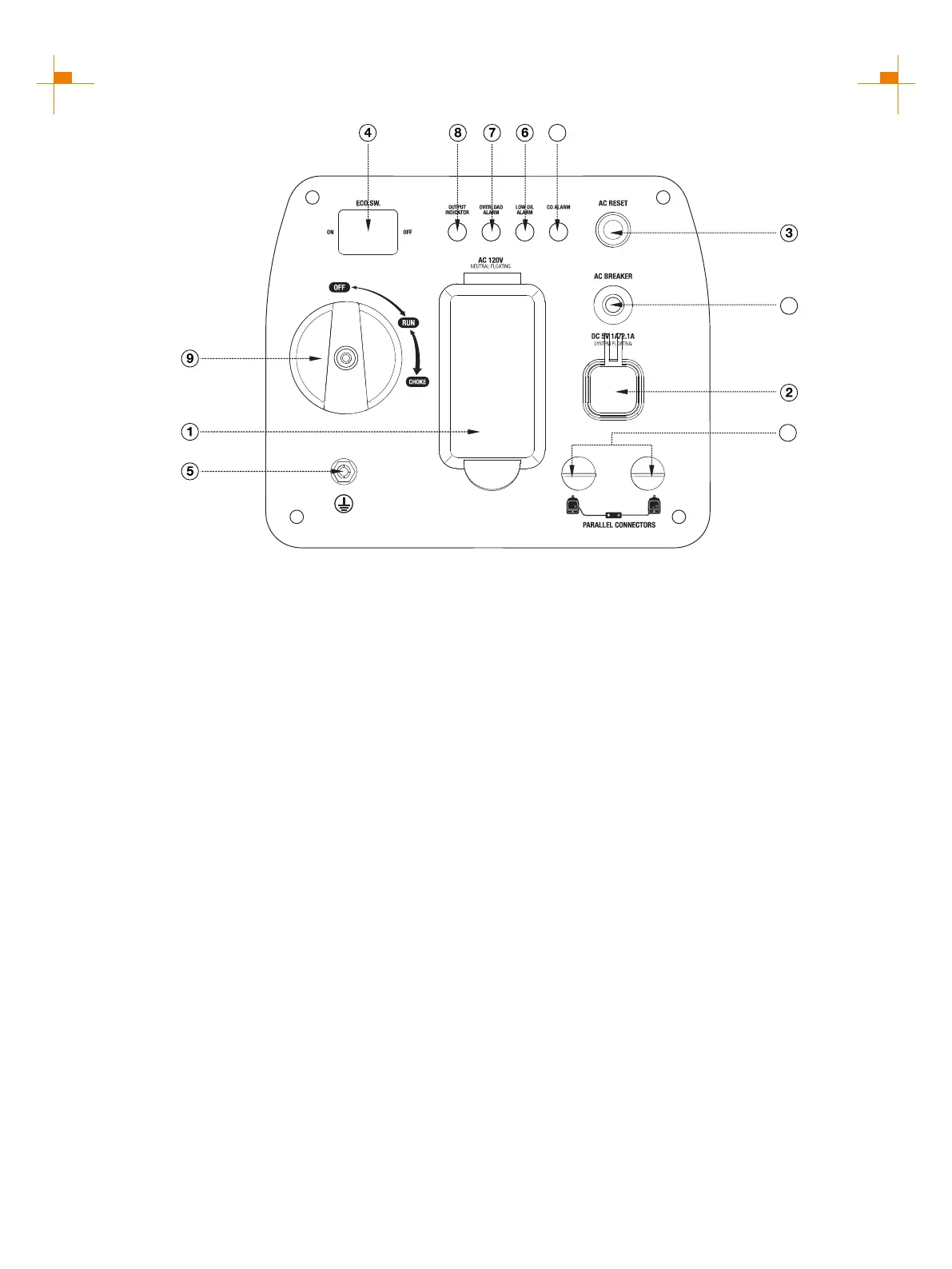
① 120-Volt, 20-Amp Duplex Outlet (NEMA 5-20R):
The outlet is capable of carrying a maximum of 20
amps.
② USB Duplex: 5V DC that come in 1 amps and2.1
amps.
③ AC Reset: If the inverter is overloaded, the reset
breaker will trip. The engine will continue to run, but
there will be no output from the inverter. Unplug the
devices and reduce the load. Push in the reset breaker
to reset it.
④ Efficiency Mode Switch: When turned to the ON
position, the engine will sense the load needed and
run at a slower RPM to save fuel.
⑤ Ground Terminal: The ground terminal is used to
externally ground the inverter.
⑥ Low Oil Alarm: Indicates low oil level.
⑦ Overload Alarm: Indicates that the inverter is
overloaded.
⑧ Output Indicator: Indicates the inverter is ready to
be used.
⑨ Engine Control Switch: Turn position to CHOKE
to start the engine, and turn to RUN position once the
engine is running. Switch to OFF to stop inverter.
10
11
12
CONTROL PANEL FEATURES GM2200i
⑩ AC Breaker: If the inverter is overloaded, the reset
breaker will trip to block current.
⑪ Parallel Connectors: To increase AC power output,
the connector sockets are used to connect the two same
type generator with special paralleling cords. The
connector sockets is only used to the
communication between the inverters, they can not used
for AC power output. The special paralleling cords shall
be purchase separately, and they shall be approved by
certification body.
⑫CO Alarm: Flashing red light: dangerous levels of
carbon monoxide gas have built up leave immediately
until area has aired out. Move generator to well-ventilated
area before operation. Flashing yellow light: carbon
monoxide sensor malfunction. Sensor needs service.



 To Next Page