3
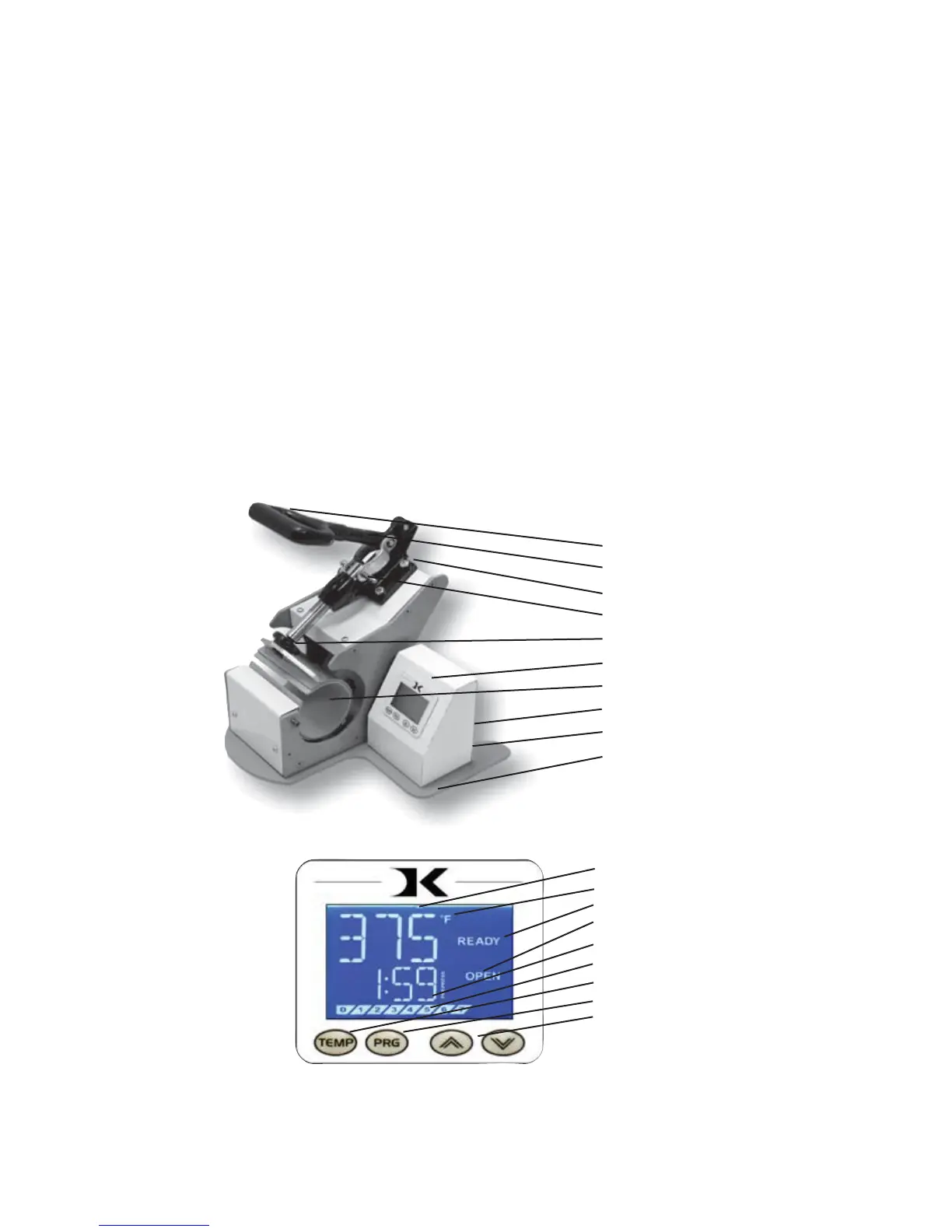
Temperature
°F/°C Indicator
Ready/Heating Indicator
Open/Timing/Done Ind.
Time
Pressure Bar Graph
TEMP key
PRG key
Up/Down Arrow keys
Default Operating Mode of Controller
Introduction
Congratulations on your purchase of the DK3 mug press! This heat
press machine has many exciting features, all of which are meant to
help make your heat transfer pressing endeavors as successful and
easy as possible. Please take the time now to thoroughly read through
this manual to become acquainted with them. It will explain some key
features, concepts and methods that will save much time and effort in
using this press and in your heat pressing applications.
Throughout this manual, many areas and components of this machine
will be referred to by specific names. Please refer to the illustrations
below in order to become familiar with some of the terminology used
in this manual.
Handle
Timer Tilt Sensor
Clamp / Linkage
Quick Release Pin
Pressure Knob
Controller
Heater Band
Power Inlet
On/Off Switch
Base


 To Next Page