P.14
Operation Instructions
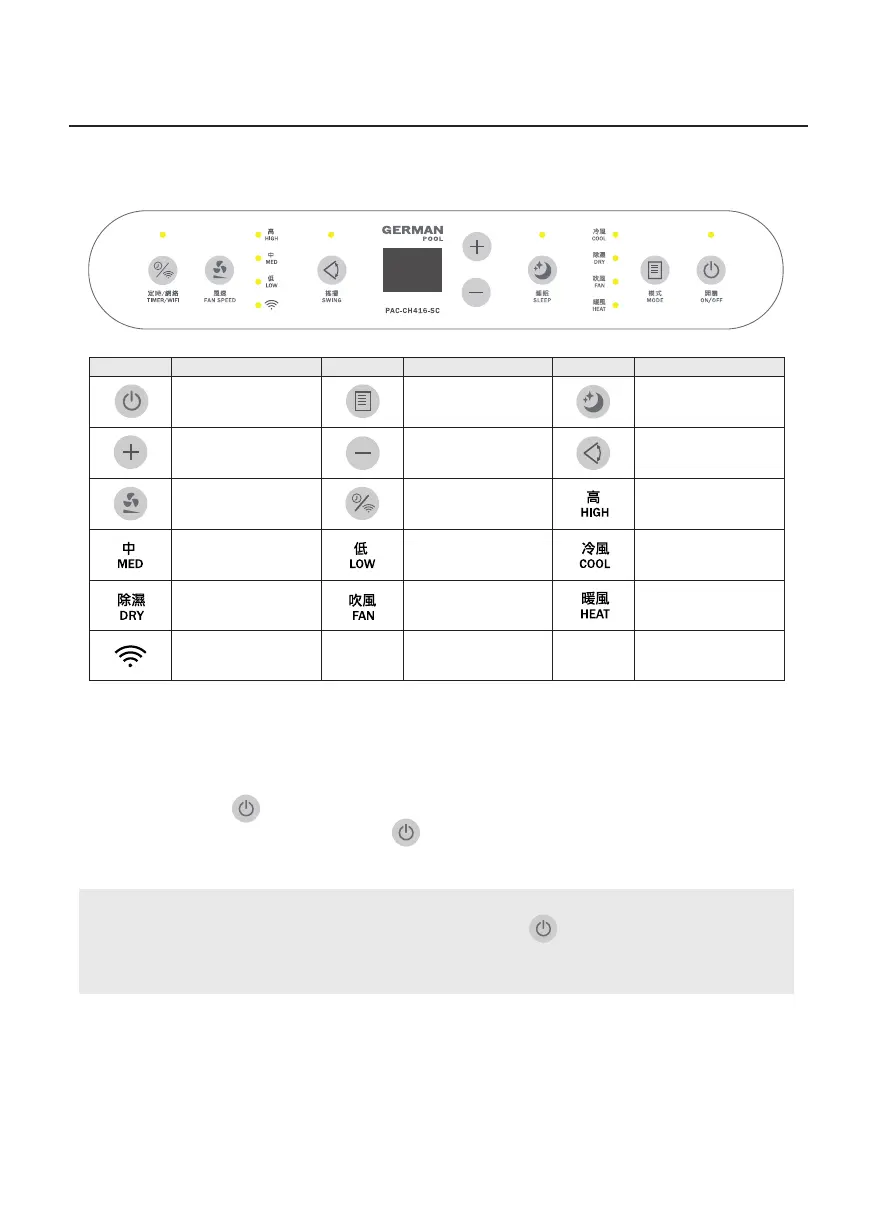
Control Panel
Icon Description Icon Description Icon Description
On/Off Key Mode Key Sleep Key
Increase Key Decrease Key Swing Key
Fan Speed Key Timer / WiFi Key
High Fan Speed
Indicator Light
Medium Fan Speed
Indicator Light
Low Fan Speed
Indicator Light
Cool Mode Indicator
Light
Dry Mode Indicator
Light
WiFi Indicator Light
Fan Mode Indicator
Light
Heat Mode
Indicator Light
Turn On The Product
1. Connect product to the power source. Buzzer beeps once, control panel lights up for 1 second
then turns dark, On/Off Indicator Light remains lit, and product enters standby state.
2. Tap On/Off Key
to turn on the product; by factory default, product runs in Fan Mode.
3. After using the product, tap On/Off Key
to turn off the product (product only returns to stand-
by state, product will still be connected to power).
Note:
This product has built-in memory. When user presses On/Off Key
to turn off the product, next time
the product is turned on again, it will run in the previous setting. Even if the product is unplugged, the
next time it is plugged in and turned on again, it will still run in the previous setting.


 To Next Page