P.20
Connecting The Product To WiFi
This product can be controlled via smartphone with German Pool Smart Control APP.
Note:
To connect the product to WiFi, please use WiFi with a frequency of 2.4 GHz, does not work with WiFi
with a frequency of 5.0 GHz.
A. How To Set Up The APP
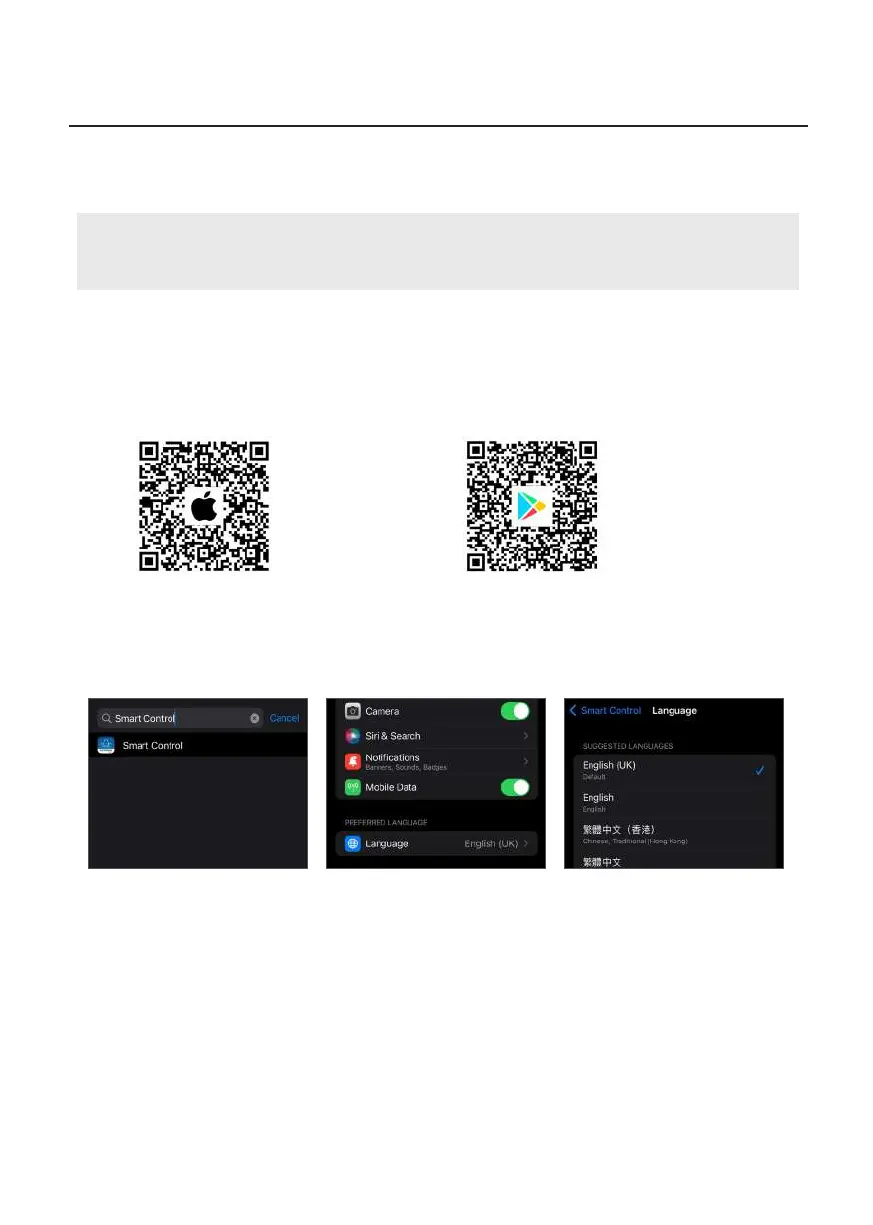
1. Connect your phone to 2.4 GHz WiFi then scan the QR Code below, or search “German Pool Smart
Control”in App Store or Google Play to download and install the APP.
Operation Instructions
B. Change The Language
Apple IOS System
1. Search “Smart Control” in
Settings.
2. Click “Preferred Language”. 3. Select Traditional Chinese
or English in the “Suggested
Languages” column (Note:
if user select “Traditional
Chinese (Hong Kong)”, app
will display in English).
Android System
App will appear in your preset phone language. If you need to change APP language, you need to
change the system language in your phone settings.
Apple IOS System
App Store
Android System
Google Play


 To Next Page