P.22
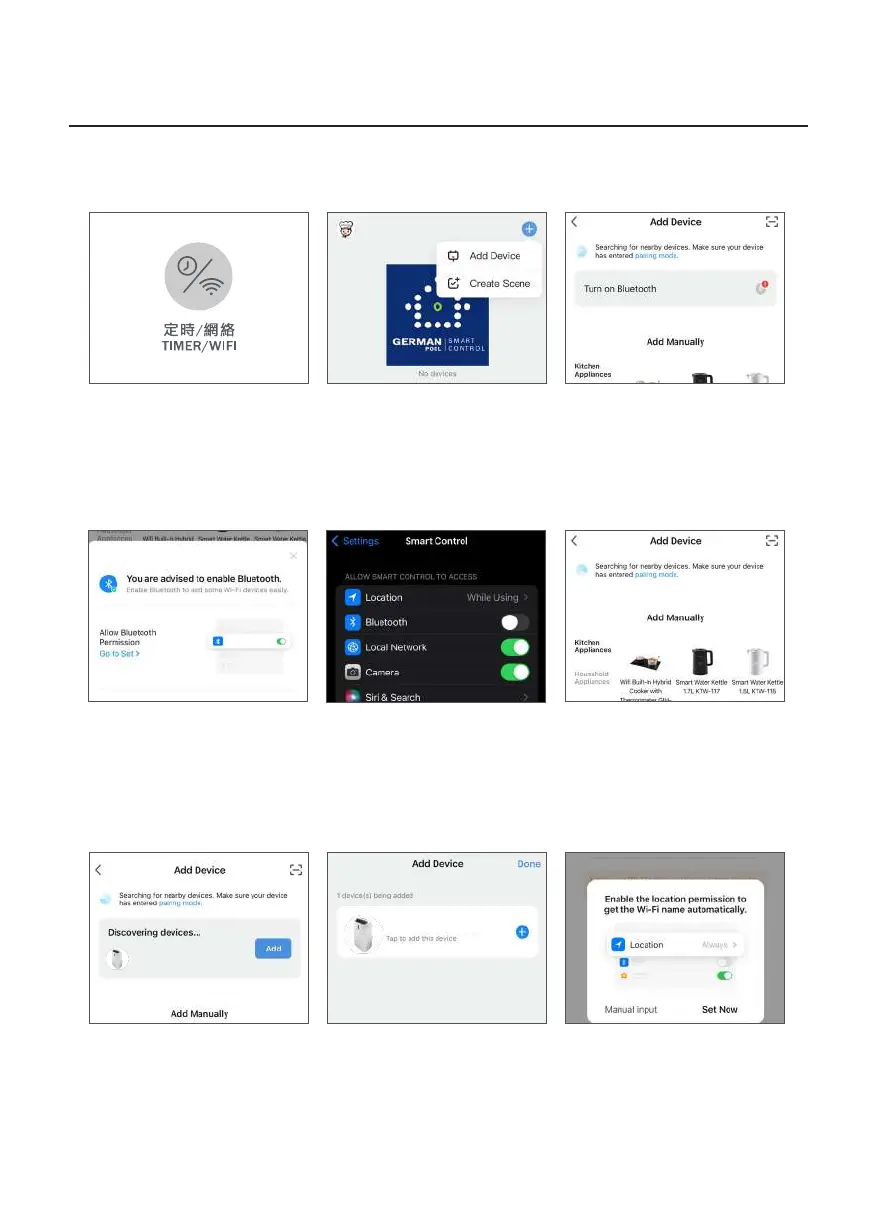
D. Pairing Sequence
Method 1: Auto Pairing
Operation Instructions
2. Click “+” on the upper right
corner of the APP homepage,
then click “Add Device”.
6. APP will show “Searching for
nearby devices…”.
1. Long-press the product’s
Timer/WiFi Button for 5
seconds until buzzer beeps
1 time and WiFi Indicator
Light blinks.
3. Before pairing, user must
allow the App to access your
Bluetooth. Tap on “Turn on
Bluetooth” (if Bluetooth is
already on, ignore this step).
4. Tap “Go To Set” (if Bluetooth
is already on, ignore this step).
5. Turn on Bluetooth (if
Bluetooth is already on, ignore
this step).
7. APP will show “Discovering
devices…”, click “Add”.
8. Click “+” on the right of
product name.
9. it is recommended to allow
the APP to access your location.
Tap “Set Now” (if Location is
already on, ignore this step).
WiFi Smart Portable Air Conditioner


 To Next Page