P.27
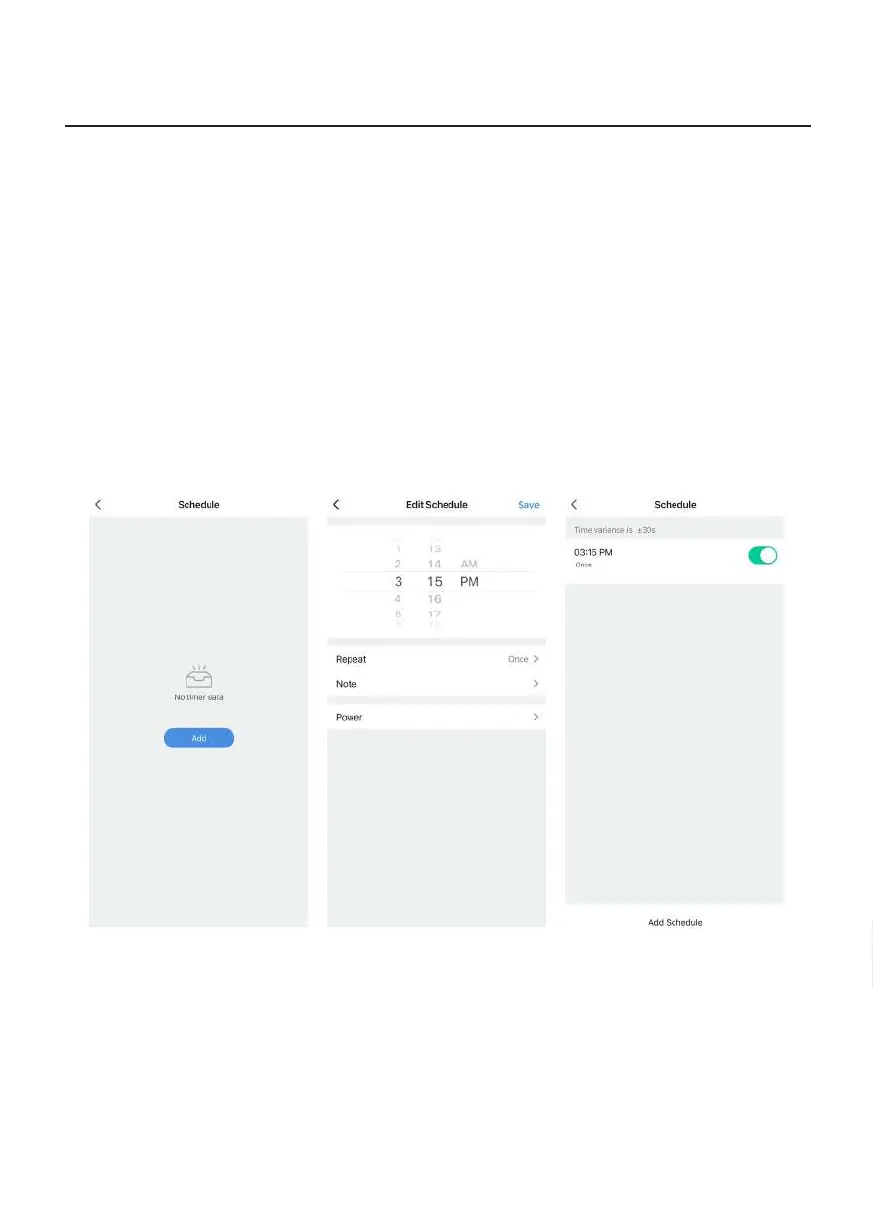
Pic 1 Pic 2 Pic 3
Timer Function
1. Select Timer Function to enter into Timer Function page. Tap “Add” to enter Timer Setting page
(Pic 1).
2. In Timer Setting page, user can set the following parameters (Pic 2):
a. Select time.
b. “Repeat” section: Select whether you wish to repeat this timer (select day/s of the week; when
Timer is turned on, the Portable Air Conditioner will run according to the setting for that specic
day of the week).
c. “Note” section: Make remark for your own reference.
d. “Power” section: Set the timer as On-Timer (time to turn on the product) or Off-Timer (time to
turn off the product).
3. After setting is completed, return to Timer Function page. If you wish to add more timers, tap “Add
Schedule” at the bottom of the page (Pic 3).
Operation Instructions
Power:On
On


 To Next Page