P.26
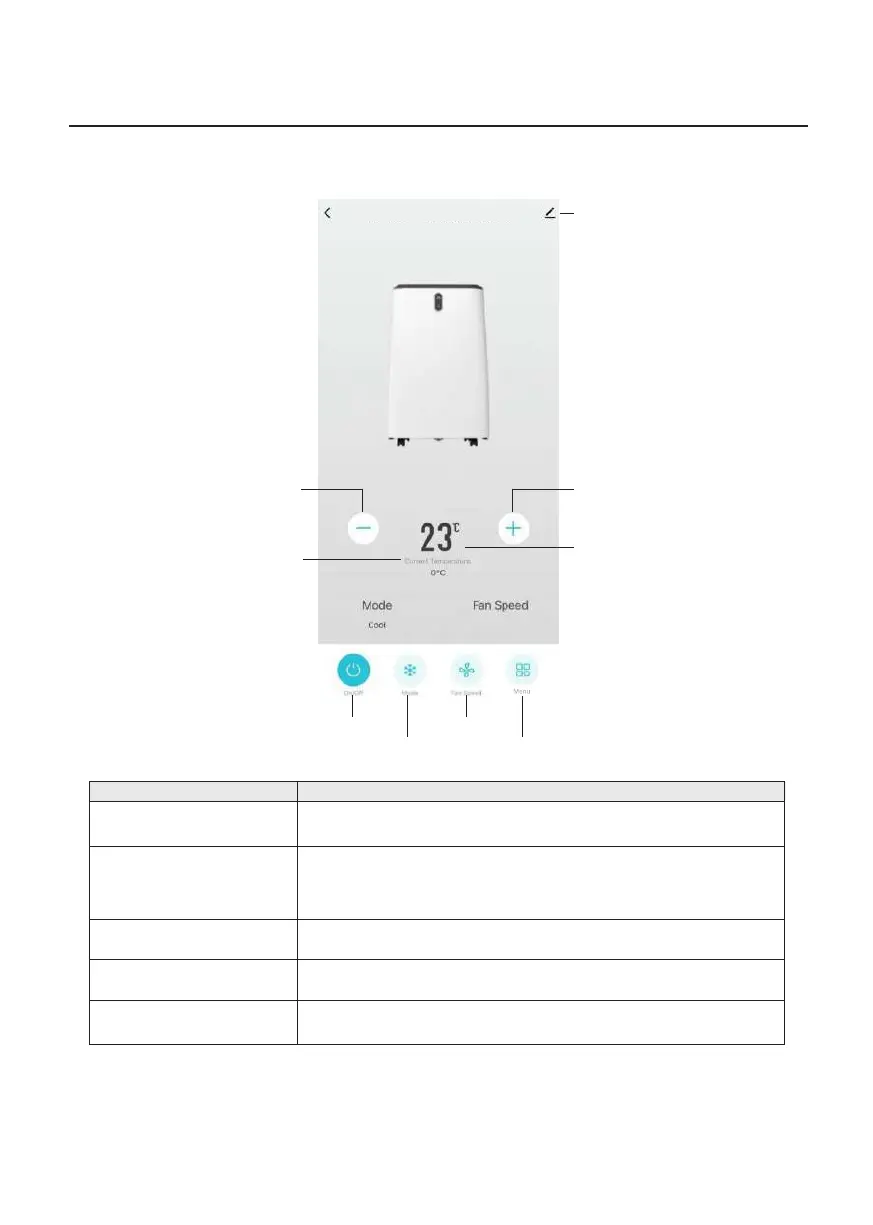
• Tap Increase Key to increase target temperature by 1°C; tap
Decrease Key to decrease target temperature by 1°C
• Target temperature is adjustable from 16-32°C
• These keys are not operable in Dry Mode / Fan Mode
Operation Instructions
Controlling The Product With The APP
Key Description
On/Off • Tap this key to turn on the product. Tap key 1 time again to turn
off the product
• Tap this key then select Low, Medium or High Wind Speed
• This key is not operable in Dry Mode
• Tap this key then select Cool Mode / Dry Mode /
Fan Mode / Heat Mode
• Tap this key then select Timer Function, Sleep Mode, Swing
Function or Temperature Scale
Increase/Decrease
Fan Speed
Mode
Menu
Settings Key
Target Temperature
Display
Current Temperature
Display
Target Temperature
Increase Key
Target Temperature
Decrease Key
Mode Key
Fan Speed KeyOn/Off
Menu Key
WiFi Smart Portable Air Conditioner
Med


 To Next Page