INSTALLATION
AND
GUARANTEE
CARD
USER'S
NAME
________________________
_
ADDRESS
_______________
CITY.
_________
_
t.:>
COUNTY
__________
_
z
STATE
______
ZIP
CODE
___
_
~
NATURE
OF
BUSINESS
l:
association D
ecclesiastical D
commercial D
educational D
professional D
others D
a::
0
u..
w OWNER'S
NAME
&
ADDRESS
(if
different from above)
___________
_
-
a::
•
:r
MODEL
PURCHASED
_______
_
SERIAL
NO.
_________
_
a::
~
~
DA
TE
PURCHASED,__
__
_
'
I-
FROM:,
_______________
_
CITY
_______________
_
STATE
_________
_
Certified equipment satisfactorily installed
and
operator
instructed :
INSTALLER(•'•~""' I
...
I
_u_s_E_R_(_s•_
·
,_na-t-ur_e_)
---------~
Please
send
guarantee to
owner
CLOSING
MACHINE
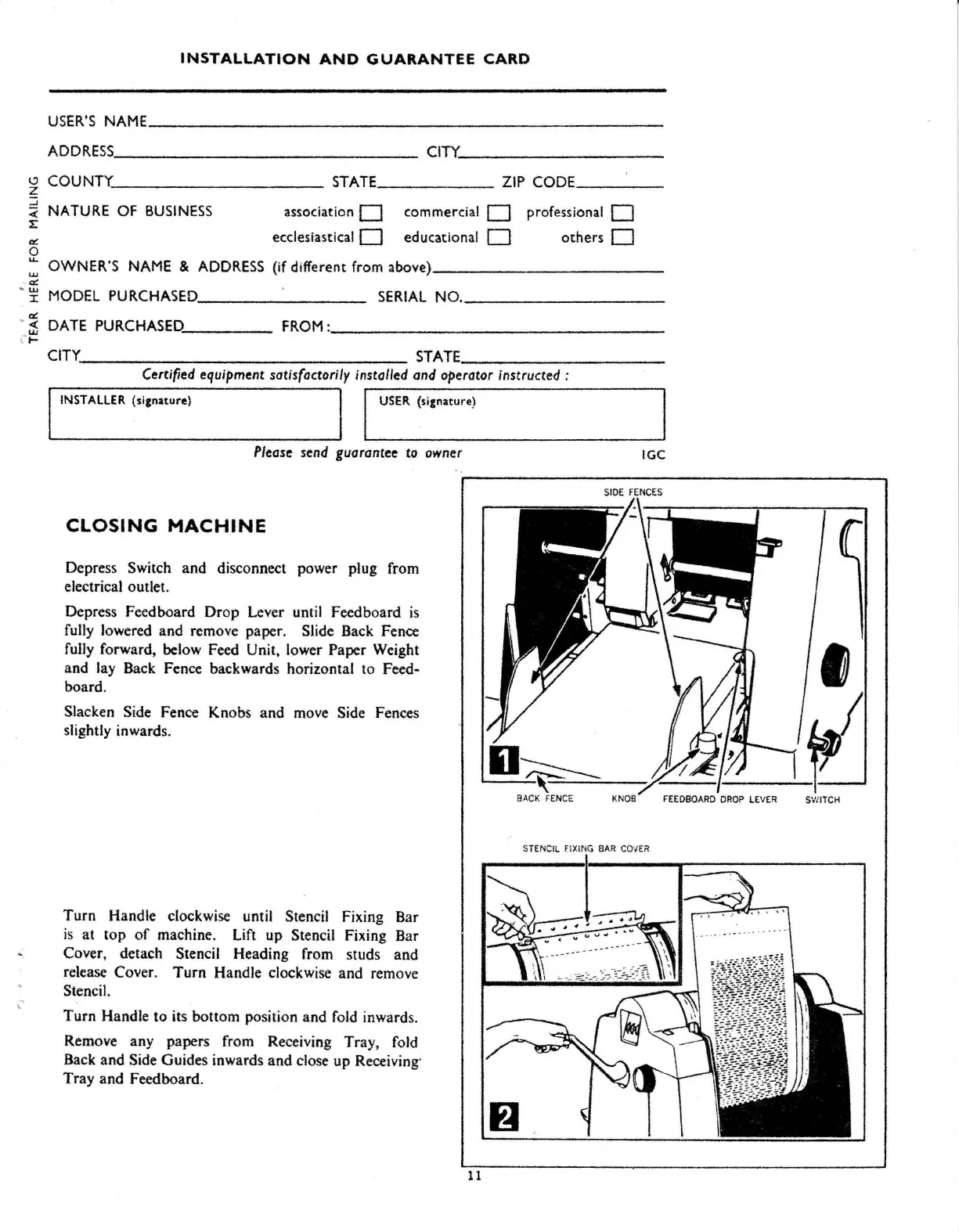
Depress Switch and disconnect power plug from
electrical outlet.
Depress Feedboard
Drop
Lever until Feedboard
is
fully lowered and remove paper. Slide Back Fence
fully forward, below Feed Unit, lower Paper Weight
and lay Back Fence backwards horizontal to Feed-
board.
Slacken Side Fence Knobs and move Side Fences
slightly inwards.
Turn
Handle clockwise until Stencil Fixing Bar
is
at
top
of
machine. Lift up Stencil Fixing Bar
Cover, detach Stencil Heading from studs and
release Cover.
Turn
Handle clockwise and remove
Stencil.
Turn
Handle to its bottom position and fold inwards.
Remove any papers from Receiving Tray, fold
Back and Side Guides inwards and close up Receiving·
Tray and Feedboard.
IGC
ST
ENCIL
flXiNG
BAR
COVER
. .
11



 To Next Page