23
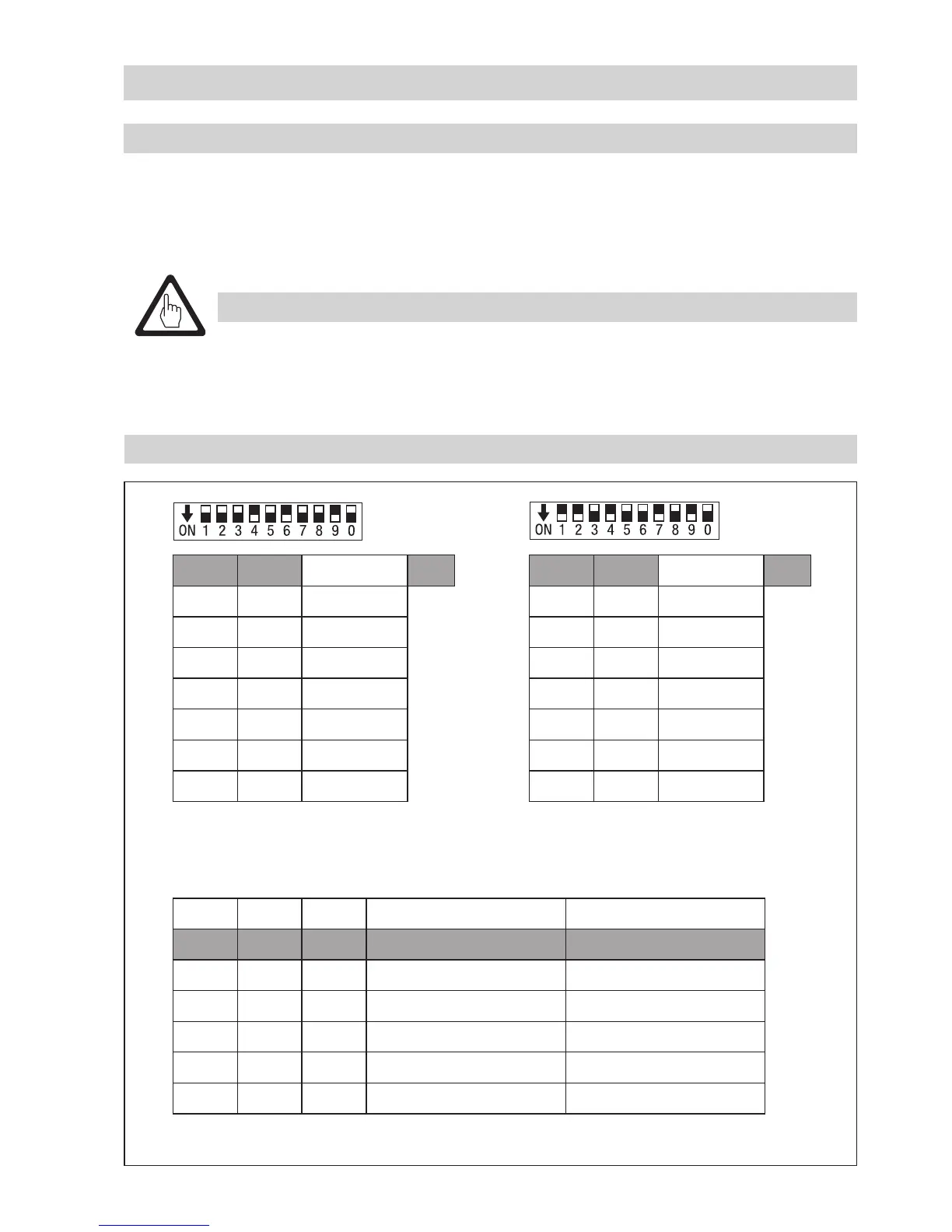
Fig. 13 (Factory setting) Fig. 14 (Example 1)
Fig. 15 (Factory setting 250 kBit/s)
Basic Settings – continued –
Code switch settings
8 8
Node ID 40
S 1 OFF 1
S 2 OFF 2
S 3 OFF 4
S 4 ON 8
S 5 OFF 16
S 6 ON 32
S 7 OFF 64
Node ID 75
S 1 ON 1
S 2 ON 2
S 3 OFF 4
S 4 ON 8
S 5 OFF 16
S 6 OFF 32
S 7 ON 64
S 8 S 9 S 0 Baud rate Cable length
OFF ON OFF 250 kBit/s 125 m
ON ON OFF 125 kBit/s 250 m
OFF ON ON 100 kBit/s 335 m
ON ON ON 50 kBit/s 500 m
OFF ON ON 20 kBit/s 1000 m
ON ON ON 10 kBit/s 1000 m
Establishing / changing node ID
If several identical systems are to communicate in a CAN bus network, allocate a different node ID for
each system (e. g. limiter, controller, etc). In most cases it is sufficient to commission the equipment
with the default factory settings.
To set the code switch 8 remove the lower terminal strip 9.
Attention
n We recommend that you commission the CAN bus devices with the default factory
setting.
n Do not use a node ID for more than one piece of equipment in the CAN bus system.



 To Next Page