EasyManua.ls Logo

Getac K120 - Page 28

Getac K120
87 pages
Print Icon
To Next Page IconTo Next Page
To Previous Page IconTo Previous Page
Loading...
22
Gestures
Actions
( = finger down; = finger up)
Descriptions
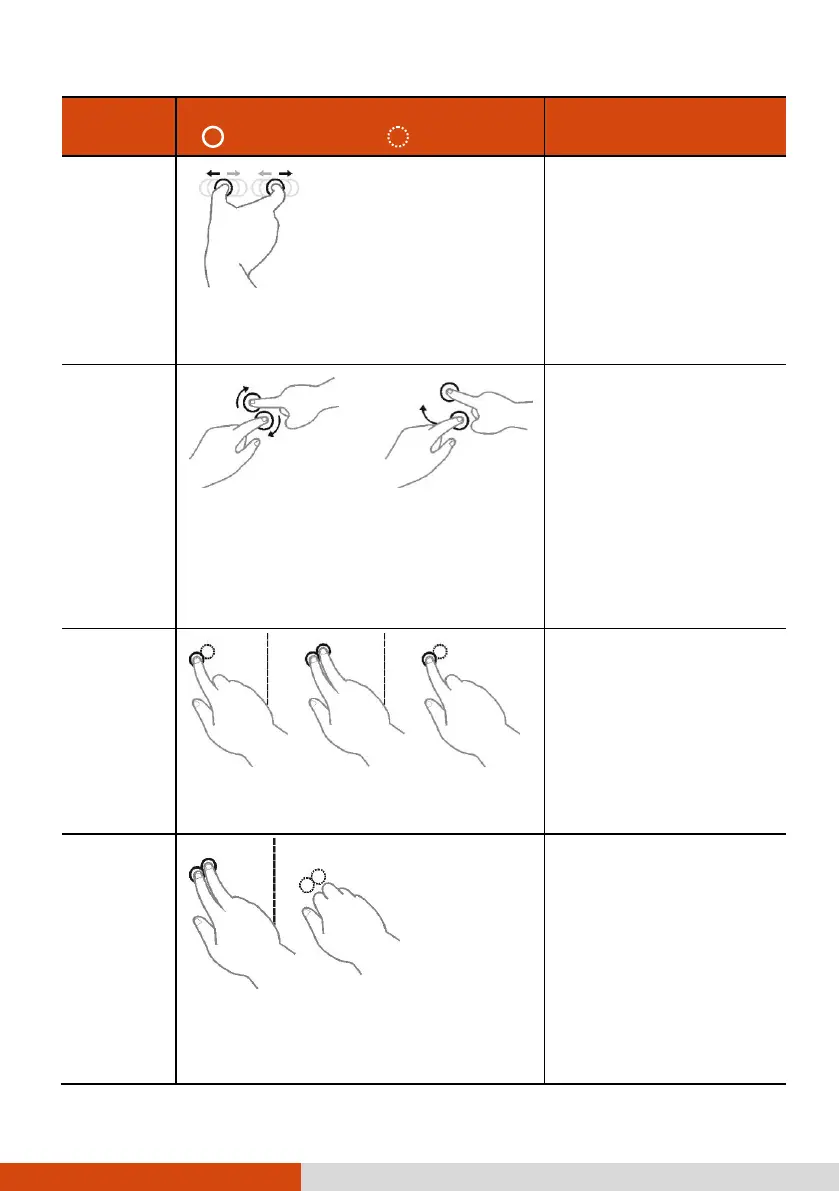
Zoom
(Pinch)
Move two fingers apart/toward each
other.
Use zooming to make an
item (a photo for
example) on the screen
larger or smaller. The
gesture works in
applications that support
mouse wheel zooming.
Rotate
or
Move two fingers in opposing directions.
-or-
Use one finger to pivot around another.
Use rotating to move a
picture or other item on
the screen in a circular
direction (clockwise or
counter-
clockwise). The gesture
works in applications that
support the specific
gesture.
Press and
Tap
Press on target and tap using a second
finger.
Use press and tap to
access the shortcut
menu.
Two-
finger Tap
Tap two fingers at the same time (where
the target is in the midpoint between the
fingers).
The function is defined by
applications that support
the specific gesture.

Table of Contents

Other manuals for Getac K120

Related product manuals