2
IMPORTANT MUST READ BEFORE PROGRAMMING
■ Make sure you have a Ghost Controls transmitter that is already programmed to operate the gate.
■ You MUST CREATE a NEW PRIMARY PIN and LEARN your remote to the keypad in order to use the keypad.
■ ALL LEDs including the backlight LEDs must be OFF (Sleep mode) prior to enter any of the programming mode.
AUDIBLE INDICATORS
■ Long beep (2-3 seconds) followed by 2 short beeps = PROGRAMING ERROR
■ 3 long beeps, pause, then 2 short beeps = PROGRAMING SUCCESSFUL
■ 2 beeps then ALL LEDs TURN OFF = Unit went into sleep mode due to inactivity.
PROGRAMMING THE KEYPAD FOR THE 1ST TIME
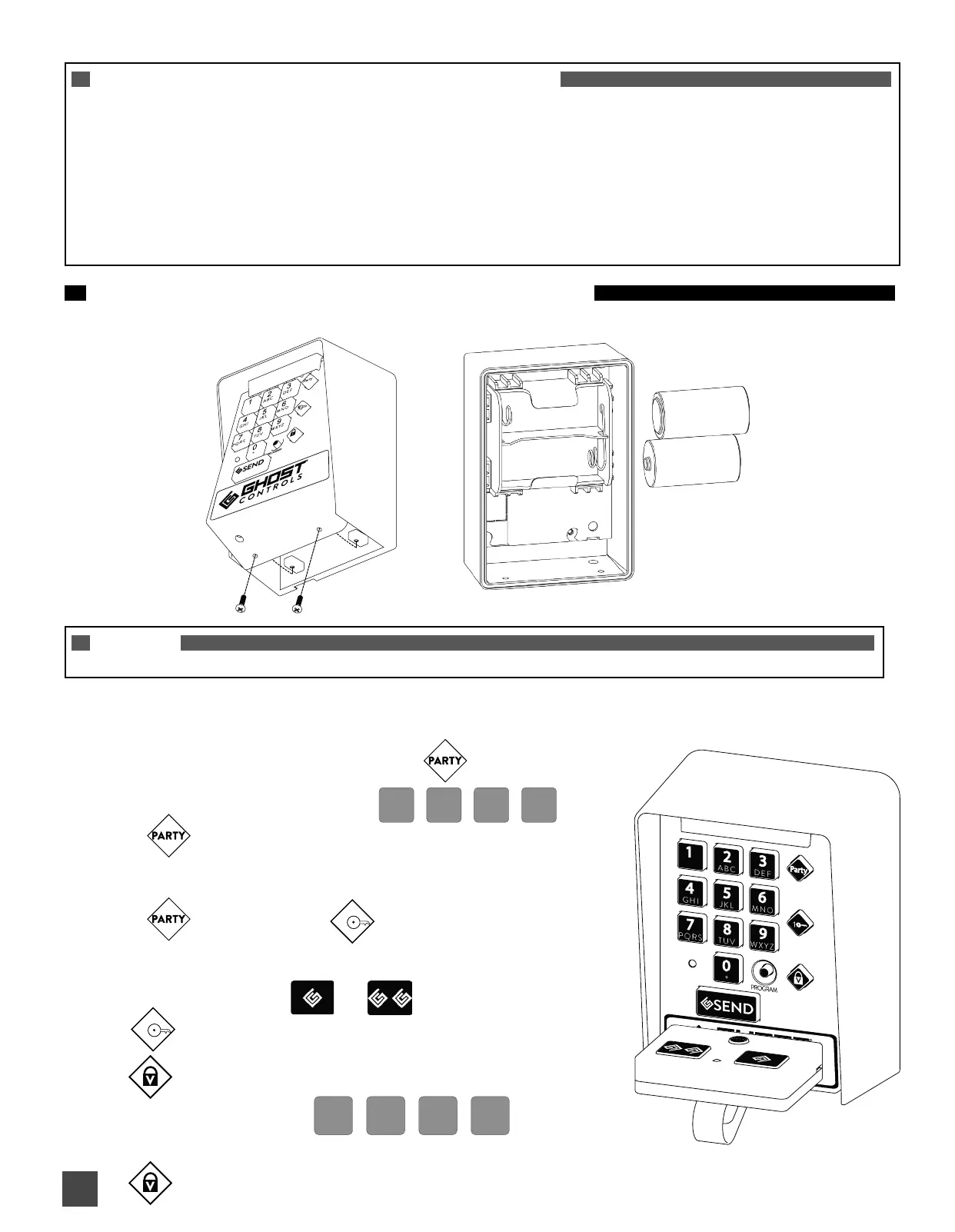
A. INSTALLING THE BATTERIES: Use only C-Size Alkaline Batteries (2 needed). Energizer or Duracell recommended.
NOTE
You will need to have your working remote transmitter (one that operates the gate) available for these next steps.
B. PROGRAMMING YOUR KEYPAD: (DO NOT GIVE OUT PRIMARY PIN FOR ACCESS)
The following steps below 1 - 5 are required and can only be performed on new keypads or after a factory reset.
1. Press and Release PROGRAM BUTTON
LED IS SOLID
2. Enter a new 4 digit PRIMARY PIN
LED IS BLINKING
3. Re-enter new 4 digit PRIMARY PIN
LED TURNS OFF LED WILL COME ON
4. Place the transmitter as shown and press the transmitter button
that operates the gate.
1
LED WILL TURN OFF when the transmitter code was accepted)
LED WILL COME ON now program 4 digit access pin for guests)
5. Enter a 4 digit access pin
(this access pin is to give out to family and friends)
LED WILL TURN OFF when access pin was accepted)
1
OR
C BATTERY
C BATTERY


 To Next Page