6
©Ghost Controls 2021
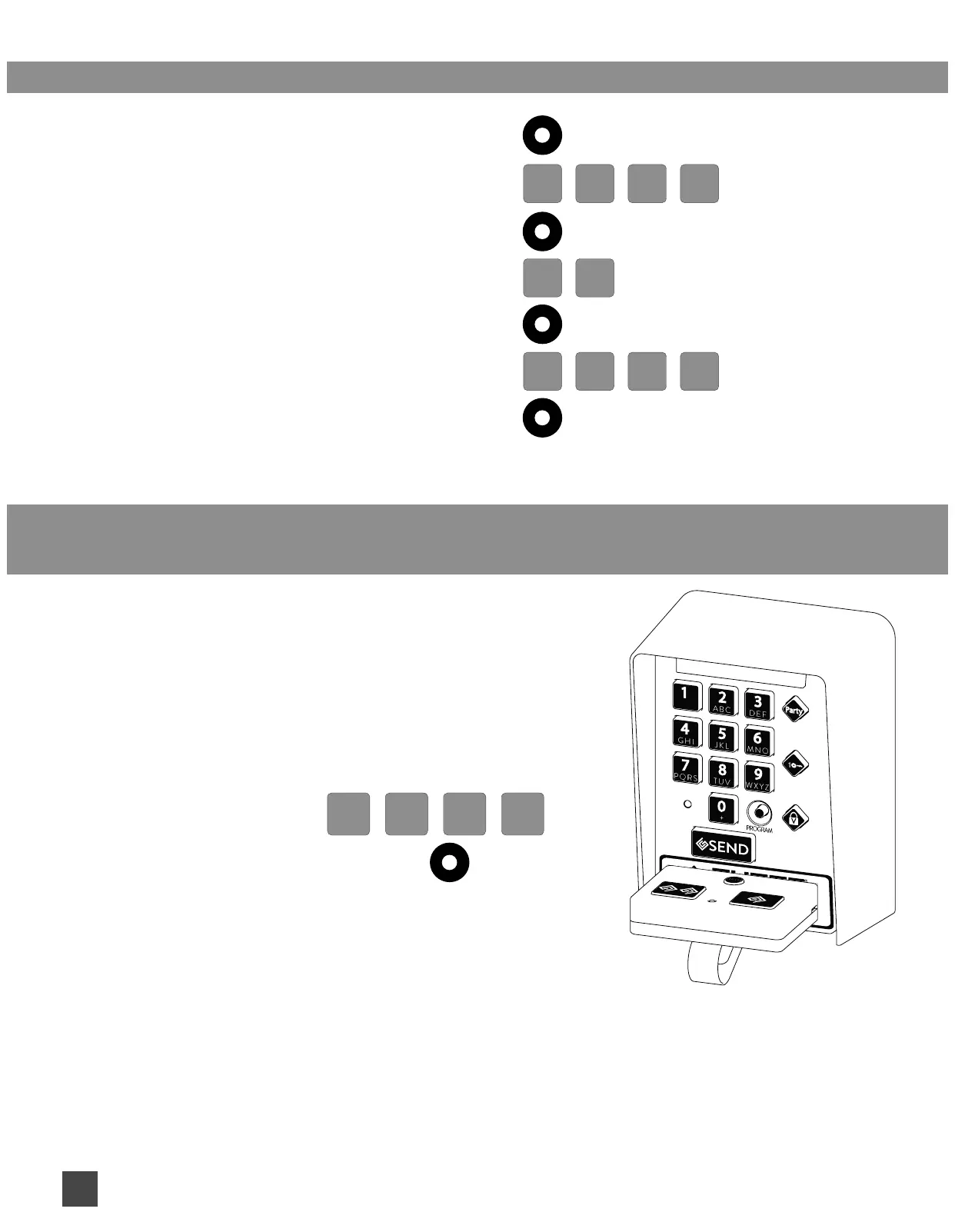
CHANGING YOUR 4 DIGIT PRIMARY PIN CANNOT USE 0 0 0 0:
1. Press and Release PROGRAM BUTTON
(the PartyMode, 1-Key, Vacation LEDs comes on)
7 6
2. Enter your PRIMARY PIN
3. Press and Release PROGRAM BUTTON
4. Enter 7 6
5. Press and Release PROGRAM BUTTON
6. Enter NEW 4 DIGIT PRIMARY PIN
YOU CAN NOT USE 0 0 0 0
7. Press and Release PROGRAM BUTTON
REPLACED REMOTE TRANSMITTER OR CHANGED YOUR REMOTE
TRANSMITTER CODE TO YOUR GATE:
1. Press and Release PROGRAM BUTTON
(the PartyMode, 1-Key, Vacation LEDs comes on)
2. Place the transmitter as shown and press the transmitter
button until the Party, 1-key and Vacation LEDs on the
keypad are blinking in alternating sequence.
(If the transmitter has already been programmed
into keypad, the unit will auto exit programming
mode. Entering Primary Pin is not required below)
3. Enter your PRIMARY PIN
4. Press and Release PROGRAM BUTTON


 To Next Page