LCD Monitor User's Manual
-
30
-
Function Key Guide
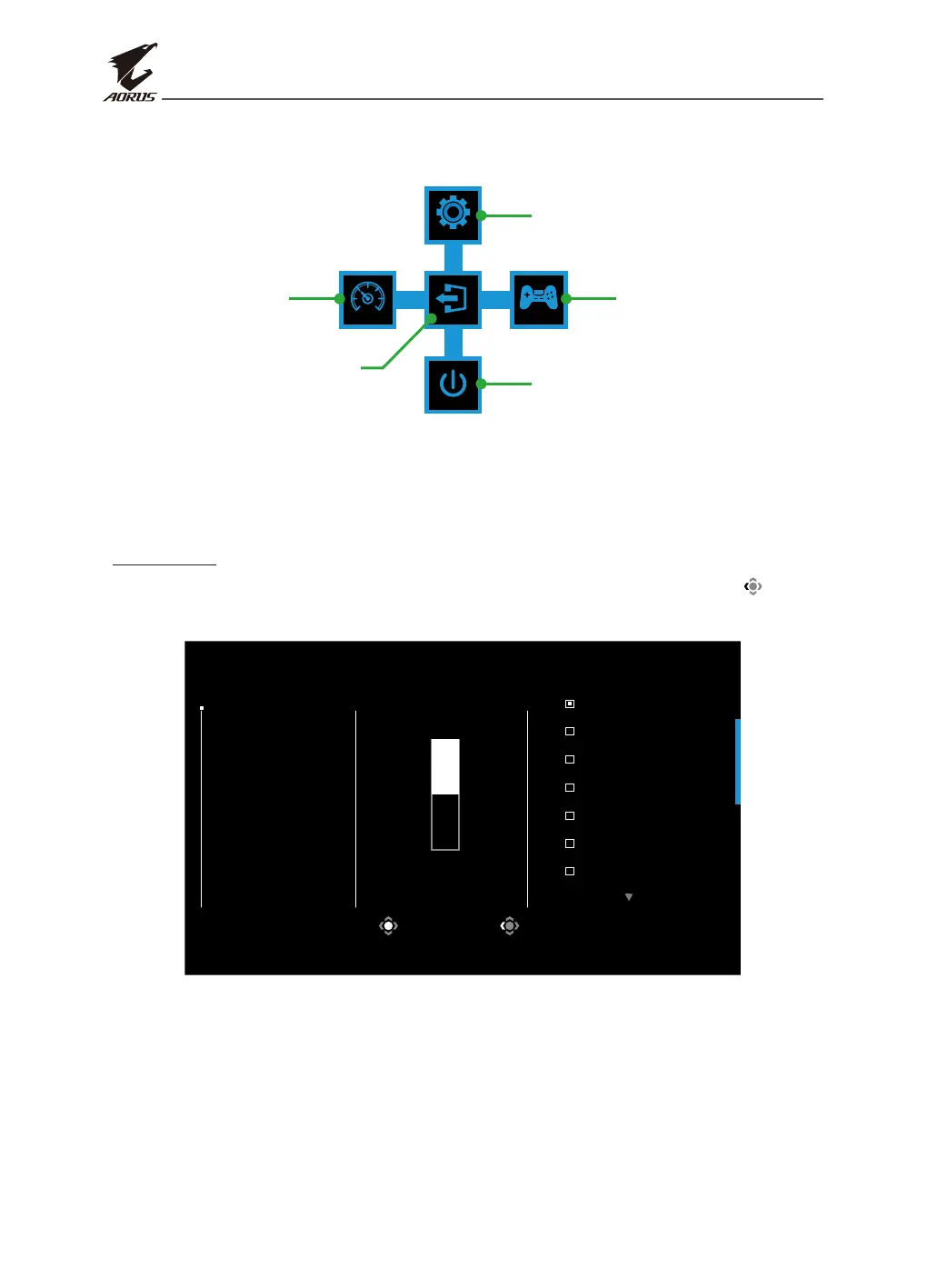
• Press the Control button to display the Main menu.
EXIT
SETTING
POWER OFF
GAME ASSISTDASHBOARD
Game Assist
Power O
Settings
Dashboard
Exit
Then use the Control button to select the desired function and congure
the related settings.
Dashboard
When the Main menu appears on the screen, move the Control button left ( ) to
enter the Dashboard menu.
Select Exit
Dashboard
Function
Dashboard
Location
ON
OFF
CPU Temperature
CPU Frequency
CPU Fan Speed
CPU Fan Speed
CPU Usage Rate
GPU Temperature
GPU Frequency
• Function: Enable/Disable the function. When enabled, you can select the desired
option(s) to be shown on the screen.
• Dashboard Location: Specify the location of the Dashboard information to be
shown on the screen.


 To Next Page