- 27 -
Hardware Installation
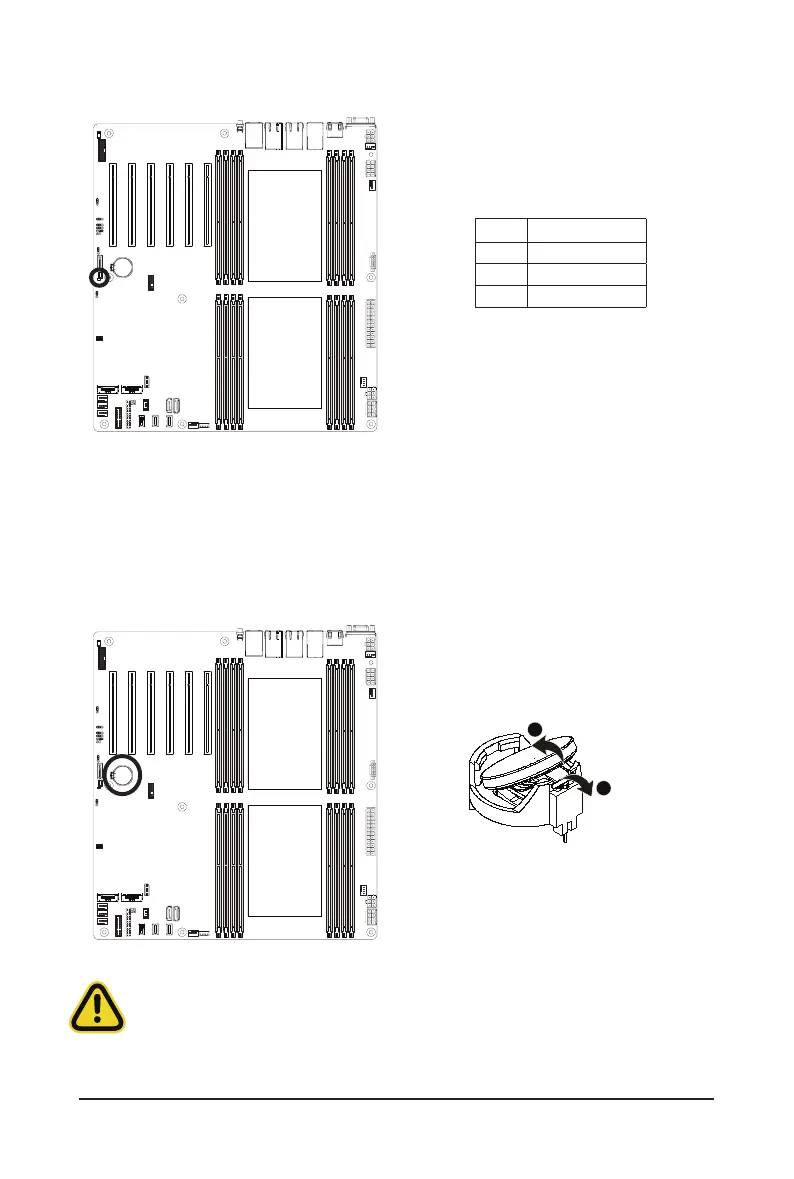
18) LED_BMC1 (BMC Firmware Readiness LED)
State Description
On BMCrmwareisinitial
Blink BMCrmwareisready
Off AC loss
19) BAT (Battery Socket)
Thebatteryprovidespowertokeepthevalues(suchasBIOScongurations,date,andtimeinformation)in
the CMOS when the computer is turned off. Replace the battery when the battery voltage drops to a low level,
or the CMOS values may not be accurate or may be lost.
•
Always turn off your computer and unplug the power cord before replacing the battery.
•
Replace the battery with an equivalent one. Danger of explosion if the battery is replaced with an incorrect
model.
•
Contact the place of purchase or local dealer if you are not able to replace the battery by yourself or
uncertain about the battery model.
•
Used batteries must be handled in accordance with local environmental regulations.
1



 To Next Page