Gigaset A690-A690A/AS690-AS690A / LUG-Kombi IE-UK (Amazon) en / A31008-M2816-L141-1-7619 / operating.fm / 2/19/21
Template Module, Version 2.1, 11.08.2020 / Template Basiseinstellungen: Version 3.1 - 07.07.2020
Using the phone
13
Display
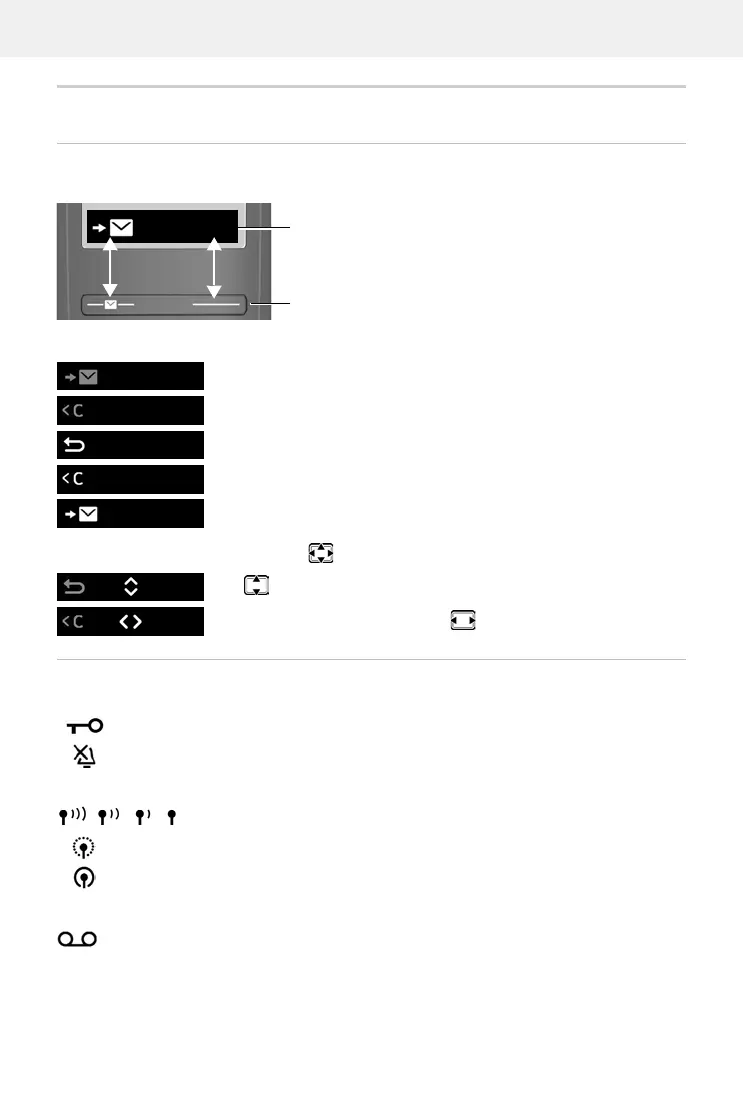
Display keys
The display keys perform a range of functions depending on the operating situation.
Press the display key . . . Function shown in display above.
Display functions accessed from the control key
Status bar
Icons display current settings and the status of the phone.
Radio contact between the base and handset
Answer machines
Open the main menu / submenu
Confirm menu function / save entry
Back one menu level
Delete character by character to the left
Access the call list / message list
Use
to scroll up/down and set the volume
Move the cursor left and right with
Keypad lock activated
Ringtone deactivated
Good to poor
No reception
ECO DECT mode No Radiation enabled
Local answer machine switched on (if available)
Current display key functions
Display keys
Menu
Menu
OK
Menu
OK
Menu
Menu
OK



 To Next Page