Gigaset A690-A690A/AS690-AS690A / LUG-Kombi IE-UK (Amazon) en / A31008-M2816-L141-1-7619 / settings.fm / 2/19/21
Template Module, Version 2.1, 11.08.2020 / Template Basiseinstellungen: Version 3.1 - 07.07.2020
Phone settings
35
Disabling/re-enabling the ringtone permanently
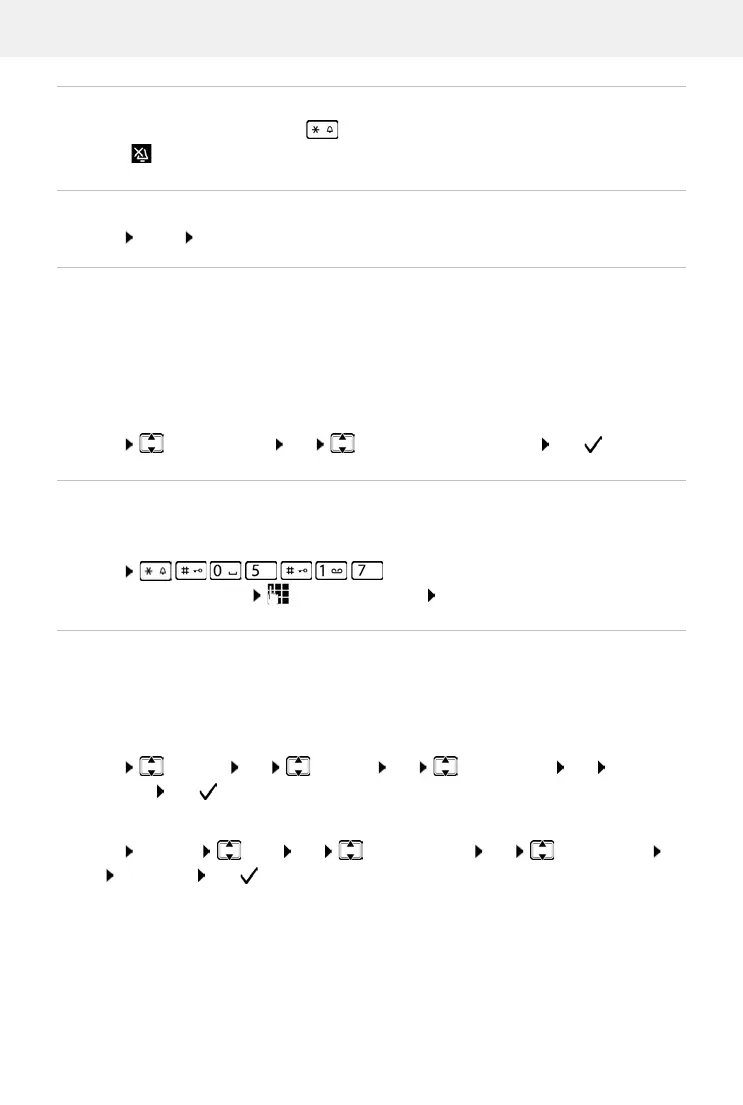
When the phone is idle, press and hold the Star key. When the ringtone is disabled,
symbol is shown on the display.
Deactivating the ring tone for the current call
Enabling/disabling advisory and warning tones
The handset provides acoustic notification of different activities and statuses.
You can enable and disable advisory and warning tones separately.
Menu Audio Settings OK Advis.Tones / Battery Low OK ( = enabled)
Music on hold
You can choose whether an external caller hears music on hold during an internal consultation
or when a call is being forwarded.
Enabling/disabling ringtone with time control
Enter a time period during which the handset should suspend ringing to indicate external calls,
such as during the night.
Enabling/disabling time control
For the handset:
Menu Settings OK Handset OK Time Control OK
Activation OK ( = enabled)
Menu Silent OK
Advisory tone: e.g. keypress tones, error tone, a new message
Battery warning tone:
The battery charge falls below a certain level during a call.
Menu . . . The digit for the current setting flashes:
0 = disabled; 1 = enabled enter required digit OK
For the base (with answer machine):
Menu Settings Base OK Audio Settings OK Time Control
OK Activation OK ( = enabled)



 To Next Page