4
en
gaset
210
or
cs en
30054-
6527-
201-2-
19
210_en.
m
13.04.2016
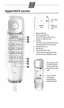
Dialling a speed dial number
c J Lift the handset, press
the speed dial key.
Q ... O Press the speed dial
number key.
Notes on saving and deleting
speed dial numbers
* and # are saved regardless
of the set dialling mode but are only
dialled with tone dialling mode
(
£ page 4).
If the number entered is longer than
21 digits, the saved number is
deleted.
Dialling pauses
One or more dialling pauses can be
entered using
I (not at 1st digit).
Pauses are transferred to the mem-
ory and are necessary for certain
extension systems (e.g.:
0
I 2368).
u Dialling a dialling pause within
the first 5 digits:
The entire number saved is
dialled, including the
2-second dialling pause.
u Dialling a dialling pause after the
first 5 digits:
The portion of the number saved
after the pause is only dialled
after pressing the
I key.
Adjusting the telephone
Setting the handset volume
The handset volume can be set to
two levels.
F Press the handset vol-
ume control key.
The primary volume is reset after
hanging up.
Mute
You can deactivate the telephone's
microphone during a call.
C Press the mute key.
To reactivate microphone: Press the
mute key again or press any other
key.
The mute key LED flashes while the
microphone is deactivated.
Setting the ringer
You can set the ringer melody and
volume to 9 levels or turn it off
(factory default: level 6).
c K Lift the handset, press
the set key.
# Press the hash key.
Q ... O Press one of the num-
ber keys.
(0: Ringer off until
handset is next lifted).
K Press the set key.
Note: The LED on the mute key flashes
while the telephone is in set mode.
Operation on a PABX
Special functions/Recall key
During an external call, you can
make an enquiry or forward the call.
To do this, press the recall key
H.
The subsequent procedure depends
on your PABX.
To set the recall key, the telephone’s
flash time must be set consistent
with your PABX. Please refer to the
operating instructions for your PABX.
Changing the dialling mode/
flash time
The telephone supports the follow-
ing dialling modes:
T1: Tone dialling, flash time 100 ms
T2: Tone dialling, flash time 280/
600 ms
(depending on device model)
P: Pulse dialling



 To Next Page