8
Gigaset CL540-CL540A / LUG - UK-IE / A31008-M2602-L101-2-7619 / starting.fm / 5/14/14
Template Borneo, Version 1, 21.06.2012
Getting started
Connecting the base station to the telephone network and the
mains power supply
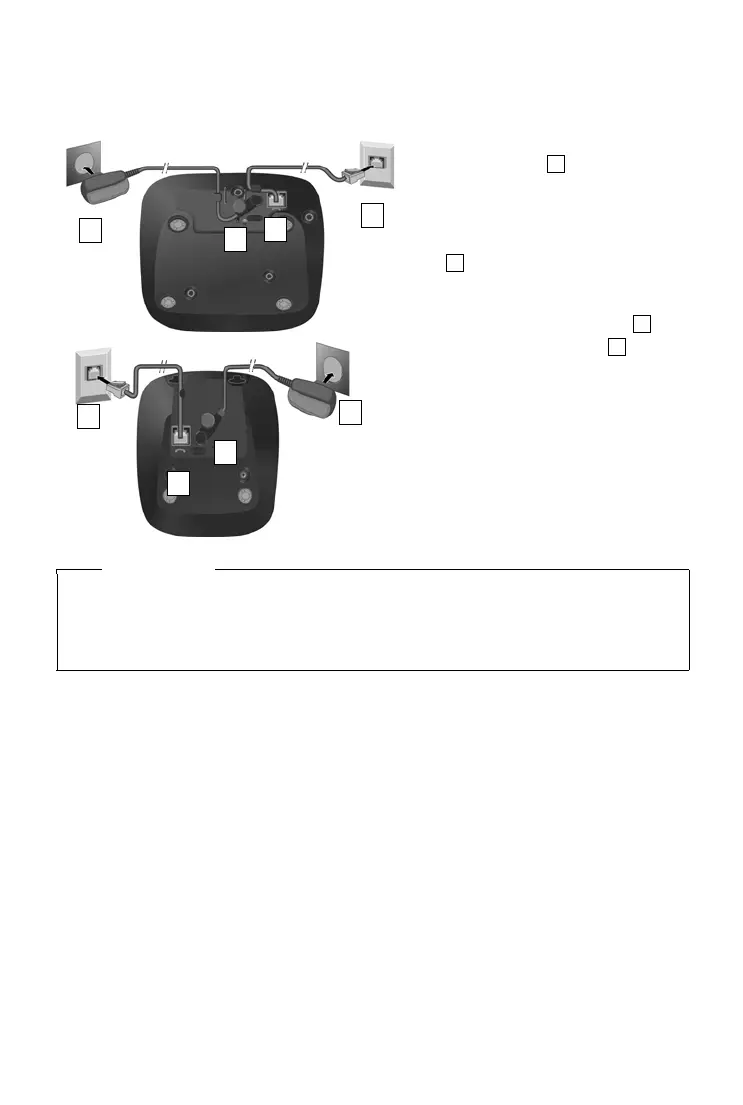
¤ Insert the phone cable into the con-
nection socket at the rear of the
base until it clicks into place and
feed under the cable protection.
¤ Insert the power cable for the power
adapter into the connection socket
at the rear of the base and rotate
the right-angle plug under the cable
protection.
¤ Connect the power adapter .
¤ Connect the phone jack .
Notes
u The power adapter must always be connected, as the phone will not operate without a
power supply.
u Use only the supplied power adapter and phone cord. Pin connections on telephone
cables can vary (pin connections,
¢ page 65).


 To Next Page