Set the date/time so that the correct date and time can be assigned to incoming calls, and so that
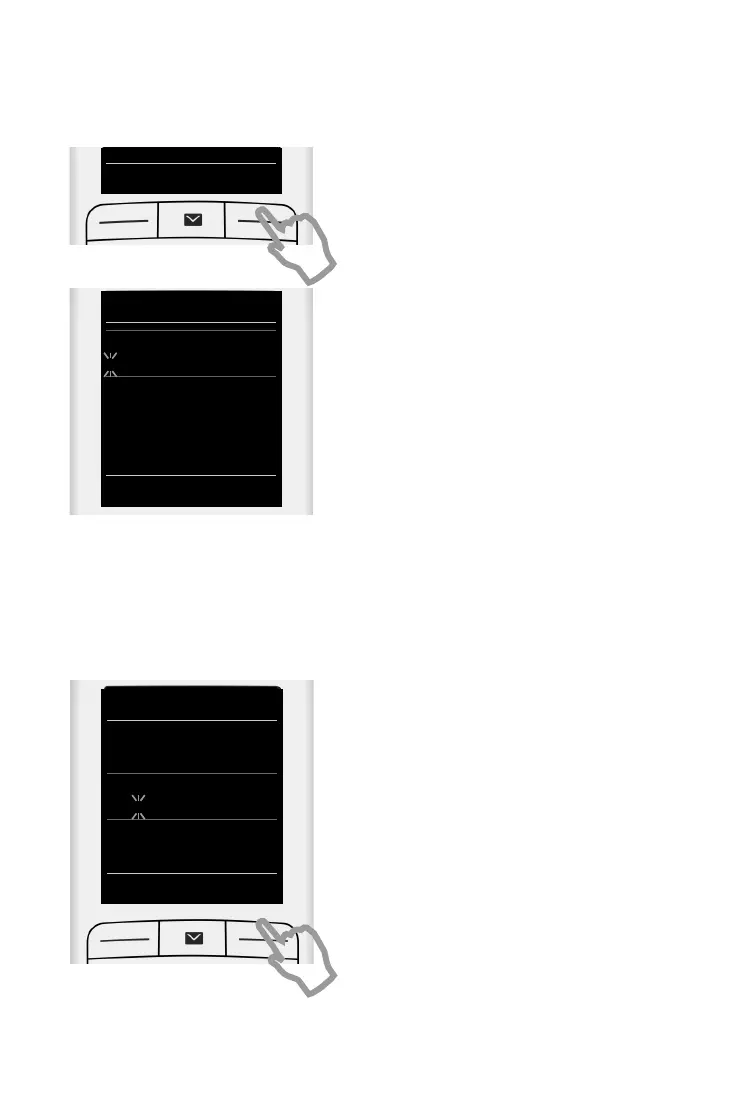
¤ Press the key Time below the display screen to
open the input field.
(If you have already set the date/time, open the
input field via the menu:
v
¤ Ϥ OK ¤ Date/Time ¤ OK)
The submenu Date/Time is shown on the
display.
¤ The active input position flashes.
Enter the day, month and year as an
8-digit number via the keypad,
e.g. 4Q2Q4
for 14.10.2014.
If you wish to change the input position, press
left
u or right v on the control key.
¤ Press the down control key to switch to the
time input field.
¤ Enter the hours and minutes in 4-digit format
via the keypad e.g., QM5
for 07:15 am.
Change the input position with the control
key if necessary.
¤ Press the key Save below the display screen to
save the entry.


 To Next Page