7
1. Setting language
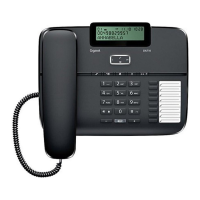
- Press and hold the ENTER Button for 4 sec.(On hook or
Off hook)
- The LCD will show : OPTION MENU ∆ ∇
- Press ∆(Up) button
- The LCD will show : SET LANGUAGE
- Press ENTER to enter in to the menu
- Use ∆(Up) or ∇(Down) button to select the language
- Then ENTER button to confirm and set the language
2. Setting local area code
- Press and hold the ENTER button for 4 sec.(On hook or Off
hook)
- The LCD will show : OPTION MENU ∆ ∇
- Using ∆(Up) or ∇(Down) button go to “LOCAL AREA CODE
MENU”
- Press ENTER button to enter in to the menu
- The LCD will show : AREA CODE - - - -
- Use ∆(Up) or ∇(Down) button to set the area code digit by
digit, pressing ENTER to select
- Then ENTER button to confirm and set the area code.
3. Setting time & date
- Press and hold the ENTER button for 4 sec.(On hook or Off
hook)
- The LCD will show : OPTION MENU ∆ ∇
- Using ∆(Up) or ∇(Down) button go to “SET TIME/DATE”
- Press ENTER to enter the menu
- The LCD will show : TIME/DATE
- Use ∆(Up) or ∇(Down) button to adjust the correct hour /
Minute / Month / Day at the top of the LCD
- Then ENTER button to confirm and set the time and
date.
Setting Up



 To Next Page