5
6
13
14
16
10
4
12
8
11
7
3
1
2
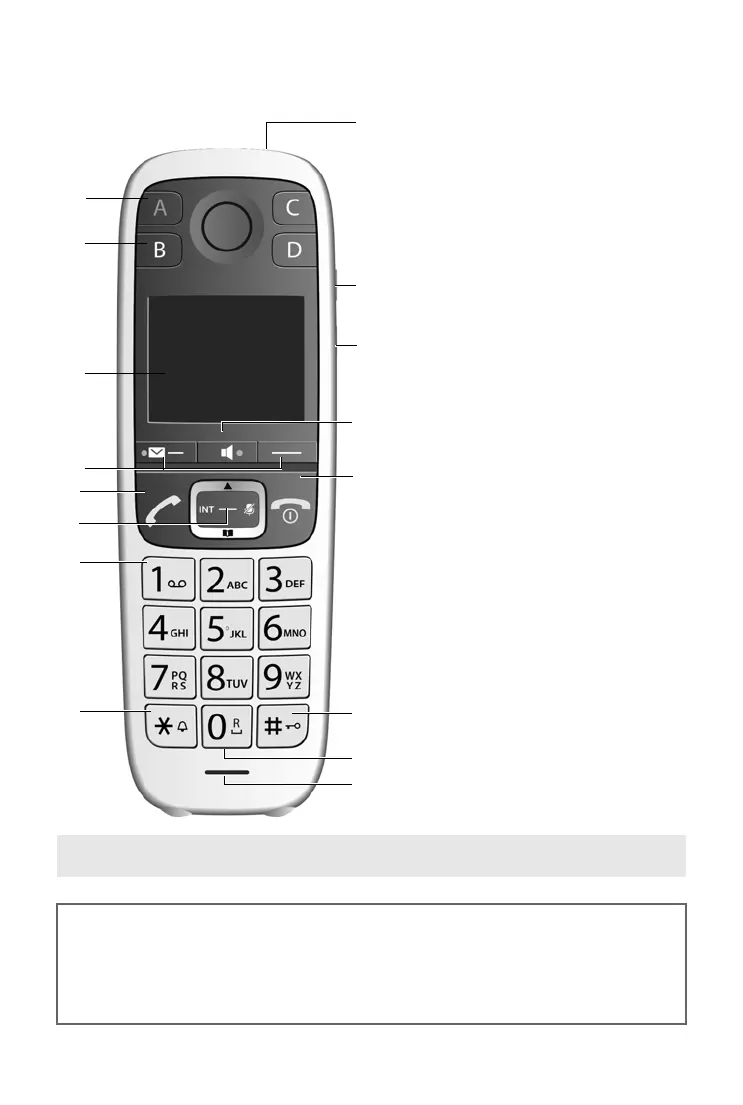
1 Direct dialling key A(¢ page 28)
("SOS key", ¢ page 34)
Illuminated: Emergency function
activated
Flashes: Emergency call started
2 Direct dialling keys B to D
(
¢ page 28)
3 Display (¢ page 6)
4 Display keys (¢ page 6)
5 Talk key
Flashes: Accepting a call
6 Control key (
¢ page 22)
7 Key 1
Answer machine (E550A only)/Call the
network mailbox (
¢ page 43)
8 Star key
Ringers on/off (press and hold)
9 Torch and signal light (LED)
10 Side key for torch
11 Side key for boost function
Extra volume key, setting the volume
( page 26)
12 Handsfree key (
¢ page 25)
Switch between earpiece and hands-
free mode;
Lights up: handsfree activated
13 End call key, On/Off key
End call; cancel function; go back one
menu level (press briefly); back to idle
status (press and hold); activate/deac-
tivate handset (press and hold in idle
status)
14 Hash key
Keypad lock on/off (press and hold,
(
¢ page 21); upper/lower case and
digits (
¢ page 23)
15 0 key/recall key
Consultation call (flash): press and hold
16 Microphone
9
15



 To Next Page