Gigaset Fusion / LUG IE-UK-International en / A31008-XXXXX-XXXX-X-XXXX / starting.fm / 12/16/22
Template Module, Version 2.2, 15.11.2022 / Version - 29.11.2022
9
Getting started
Connecting the telephone
Setup Wizard
Once the phone is connected to the mains power or has been reset to default settings, the setup
wizard starts. This guides you step-by-step through initial configuration. You can see your
progress in the header. You can change the settings later via the menu or Web user interface.
Setting the language
Select language ( = selected) Next
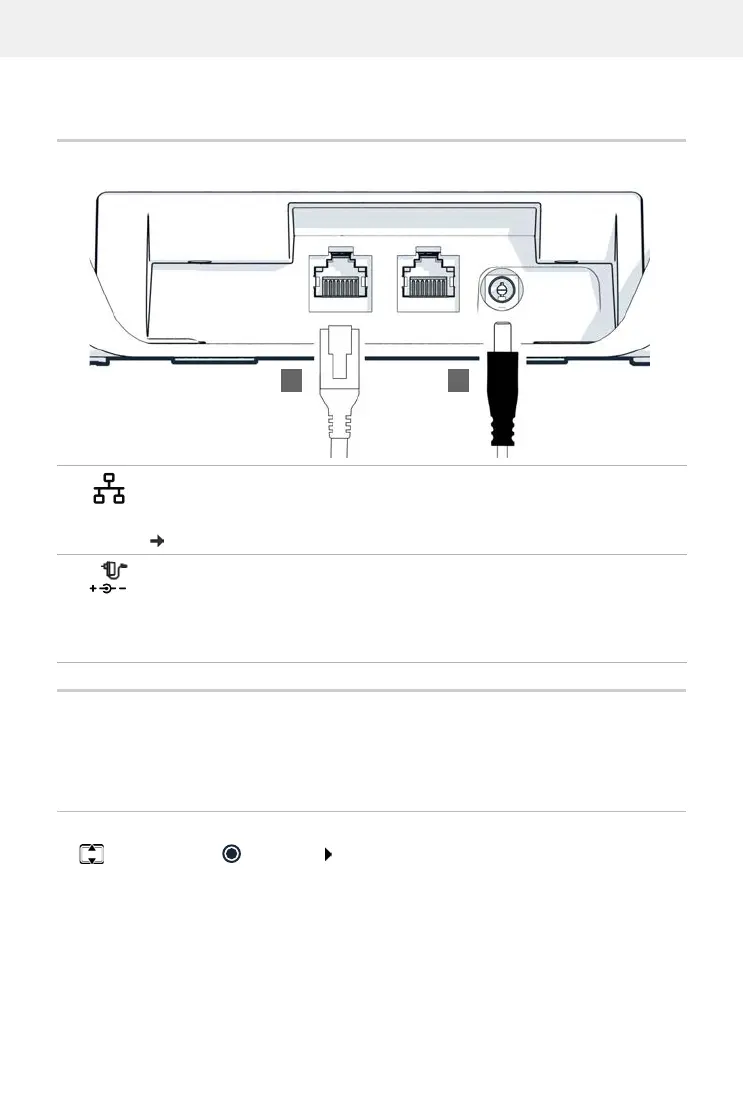
1 Connect LAN port on the device to the local network, for example, using a router,
switch or hub.
Alternatively, you can also connect the device to the local network via WLAN
(p.89)
2 Connect the device to the mains power.
The Gigaset Fusion can also be supplied with sufficient electricity via PoE (Power
over Ethernet) if the device is connected to a PoE-capable Ethernet switch (PoE
class IEEE802.3af). In this case, you must not connect the device to the mains
power.


 To Next Page