Template Module, Version 2.2, 15.11.2022 / Version - 29.11.2022
Keys and operating elements
Gigaset Fusion / LUG IE-UK-International en / A31008-XXXXX-XXXX-X-XXXX / overview.fm / 12/16/22
4
Overview
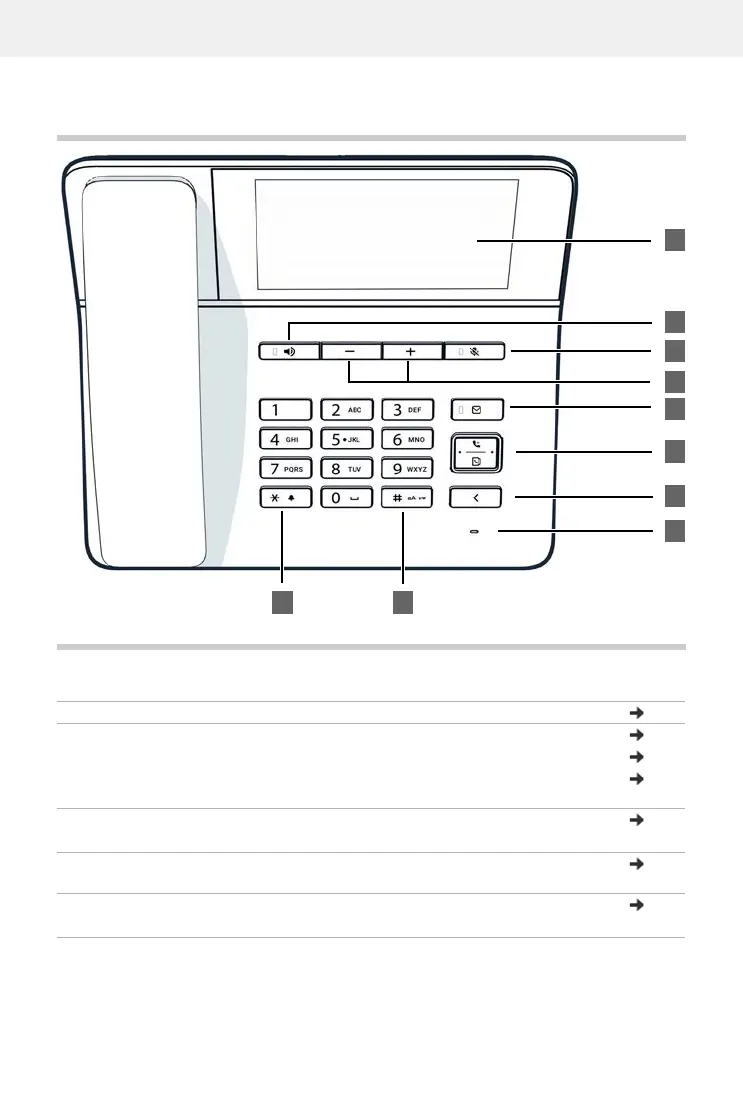
Keys and operating elements
1 Touch screen Idle display p. 18
2 Handsfree key Enable/disable the speaker p. 30
Start dialling p. 27
Lights up: Call is being made via the speaker (hands-
free mode)
p. 30
3 Mute key Activate/deactivate microphone (mute) p. 30
Lights up: The microphone is muted
4 Volume keys Depending on the operating mode: Adjust the volume
of the speaker, receiver, headset or ringtone
p. 30
5 Message Centre Open call and message lists p. 40
Flashes: New message in the Message Centre


 To Next Page