Gigaset Fusion / LUG IE-UK-International en / A31008-XXXXX-XXXX-X-XXXX / overview.fm / 12/16/22
Template Module, Version 2.2, 15.11.2022 / Version - 29.11.2022
Connections and ports
5
Connections and ports
6 Control key Scroll through lists and entries.
When phone is in idle:
p. 19
Open the call lists p. 37
Opening menu p. 20
Open list of directories p. 42
Scroll through the idle display screens p. 18
7 Home/Back key Cancel function;
go back one menu level (press briefly);
return to idle status (press and hold)
p. 19
8 Microphone Microphone of the handsfree unit p. 30
9 Star key Display special characters when inputting text p. 21
Switch ringtone on/off (press and hold)p.29
10 Hash key Switch text mode (upper/lower case letters, digits) p. 21
Enable/disable keypad lock (press and hold)p.20
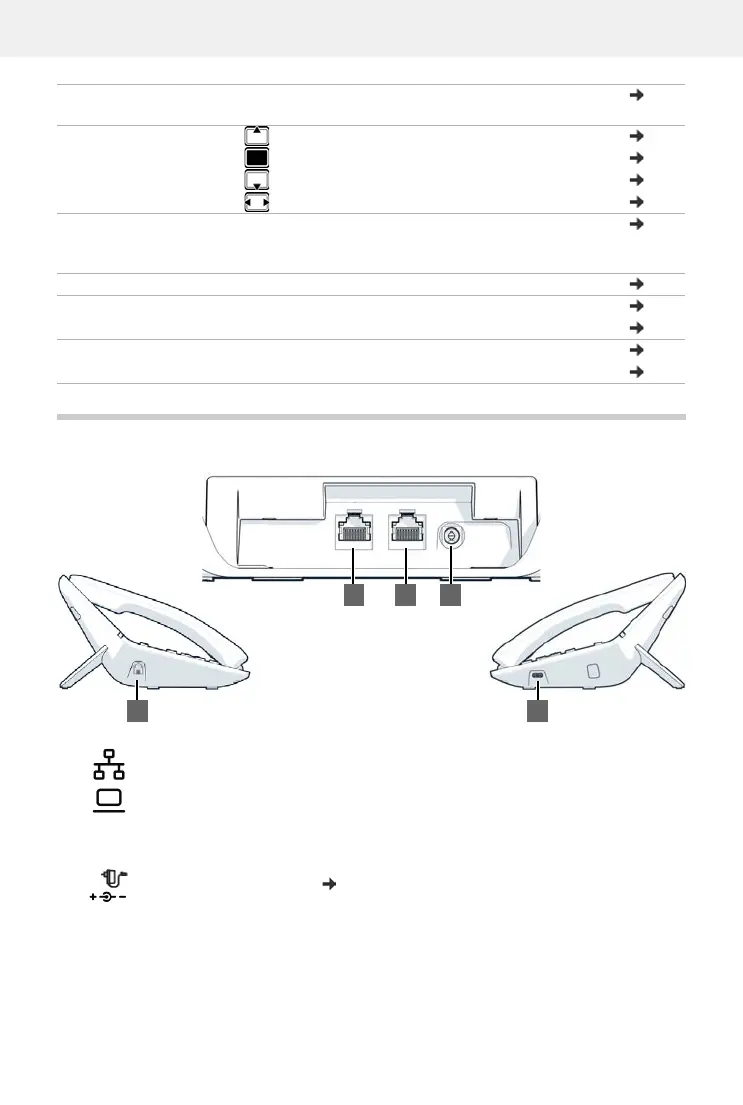
1
LAN (PoE)
2PC
A PC can also be connected to the telephone instead of to the local network, using
the PC port; the telephone establishes the network connection This is not possible
if the telephone is connected to the network via WLAN.
3
Power adapter, 12V/1.3A ( p. 7)
4Receiver
5USB-C
Left sideRight side
4
Back
1 2 3
5


 To Next Page