Template Module, Version 2.2, 15.11.2022 / Version - 29.11.2022
Network
Gigaset Fusion / LUG IE-UK-International en / A31008-XXXXX-XXXX-X-XXXX / settings_advanced.fm / 12/16/22
90
Enabling/disabling WLAN
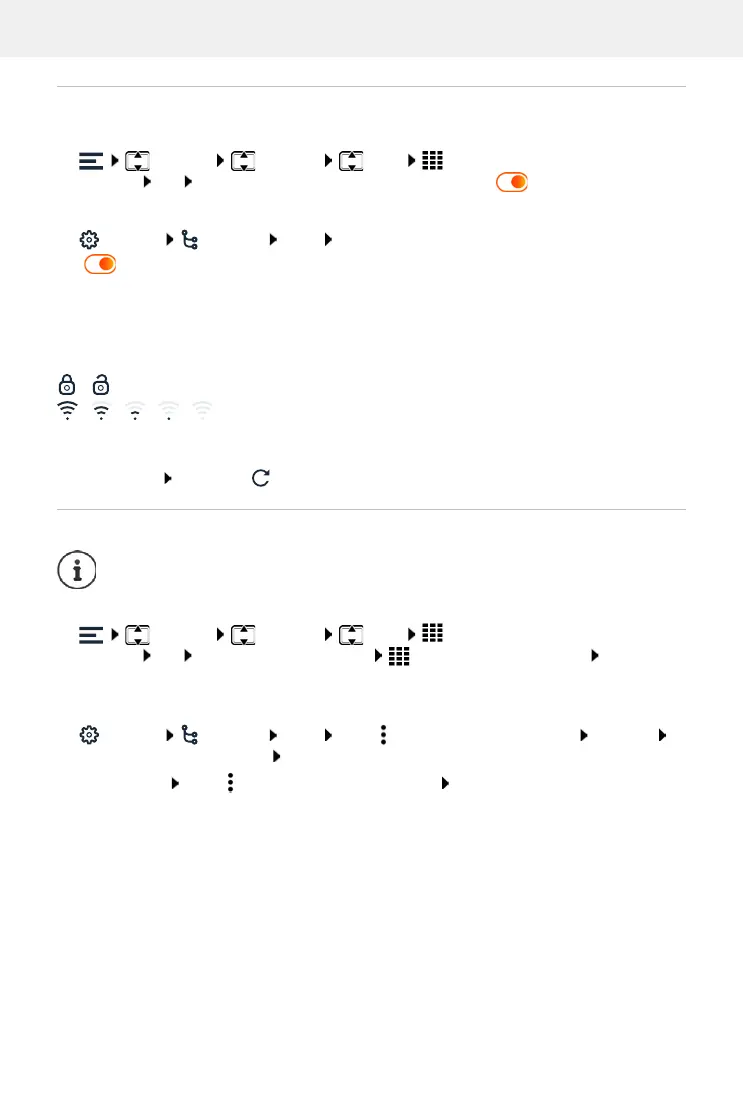
In display menu
Settings Network Wi-Fi Enter the password for the Admin
user role OK Enable/disable the function with the switch ( = enabled)
In Web user interface
Settings Network Wi-Fi Enable/disable the function with the switch
(=enabled)
If the WLAN interface is enabled, the WLAN networks in range are listed with their name and
status. If the phone is registered in a WLAN and the connection is active, Connected is displayed
as the status.
Icons:
Refresh the list: Refresh or
Connecting with a WLAN
In display menu
Settings Network Wi-Fi Enter the password for the Admin
user role OK Select the required WLAN Enter the WLAN password Connect ...
The connection is set up, Connected is displayed as the status if successful
In Web user interface
Settings Network Wi-Fi Click next to the required WLAN Connect
Enter the network password Connect . . . The connection is set up
End connection: Click next to the connected WLAN Disconnect
/ WLAN encrypted/not encrypted
/ / / / Wireless signal strength, the number of black bars indicates signal
strength: Excellent signal, Good signal, Fair signal, Weak signal, No
signal.
The phone can only be connected with one WLAN. A new connections ends any
existing one.


 To Next Page