This document describes the GIMA QV-600 Professional Vein Finder (GIMA 23454), a medical device designed to assist healthcare professionals in locating superficial veins.
Function Description
The QV-600 Vein Finder operates by emitting infrared light to detect veins beneath the skin. It then projects the position of these veins onto the skin surface, directly above their actual location. This visualization helps qualified medical personnel identify suitable veins for procedures such as venipuncture and other medical interventions requiring superficial vein access.
It is crucial to understand that the device is intended as a supplement to appropriate medical training and experience, not as the sole method for vein location. Users should always follow established medical protocols, practices, and sound medical judgment. The device displays only superficial vasculature, and the maximum depth of vein display varies by patient. Factors such as vein depth, skin conditions (e.g., eczema, tattoos), hair, scarring, highly contoured skin surfaces, and adipose tissue can affect display quality.
When held directly overhead, the device accurately pinpoints the center of a vein. Tilting the device will offset the projected vein from its true location. The displayed vein width may vary from the actual width depending on patient differences and vein size, but the center line remains accurate when used correctly. The device is portable, with optional table and mobile stands available.
Important Technical Specifications
- Infrared Light Detection: Harmless to the human body.
- Infrared Wave: 760-940nm.
- Infrared Detection Depth: 0-10mm.
- Best Detection Distance: 15-25cm.
- Accuracy of Blood Vessel Position: ±0.3mm.
- Accuracy of Blood Vessel Resolution: ±0.3mm.
- Low Working Noise: ≤40DB.
- Battery: Samsung 5000mAh rechargeable lithium battery, providing 3 hours of duration. Battery capacity display and low battery capacity prompt are available.
- Projection Technology: TI DLP.
- Power Supply for Charging: 5V 4.5A, 100V-240V 50Hz-60Hz.
- Size: 23(L)x6.4(W)x5.7(H)cm.
- Automatic Power Off: If idle for 35 minutes.
- Sleep Mode: Automatically enters sleep mode when idle for 10 minutes (default) or as set via the LCD interface.
- Electromagnetic Compatibility: Complies with IEC 60601-1-2. RF emissions CISPR 11 Group 1.
Usage Features
The QV-600 features an LCD user interface and a control panel with Power, Sleep, OK, and four arrow keys.
Basic Operation:
- Power On/Off: Short press the power button.
- Holding Position: Hold the device 15 to 25 cm above the skin surface.
- Scanning: Scan the area of interest to view veins.
- Optimizing Display: Slightly adjusting the height and angle to the skin can enhance display quality. Moving the device closer or further from the skin can help bring additional veins into view, depending on the patient's vasculature, room lighting, and vein depth.
- Pre-Palpation: Use "sport mode" for quick scanning to narrow down possible locations.
- Post-Palpation: Switch to "enhance mode" to find deeper veins after confirming a suitable vein location.
- Confirmation: Always verify vein location and suitability using normal medical techniques and judgment (visualization, palpation, etc.).
LCD User Interface Controls:
- Color: Use arrow keys to select "Color" on the LCD and press "OK" or left/right arrow keys to choose the desired color for vein display.
- Size: Use arrow keys to select "Size" on the LCD and press "OK" or left/right arrow keys to choose the appropriate display size.
- Inverse: Use arrow keys to select "Inverse" on the LCD and press "OK" or left/right arrow keys to turn inverse mode on/off. Inverse mode can enhance visibility for certain skin types or lighting conditions.
- Brightness: Use arrow keys to select "Brightness" on the LCD and press "OK" or left/right arrow keys to adjust the display brightness.
- Enhance: Use arrow keys to select "Enhance" on the LCD and press "OK" or left/right arrow keys to turn enhance mode on/off. This mode can help visualize deeper veins.
- Photograph: Use arrow keys to select "Photograph" on the LCD and press "OK" or left/right arrow keys to save real-time vein images. Captured images can be accessed via a Type-C cable connection to a computer.
- Sleep: Use arrow keys to select "Sleep" on the LCD and press "OK" or left/right arrow keys to set the idle time before the device enters sleep mode.
- Language Change: Press the "Sleep button" and the "direction Down button" simultaneously for 3 seconds to enter "developer mode." Then, select the desired language (10 languages available) by pushing "OK."
Light Indicator:
- Blue: Working.
- Green: Fully charged.
- Red: Charging.
Maintenance Features
Regular maintenance ensures the device's longevity and optimal performance.
- Monthly Maintenance: Maintain and clean the device once a month.
- Cleaning:
- Always unplug the power cable and ensure the device is off before cleaning.
- Use a dust-free cloth dipped in 70% alcohol to wipe the device.
- Do not open the device to clean the inner parts.
- Battery Management:
- The device has an independent battery compartment, making battery removal easy.
- If the device will not be used for more than 3 months, remove the battery.
- Storage: After use, place the device in its aluminum carrying case and store it in a dry and cool place.
- Servicing: If the vein light window is scratched, the device should be returned to the factory for servicing. Repairs must only be performed by authorized and qualified staff.
- Prohibitions:
- Do not attempt to open, disassemble, or service the battery.
- Do not attempt to sterilize the device with heat or pressure.
- Do not throw the vein finder or battery into fire.
- Accessories: Use only official accessories to ensure safety.
- Reporting Incidents: Any serious incident related to the device must be reported to the manufacturer and the competent authority of the Member State where the user and/or patient is established.
The GIMA QV-600 Vein Finder comes with a 12-month standard B2B warranty. For disposal, the product must not be treated as domestic waste but should be taken to a specific recycling point for electrical and electronic equipment.

 Need help?
 General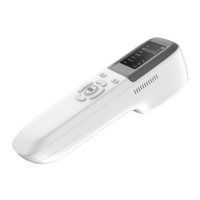

 To Next Page











