11
ENGLISH
Operating Instructions
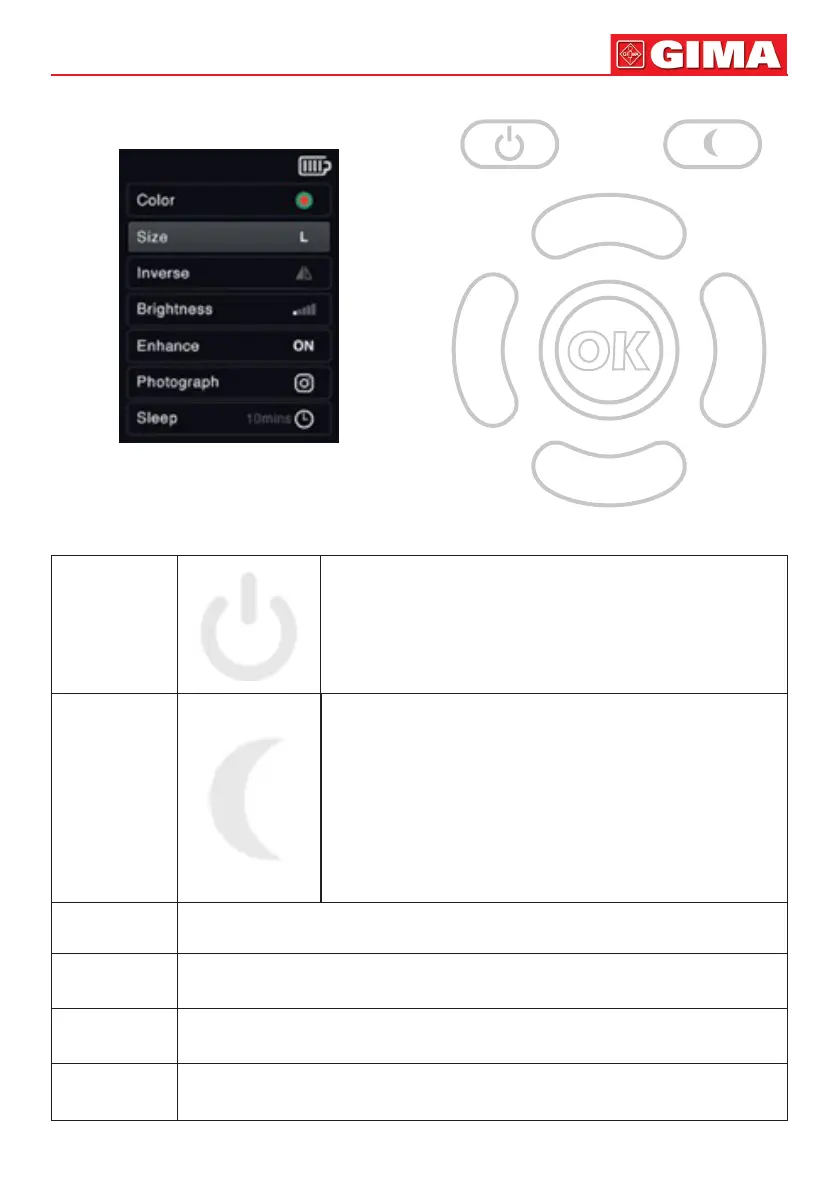
LCD User Interface
Key
Power, Sleep, OK, and Four Arrow Key
Key Power
Short press the button to startup or shutdown. Automat-
ic power o when machine idle for 35 minutes.
Light indicator:
Blue: Working; Green: Fully charged; Red: Charging
Key Sleep
Machine enter sleep mode automatically when idle for
10mins(default) or set idle time by LCD interface. Short
press make machine enter low energy consumption mode
immediately.
LCD Color
Using the up and down arrow keys, select row “Color” in LCD and press the “OK”
key or the left and right arrow keys to choose appropriate color.
LCD Size
Using the up and down arrow keys, select row “Size” in LCD and press the “OK”
key or the left and right arrow keys to choose appropriate size.
LCD
Inverse
Using the up and down arrow keys, select row “Inverse” in LCD and press the
“OK” key or the left and right arrow keys to turn on/o inverse mode.
LCD
Brightness
Using the up and down arrow keys, select row “Brightness” in LCD and press the
“OK” key or the left and right arrow keys to choose appropriate brightness.


 To Next Page