EasyManua.ls Logo

GJD Emerald 3000 MK3 - User Manual

GJD Emerald 3000 MK3
4 pages
Print Icon
To Next Page IconTo Next Page
Loading...
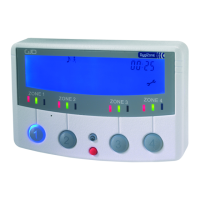
The GJD Emerald is a dual area security lighting controller
which enables external areas to be accurately monitored.
It automatically switches up to 3000 Watts of resistive
lighting at night for a pre-set period and can be manually
overridden when required. The controller incorporates an
audible warning tone and features six detector indicators
which illuminate when activated by detection day and night.
OPERATING INSTRUCTIONS
When a detector is activated day or night the relevant
detector indicator ickers and will remain on for the length
of the timer setting. During darkness the lighting will be
switched on automatically while the detector is receiving
activation signals, and will automatically turn off after the
pre-set timer period.
The ‘Zone 1’ and ‘Zone 2’ green indicator have to be
selected for automatically controlled lighting on detection
during darkness.
ZONE 1
ZONE 1
ZONE 1
Green indicator is ‘on’. This mode
must be selected for automatic
lighting during darkness.
Indicator ‘off’. Lighting and tone
are switch off for this zone.
Green indicator ashing. A
detector has activated the
lighting.
Manually selecting this yellow
indicator will turn the lighting
‘on’. Turning the indicator ‘off’ will
return to automatic mode.
Indicator ‘off’.
Yellow indicator ashing. A
detection has automatically
activated the lighting.
Red indicator ‘on’. Audible
warning tone selected. Zone 1
and/or Zone 2 indicator to be
selected to function.
Indicator ‘off’ Audible warning
tone is switched off.
ADJUSTMENT TO FACTORY SETTINGS
When connecting the unit to the electrical supply or when
the supply is interrupted, the indicators will ash for one
minute whilst the system settles. Pressing any button
during this time will start normal operation.
Internal adjustments panel
The factory settings are shown.
AUX - Auxiliary Output (50mA maximum)
OFF - Internal sounder and auxiliary output disabled
STD -Internal sounder and auxiliary output active and will
emit a warning tone on each detection when the tone
button is selected.
10-30 Seconds - The auxiliary output time after last
detection. The internal sounder is as the STD
LIGHT ON TIME IN MINUTES
1 to 24 minutes - The length of the time after last detection
during darkness. The red detector indicators will stay on for
this time after the last detection day and night.
Pulse Count / Walk Test - Select the symbol to assist in
location/alignment of the detector beams during daylight
installations. When the detector beams are activated the
external lights will stay on for a period of 6 seconds.
1,2 or 3 - After completing the ‘walk test’ function, set
the pulse count to the required level. The pulse count is
the number of detector beams that have to be crossed to
trigger the system.
1. will give fast response
2. gives better immunity with good response
3. gives highest immunity to false activation in poor
environments but is less responsive.
OFF
STD
10
20
30
1
3
5
10
24
1 2
3
AUX
TIME SECS
LIGHT ON
TIME MINS
PULSE
COUNT
Emerald 3000 MK3
GJD010 Lighting Controller
Detect. Illuminate. Dete
r
Question and Answer IconNeed help?

Do you have a question about the GJD Emerald 3000 MK3 and is the answer not in the manual?

Summary

Operating Instructions

Adjustment to Factory Settings

Audible Warning Tone and Indicator Status

Explains red indicator status for audible tone selection and disabling.

Auxiliary Output Settings

Configures the auxiliary output and internal sounder functionality.

Lighting Duration Settings

Sets the duration the lighting stays on after detection.

Detector Walk Test and Pulse Count

Assists detector alignment and sets trigger sensitivity.

Wiring and Connections

AC Mains Supply and Load Connections

Details wiring for 230V AC mains supply, fuses, and load outputs.

12 VDC Detector and Auxiliary Connections

Illustrates 12VDC connections for detectors and auxiliary units.

Optional Components Wiring

Diagrams for optional piezo sounder, relay, and external button.

Specifications and Compatibility

Emerald 3000 (DX10) to MK3 Exchange

Lists connection changes for upgrading from DX10 to MK3 models.

Technical Specifications

Details power, load capacity, indications, control, and dimensions.

Certifications and Mounting

Covers CE/UKCA certification and indoor mounting requirements.

Overview

The GJD Emerald 3000 MK3 (GJD010) is a dual-area security lighting controller designed to monitor external areas and manage lighting automatically. It can switch up to 3000 Watts of resistive lighting at night for a pre-set period and offers manual override capabilities. The controller includes an audible warning tone and six detector indicators that illuminate upon detection, day or night.

Function Description:

When a detector is activated, the corresponding indicator flickers and remains on for the duration of the timer setting. During darkness, the lighting automatically switches on when the detector receives activation signals and turns off after the pre-set timer period. For automatic lighting control on detection during darkness, the 'Zone 1' and 'Zone 2' green indicators must be selected.

Usage Features:

  • Detector Indicators: Six 24-hour detector indicators pulse during detection and remain steady after detection for the duration of the light-on timer setting.
    • Red Indicator (On): Signifies that the audible warning tone is selected, and Zone 1 and/or Zone 2 indicators are selected to function.
    • Indicator (Off): Indicates that the audible warning tone is switched off.
    • Green Indicator (On): This mode must be selected for automatic lighting during darkness.
    • Green Indicator (Off): Lighting and tone are switched off for this zone.
    • Green Indicator (Flashing): A detector has activated the lighting.
    • Yellow Indicator (Manually On): Manually selecting this indicator turns the lighting 'on'. Turning it 'off' returns to automatic mode.
    • Yellow Indicator (Off): The indicator is off.
    • Yellow Indicator (Flashing): A detection has automatically activated the lighting.
  • Audible Warning Tone: An internal warning tone sounds on detection day and night. It is button-selectable, with a steady tone for Zone One and a pulsed tone for Zone Two.
  • Manual Override: The system allows for manual override of the lighting.
  • Pulse Count / Walk Test: This feature assists in locating and aligning detector beams during daylight installations. When detector beams are activated, external lights stay on for 6 seconds.
  • Pulse Count Settings (1, 2, or 3): After the 'walk test', the pulse count can be set to the required level, which is the number of detector beams that must be crossed to trigger the system.
    • 1: Fast response.
    • 2: Better immunity with good response.
    • 3: Highest immunity to false activation in poor environments but is less responsive.
  • Auxiliary Output (AUX):
    • OFF: Internal sounder and auxiliary output disabled.
    • STD: Internal sounder and auxiliary output active, emitting a warning tone on each detection when the tone button is selected.
    • 10-30 Seconds: Sets the auxiliary output time after the last detection. The internal sounder operates as per STD.
  • Light On Time (1 to 24 minutes): Determines the length of time the lighting remains on after the last detection during darkness. Red detector indicators stay on for this time after the last detection, day and night.
  • Linking Lighting Areas: Both lighting areas can be linked together (except in walk test) by connecting 'LINK' to '-'.
  • Remote Triggering: Lights can be triggered remotely for the timer period; Pulse Count '1' must be selected.
  • Intruder Alarm Panel Integration: Zone lighting can be activated for an alarm period when linked to an intruder alarm panel.

Important Technical Specifications:

  • Supply: 230 Vac 50Hz via ELCB/MCB, unit fused at 13A.
  • 12VDC@ 100mA: Compatible with GJD Opal XL (6mA) or Elite Detectors (10mA). Optional external 12VDC piezo sounder up to 50mA.
  • Load: Each expansion unit switches two channels, each up to 1500W of resistive load or 1000 Watts of inductive load. Inductive loads may require a 'snubber' (suppressor) to manage lamp discharge current.
  • Control: Controls up to 12 GJD detectors. Switches two independent areas of lighting with manual override when required.
  • Dimensions: 146(W) x 86(H) x 56(D) mm.
  • Mounting: Indoor use only. Mount in a clean, dry location on a secure, flat surface.
  • Temperature: -10 to +55 Centigrade.
  • Certifications: CE UKCA, Self-contained - Class 2 independently mounted control.
  • Diodes: All diodes are IN4148, IN4002 etc.

Maintenance Features:

  • Factory Settings Adjustment: When connecting the unit to the electrical supply or after an interruption, indicators flash for one minute as the system settles. Pressing any button during this time initiates normal operation.
  • Installation: To be installed by qualified personnel only.
  • Exchanging Emerald 3000 with Emerald MK3: If replacing an original Emerald 3000 (DX10) with an Emerald MK3, specific connection changes must be applied for 230 Volt A.C and 12 Volt D.C connections as detailed in the manual.
    • 230 Volt A.C Connections:
      • Emerald 3000 (DX10) LIVE to Emerald MK3 LIVE
      • Emerald 3000 (DX10) LIGHT A to Emerald MK3 LOAD 1
      • Emerald 3000 (DX10) LIGHT B to Emerald MK3 LOAD 2
      • Emerald 3000 (DX10) NEUTRAL to Emerald MK3 N
    • 12 Volt D.C Connections:
      • S1, S2, S3 to S1 ZONE1
      • S4, S5, S6 to S2 ZONE2
      • AA to A1, A2, OR A3 ZONE1
      • AB to A1, A2 OR A3 ZONE2
      • '-' to AUX

GJD Emerald 3000 MK3 Specifications

General IconGeneral
BrandGJD
ModelEmerald 3000 MK3
CategoryController
LanguageEnglish

Related product manuals