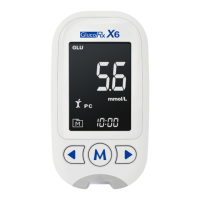
Need help?
Do you have a question about the GlucoRx TD-4230 and is the answer not in the manual?
Basic safety precautions to be taken when using the device and supplies.
Information on conditions like dehydration, hematocrit, and substances that can impact test results.
Details on operating conditions, altitude limits, and patient types not suitable for testing.
Definition of alternative site testing for blood glucose measurement.
Explains why other body sites may be less painful than fingertips for testing.
Specifies recommended times and conditions for performing alternative site testing.
Lists situations where alternative site testing should not be performed.
Provides guidance on how to improve the accuracy of blood glucose measurements.
Details the intended purpose and applications of the blood glucose monitoring system.
Describes the scientific basis and mechanism of blood glucose measurement.
Details all the items that come with the blood glucose monitoring system.
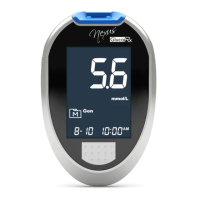
Identifies and explains the purpose of each button, slot, and port on the glucose meter.
Details the meaning of symbols, messages, and indicators shown on the meter's LCD screen.
Identifies and explains the function of each part of the blood glucose test strip.
Step-by-step guide on how to replace the meter's battery.
Visual and textual instructions for safely removing and installing the meter's battery.
Guide to setting the current year, month, and day on the glucose meter.
Guide to setting the current hour and minute on the glucose meter.
Key points regarding time/date settings, DST, and how averages are calculated.
Procedure for removing all stored blood glucose test results from the meter's memory.
Guide to setting up multiple daily alarms for blood glucose testing reminders.
Detailed instructions for setting the hour and minute for each of the four available alarms.
Steps to configure the third and fourth daily alarm times on the glucose meter.
Procedure for setting the final alarm and turning off the meter after configuration.
Describes the beeping and visual cues the meter uses to signal an alarm.
Illustrates a typical scenario of the meter activating a set alarm for testing.
Demonstrates the meter's behavior when multiple alarms are set and activated.
Instructions on how to manually turn off the meter after an alarm has been triggered.
Explains the 'CHK' indication confirming the meter and test strip are ready.
Details the process of using control solutions to verify meter and strip performance.
Provides crucial information on using, storing, and checking expiry dates of control solutions.
Instructions for inserting the test strip into the meter to begin the test.
Procedure to activate the 'CTL' mode for control solution testing.
Instructions for obtaining and applying the control solution to the test strip.
How to read the result and compare it with the expected range.
Enumerates the essential components needed for performing a blood glucose test.
Crucial safety advice to prevent infection during blood glucose testing.
Step-by-step guide on how to load and adjust the lancing device for skin puncture.
Details on cocking the lancing device and using the AST cap.
Instructions for inserting a test strip into the meter to prepare for sample application.
Guidance on cleaning the puncture site and collecting the blood sample.
Instructions for applying blood to the strip and obtaining the test result.
Procedure for safely removing and ejecting the used test strip from the meter.
Safe steps for removing the used lancet and proper disposal methods.
Provides reference ranges for blood glucose levels based on age and diabetes type.
Steps to take before visiting a laboratory for blood glucose comparison testing.
Guidelines for ensuring accurate comparison when samples are taken at the laboratory.
Procedure to retrieve and view individual blood glucose test results stored in the meter.
How to navigate and view stored test results one after another.
Instructions for accessing and viewing calculated average blood glucose readings.
Explanation of how 7, 14, 21, 28, 60, and 90-day averages are calculated and displayed.
Key points about initial memory display, exiting memory mode, and data storage limitations.
Instructions for downloading and installing the necessary software on your computer.
Steps for connecting the glucose meter to a computer using the interface cable.
Guidance on how to clean the exterior of the blood glucose meter.
Recommended conditions for storing the glucose meter to ensure its longevity.
Recommendations for storing test strips to maintain their efficacy and prevent damage.
Guidelines for storing the control solution properly to ensure accurate test results.
Provides advice for identifying and resolving common problems encountered with the meter.
Details the meaning of various symbols and messages displayed with test results.
Identifies common error codes and provides specific actions to resolve them.
Troubleshooting steps for issues like no display or test not starting.
Guidance for resolving issues when control solution test results are out of range.
Lists technical parameters such as model, dimensions, power source, and memory capacity.
Specifies the recommended operating temperature, humidity, and storage conditions.
Provides a key to interpret the symbols found on the meter and its packaging.
A concise summary of the main steps for performing a blood glucose test.
Outlines the core steps for obtaining a result, ejecting the strip, and discarding waste.
 General
| Brand | GlucoRx |
|---|---|
| Model | TD-4230 |
| Category | Blood Glucose Meter |
| Language | English |

 To Next Page