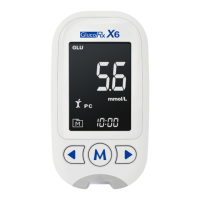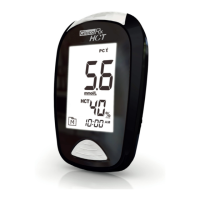
EasyManua.ls Logo

GlucoRx HCT - User Manual

GlucoRx HCT
34 pages
Print Icon
To Next Page IconTo Next Page
Loading...
L148*W105mm/模造紙80P/:4C,4, :,32/36/騎馬釘
機器說明書/GlucoRx HCT/英文(DiME)
311-4279300-XXX
K100
K80 K20
Emily
Color
Designer
Part no.
Product name
Spec
C40 M40 Y70 K30
C90 M60 Y10 K0

Questions and Answers

Summary

IMPORTANT SAFTY INSTRUCTIONS READ BEFORE USE

BEFORE YOU BEGIN

Important Information

Details crucial advice for using the glucose meter, including hydration effects and result interpretation.

Contents of System

Lists all items included in the GlucoRx HCT System kit.

Meter Overview

Identifies and describes the main parts and buttons of the glucose meter.

Display Screen

Explains the various symbols and readings shown on the meter's display.

Test Strip

Details the structure and correct insertion of the glucose and ketone test strips.

SETTING THE METER

Setting the date

Guide to configuring the meter's date format and inputting the correct date.

Setting the time format

Instructions for selecting the preferred 12-hour or 24-hour time format.

Setting the time

Steps to input the correct current time into the meter.

Setting the buzzer

How to enable or disable the meter's audible buzzer.

Setting the reminder alarm

Procedure for setting up multiple daily reminder alarms on the meter.

Setting the backlight

Instructions on how to turn the meter's backlight on or off.

The Three Measuring Modes

Explains the General, AC, and PC measurement modes available on the meter.

BEFORE TESTING

Calibration

Procedure for coding the meter with the correct strip code for accurate ẞ-ketone tests.

How to Code Your Meter (for ẞ-Ketone test)

Step-by-step guide for inserting the code strip to calibrate the meter for ketone testing.

Checking the Code Number

Ensuring the meter's displayed code matches the test strip vial before testing.

Control Testing

Guidance on performing control tests to ensure meter and strip accuracy.

Performing Blood Glucose Control Test

Steps for applying control solution to a glucose test strip for meter verification.

Performing ẞ-ketone Control Test

Instructions for using a ketone control key for meter calibration and verification.

TESTING WITH BLOOD SAMPLE

Preparing the Lancing Device for Blood Testing

Instructions on preparing the lancing device for collecting a blood sample.

Preparing the Puncture Site

Advice on preparing the skin site for accurate blood sample extraction.

Fingertip testing

Detailed steps for pricking a fingertip to obtain a blood sample.

Blood from site other than the fingertip (for ẞ-ketone test)

Procedure for using alternative sites for blood sampling, specifically for ketone tests.

Performing a Blood Glucose or ẞ-Ketone Test

Step-by-step guide for performing blood glucose or ketone tests with the meter.

Read your result

How to interpret and view the blood glucose or ketone test results displayed by the meter.

Eject the used test strip

Instructions on safely removing and disposing of used test strips.

Alternative Site Testing (for ẞ-Ketone Test)

Guidance on performing tests on palm sites, including when to use and not use AST.

METER MEMORY

Reviewing Test Results

How to access and view stored blood glucose and ketone test results on the meter.

Reviewing Blood Glucose Day Average Results

Steps to view the meter's stored 7, 14, 21, 28, 60, and 90-day average glucose results.

DOWNLOADING RESULTS ONTO A COMPUTER

Data Transmission Via Cable

Instructions for connecting the meter to a PC and using software to transfer test data.

MAINTENANCE

Battery

Information on low battery signals and procedures for replacing meter batteries.

Caring for Your Meter

Cleaning, storage, and disposal guidelines for the glucose meter.

Caring for Your Test Strips

Proper storage and handling instructions for blood glucose and ketone test strips.

Caring for Your Carry Case

Instructions for cleaning and maintaining the meter's protective carry case.

Important Control Solution Information

Key guidelines for using, storing, and managing the control solution.

SYSTEM TROUBLESHOOTING

Result Readings (for glucose test)

Explains common messages and their meanings for blood glucose test results.

Result Readings (for ẞ-ketone test)

Interprets common messages and their meanings for blood ketone test results.

How to interpret blood Ketone results

Provides a table for understanding blood ketone readings and their implications.

Error Messages

Lists common error codes, their causes, and recommended actions to resolve them.

Troubleshooting Common Issues

Addresses potential problems like no display, test not starting, or out-of-range control tests.

DETAILED INFORMATION

Normal Blood Glucose Range

Presents plasma equivalent results and normal blood glucose ranges for diabetics.

ẞ-Ketone Test Interpretation

Explains how to interpret ẞ-ketone results and when to seek medical advice.

SYMBOL INFORMATION

Symbol Information

Defines the meaning of various symbols used on the meter and in the manual.

SPECIFICATIONS

Technical Specifications

Details the meter's model, dimensions, power, memory, operating conditions, and ranges.

GlucoRx HCT Specifications

General IconGeneral
Sample Size0.5 µL
Test Time5 seconds
Battery Type2 x AAA batteries
Hematocrit Range30 - 55%
Blood SampleCapillary whole blood
Measurement Range20-600 mg/dL
Memory Capacity1000 test results
Operating Temperature10-40°C
Operating Humidity10% to 90% RH

Videos

How to perform a Blood Glucose Test on a GlucoRx HCT

How to perform a blood glucose test on a GlucoRx HCT meter

Related product manuals