10-36 Vehicle Care
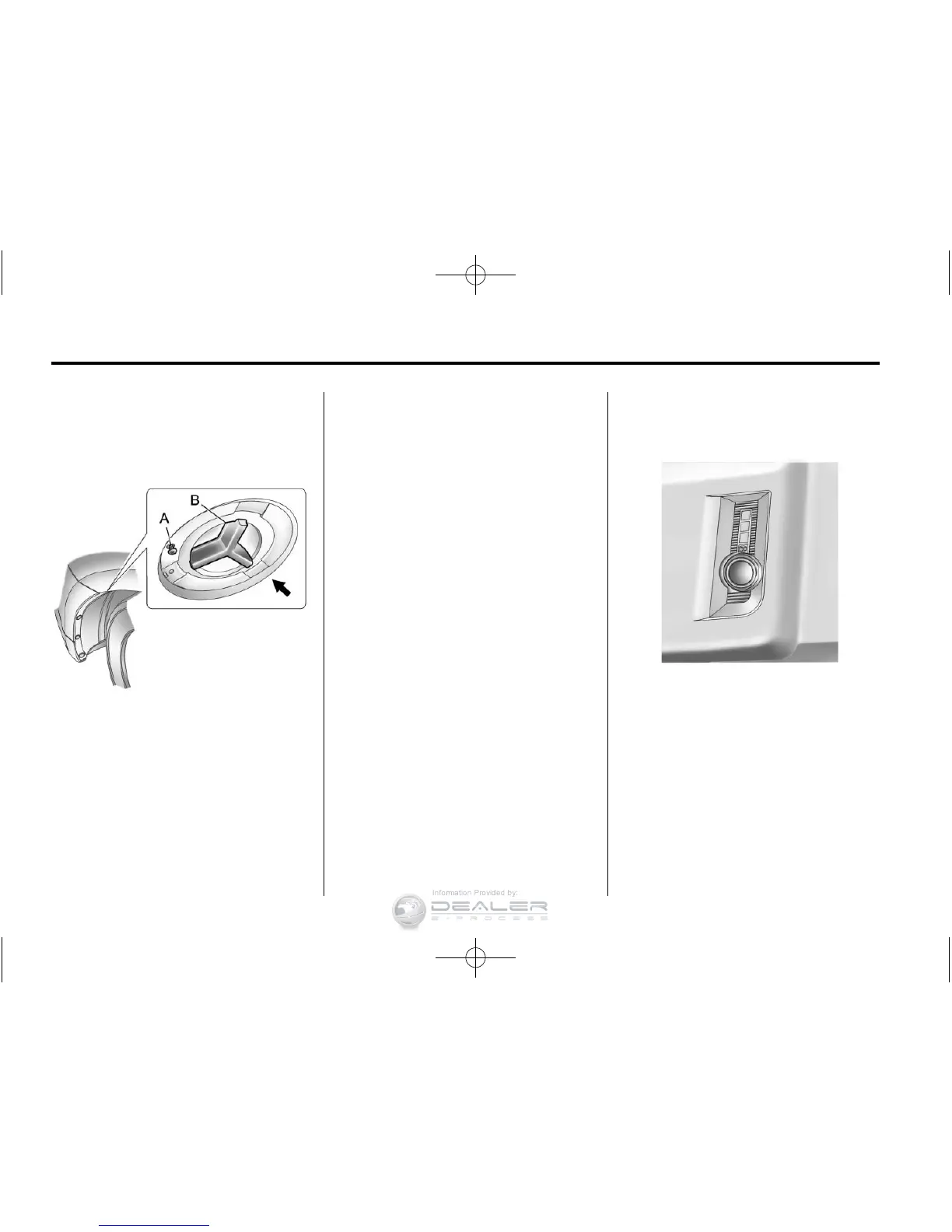
To replace one of these bulbs:
1. Turn the tire to reach the access
port cap located in the front of
wheel well cover.
A. Screw
B. Access Port Cap
2. Remove the screw (A) and
turn the access port cap (B)
counterclockwise to remove.
3. If replacing a headlamp bulb,
remove the dust cover cap from
the back of the headlamp
housing by turning the cap
counterclockwise.
4. Turn the bulb socket
counterclockwise to remove it
from the lamp assembly.
5. Remove the bulb from the
socket or disconnect the bulb
assembly from the harness
connector.
6. Install the new bulb.
7. Reinstall the bulb socket to
the lamp assembly, turning
clockwise.
8. Replace the dust cover cap on
headlamps.
9. Reinstall the wheel well cover
access port cap and secure by
installing the screw.
Fog Lamps
To replace one of these bulbs:
1. Locate the fog lamp assembly
under the front facia.
2. Disconnect the bulb socket from
the electrical connector, turn,
and pull out the bulb assembly.














 To Next Page