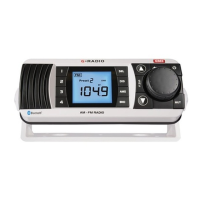
will increase the treble while pressing the key will decrease the treble. The treble
setting will be displayed on the LCD. Minimum treble setting displays a value of -7
with a maximum treble setting of +7. A setting of 0 indicates a flat treble response. To
quickly adjust the treble setting, press and hold the or key.
Adjusting the Balance
The balance setting controls the audio balance between the left and right speaker.
Note: The balance mode is only available when the external speakers are attached. If
running the GR100 from the internal monitor speaker, the balance function is skipped
when the Mode key is pressed.
Briefly press the Mode key repeatedly until ‘BAL’ is displayed on the right of the
LCD. To adjust the Balance, press the
or key. Pressing the key will adjust the
balance towards the left speaker while pressing the Key will adjust the Balance
towards the right speaker. The Balance setting will be displayed on the LCD. Full left
balance displays a value of L10 with a full right balance setting of R10. A setting of
0 indicates the balance is set equally between both speakers. To quickly adjust the
Balance setting, press and hold the or key.
Muting the Sound
The Mute feature allows the radio’s sound to be temporarily disabled without affecting
any other settings. This could be useful when making calls on your two way radio or
mobile phone or during a local conversation where the radio sound is distracting.
To temporarily mute the radio, briefly press the
key. The audio will be temporarily
disabled and no sound will be heard from the speaker(s). While the sound is muted,
‘MUTE’ will flash on the display.
To cancel the Mute selection and restore the sound to its previous level, briefly press
the
key again.
Dimming the Display
The display lighting can be dimmed for night time viewing. The default setting is
maximum brightness. To dim the display:
1. Press and hold the
key to turn the GR100 OFF.
2. Now press and hold the
key again. The GR100 will turn on. DON’T RELEASE
THE KEY YET.
3. Now briefly press the M key to toggle the display lighting dim or bright. Once you
have selected the display lighting you can release the
key.


 To Next Page