•
Programmable Scan Function: Scans the programmable
UHF CB or Receive-only channels with both Group and
Open scan functions available.
•
Remote or Local Installation Option: The TX3420 can
be mounted either remotely using the separate control
head, or locally with the control head attached to the
main unit.
•
Individually Programmable DUPLEX function: User
selectable for only those individual channels in your area
that have repeaters, leaving the others free for use as
extra simplex channels.
•
Priority Channel: A user programmable priority channel
feature allows your working or local repeater channel to
be instantly recalled at the press of a button.
•
High Contrast Liquid Crystal Display: Fully detailed LCD
provides a visual indication of the selected channel and
all selected functions at a glance. Backlit for viewing
at night.
•
In-Built Selcall: Selective Calling with five digit ANI
and fully user-adjustable 5 tone transmitted Selcall
Ident. Also allows naming of Idents for easier caller
identification.
•
Quiet Mode: Selectable on individual channels, Quiet
mode prevents incoming signals from being heard on
selected channels unless preceded by your Selcall code.
•
CTCSS: A built-in Continuous Tone Coded Squelch
System option provides quiet channel operation.
•
Overvoltage Protection: Special overvoltage detection
circuitry protects the radio and warns of excessive
voltage conditions by flashing the display.
•
Surface Mount Technology: The very latest surface
mount component types, design and assembly
techniques and quality control procedures are used
to ensure the highest performance and reliability.
•
Designed and Manufactured in Australia: The TX3420
has been totally designed and manufactured in
Gladesville N.S.W. to meet the demanding needs of
the Australian community.
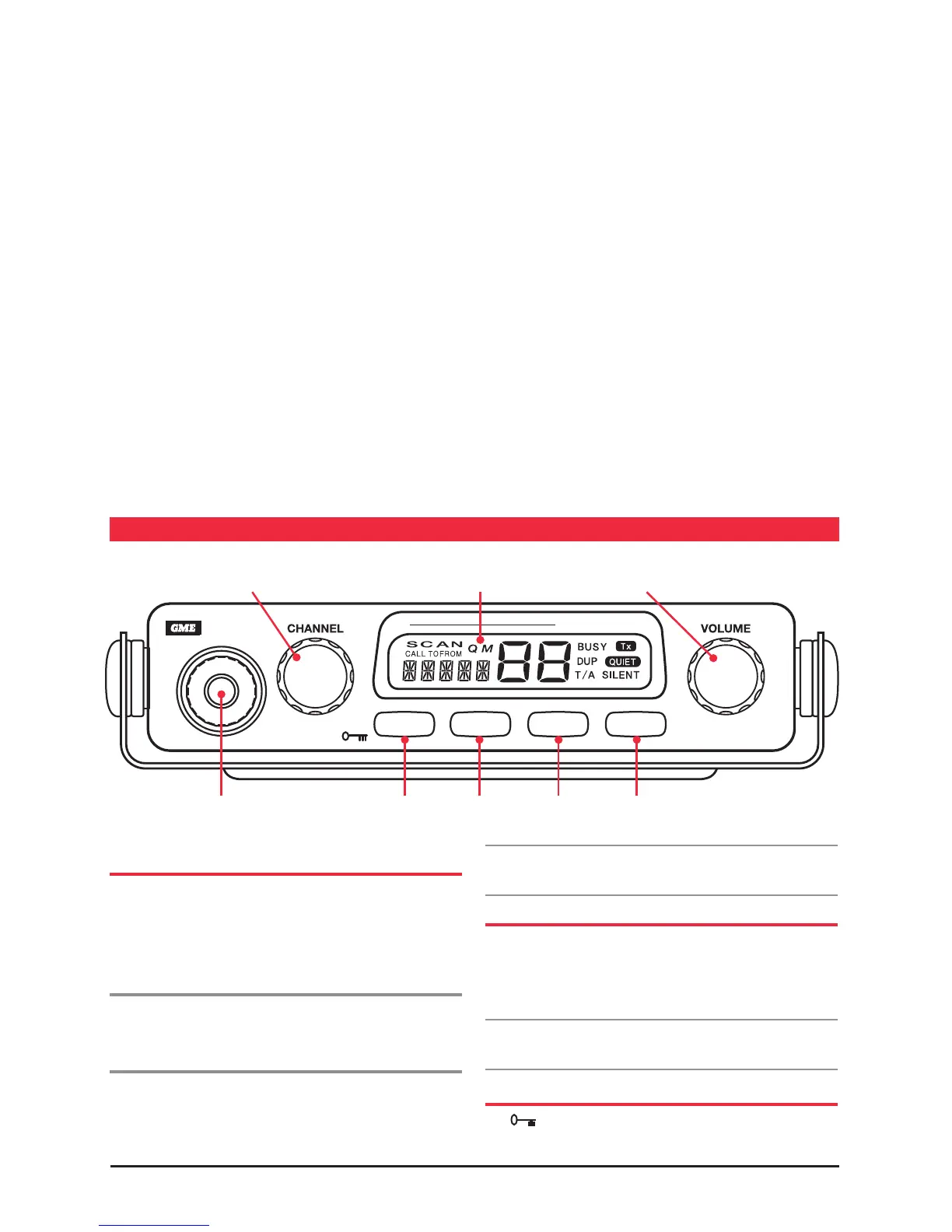
Channel Selector /
PRI Key Liquid Crystal Display Volume Control
Microphone Port Menu Key /
F Key
Scan Key /
OS/GS
Quiet Key /
Duplex Key
Squelch Key /
Alpha Key
gENEral OpEraTION
FUNCTION KEY
The four keys beneath the TX3420’s display have both
primary and secondary functions. Their primary functions
are printed in Black while their secondary functions are
printed in Red.
To access the primary functions
Simply press the required key. e.g. To control the Squelch,
briefly press the SQL key.
To access the secondary functions
Press the F key followed immediately by the required
key. e.g. To lock the radio, briefly press the F key (‘F’
is displayed), then press the Channel knob. The radio
will lock.
Note: If the secondary key is not pressed within 10 seconds
the F key selection will be cancelled.
VOLUME KEY
Rotate the Volume control clockwise past the ‘click’ to turn
the TX3420 ON. Continue to advance the control clockwise
to increase the volume. Rotate the control counter clockwise
to turn the radio OFF.
Note: At minimum volume setting there is still sufficient
volume to be heard in a quiet cabin environment.
KEYLOCK FEATURE
The key locks the keys on the unit to prevent
unintentional key presses from altering your TX3420



 To Next Page