To remove Duplex from a channel
1. Select the required channel 1-8. ‘DUP’ will be visible
on the display.
2. Briefly press the F key followed by the DUP key.
‘DUP’ will disappear from the display accompanied
by a low beep.
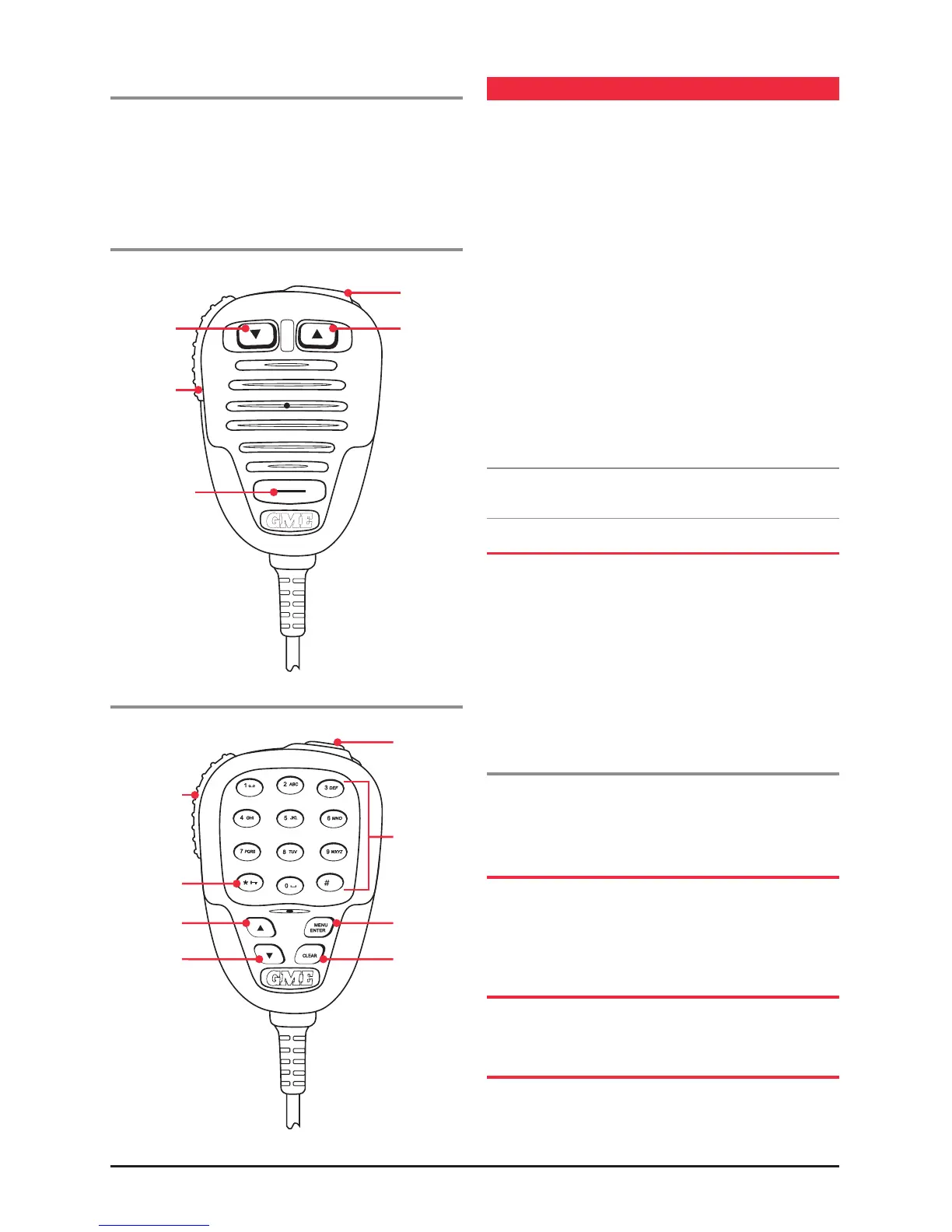
Standard Microphone MC503B
Optional Microphone MC540B
CTCSS
CTCSS (Continuous Tone Coded Squelch System) is a
squelch quieting system that allows several groups of users
to share the same channel without disturbing each other.
It uses a preset sub-audible (very low frequency) tone to
open and close the squelch on your radio. There are up to
50 tones available in two optional tone sets. The system
applies a continuous low-level tone to your transmission
and uses a matching tone decoder to control your receiver’s
squelch. With CTCSS enabled, the channel remains quiet
to all incoming signals unless they carry the correct tone.
When a transmission with the correct tone is received, the
squelch opens and remains open for as long as the signal is
present. When the transmission ends, the channel becomes
quiet again. Transmissions that do not use the correct tone
will not be heard.
The TX3420 allows CTCSS to be enabled or disabled on
individual channels.
Note: The CTCSS tone you select will be used for all CTCSS
enabled channels in your radio.
MONITORING THE CHANNEL
It is useful to be able to temporarily open your radio’s
Squelch to allow you to listen for signals from other CTCSS
users outside your group. Because their CTCSS tone is
different to yours, your Squelch would normally remain
closed, preventing you from hearing them. You can use
the SQL key to open the squelch and listen to the channel
to check that it is clear before transmitting. This will help
prevent you from accidentally transmitting over the top
of another transmission.
To monitor the channel
Press the SQL key. If there are no signals present, you will
hear the usual hiss of an empty channel. Press the SQL key
again to restore the Squelch to its previous setting.
SELECTING THE TONE SET
There are two standard tones sets available, one comprising
50 tones and the other comprising 38 tones. Both tone sets
are included in the TX3420 to provide compatibility with
other GME radio systems.
SELECTING THE REQUIRED CTCSS TONE
To pre-select the CTCSS tone on your radio, please refer to
the MENU SETTINGS on page 16.
ENABLING CTCSS ON A CHANNEL
If a CTCSS tone has been selected, it can be enabled on
individual channels.
Channel
Up
Channel
Down
Push To Talk
PPT
Priority
Skip / Call
Skip / Call
Direct
Channel
Entry
Keypad
Menu/
Enter Key
Clear KeyDown Key
Up Key
Keylock Key
Push to Talk



 To Next Page