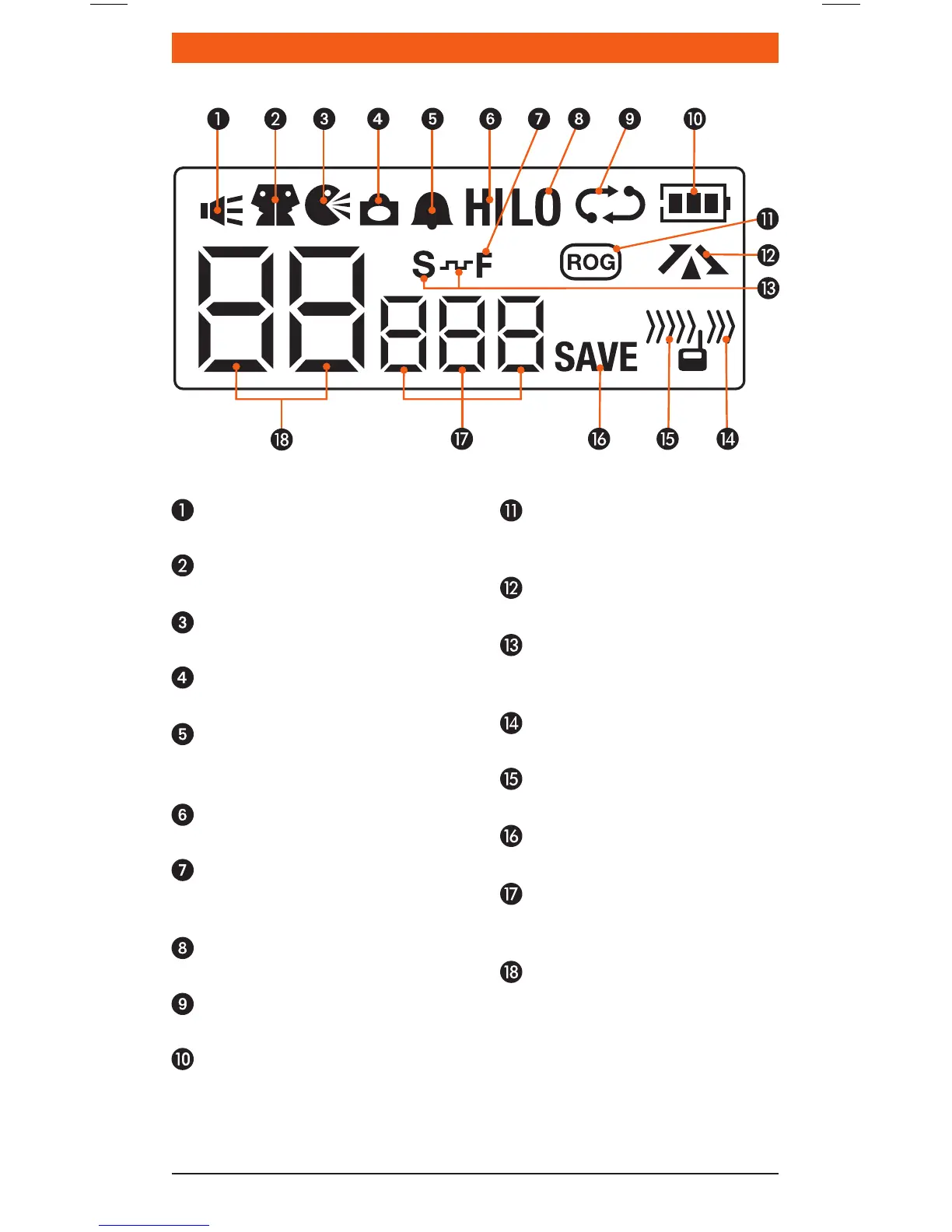
lCD ICons
Monitor icon: Appears when
the Squelch is open.
Dual Watch icon: Appears when
Dual Watch is active.
VOX icon: Appears when VOX
mode is active.
Key Lock icon: Appears when
the keypad is locked.
Button Beep icon:
Appears when button
confirmation tones are on.
High Power icon: Appears
when High TX power is selected.
Function icon: Appears when
the function ‘F’ key is pressed to
activate secondary functions.
Low Power icon: Appears when
Low TX power is selected.
Scan icon: Flashes when radio
is scanning.
Battery icon: Displays battery
charge level.
Roger Beep icon:
Appears when the Roger Beep
tones are active.
Duplex icon: Appears on
channels where Duplex is enabled.
CTCSS/DCS Silent icon:
Indicates a CTCSS or DCS tone has
been set in the menu.
Transmit icon:
Appears when transmitting.
Receive icon:
Appears when receiving signals.
Power Save icon: Appears
when the radio is sleeping.
CTCSS/DCS display: Displays
the selected CTCSS or DCS tone
when Silent mode is active.
Channel display: Displays the
selected channel in use.



 To Next Page