ENG - 51
A
++
E N E R G Y C L A S S
START/PAUSE
ECO
5
1
2 3
7
6
4
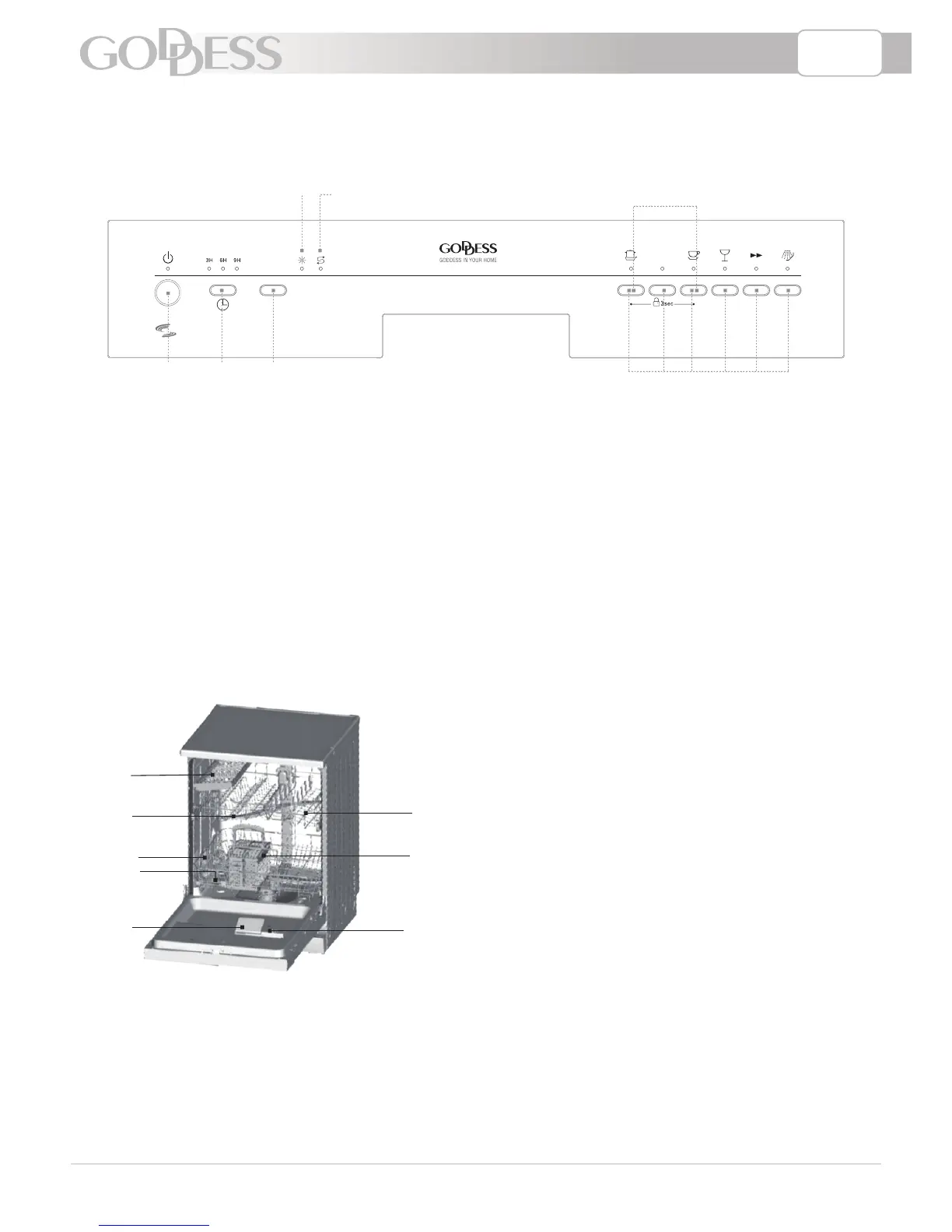
1. Power switch: To control the power supply.
2. Delay time: Pressing the DELAY pad one
time can select 3 h delay time, continuous
pressing second time will increase the
delay hours to 6 h, third time increase to 9 h.
Continuous pressing the fourth time can
cancel the delay selection.
3. Start/Pause Button: Press this button to
start or pause the dishwasher.
4. Rinse Aid Light: To come on when
dispenser needs to be refilled.
5. Salt Aid Light: To come on when
the softener needs to be refilled.
6. Child lock:To lock the dishwasher controls,
press and hold the INTENSIVE & Light
button at the same time for seconds.
The INTENSIVE & Light light will turn on.
To unlock the dishwasher controls, press
the same button in the same way, the light
will turn off.
7. Program Button: To select washing
program when press the button.
1
2
3
4
6
8
7
5
1) Upper Basket
2) Spray Arms
3) Lower Basket
4) Water Softener
5) Cutlery Basket
6) Detergent Dispenser
7) Rinse Aid Dispenser
8) Fork Shelf
A) Water softener
B) Pour 500 ml of water inside the salt container and then fill with dishwasher salt
C) Fill the rinse aid dispenser
D) Function of detergent


 To Next Page