Need help?
Do you have a question about the Godox FT-16 and is the answer not in the manual?
Warning against altering the product to prevent electric shock or malfunction.
Avoid contact with water or moisture to prevent fire or electric shock.
Do not use near flammable gases to prevent fire or explosion.
Product contains small parts posing a choking hazard for children.
Turn off immediately if smoke or unusual smell occurs; seek authorized service.
Avoid exposing the product to extreme heat to prevent fire or damage.
Follow guidelines for battery use, charging, and disposal to prevent leaks or explosions.
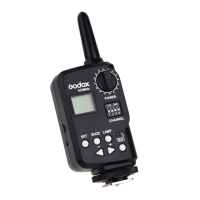
Details the physical controls and display elements of the transmitter.
Explains the battery requirements and installation for the transmitter.
Describes the display icon and action needed when transmitter battery power is low.
Instructions for turning the transmitter on and off to conserve power.
Explains the two modes for displaying flash power ratios and how to switch them.
Details how to set the transmitter and receiver to the same channel for communication.
Describes how to use the dial to control flash groups for power ratios and functions.
Details the functions of the Set, Buzz, LAMP, <->/+, and Test buttons.
Guide to wirelessly adjusting flash power ratio, buzzer, and modeling lamp.
Steps to trigger a flash wirelessly using the transmitter and receiver.
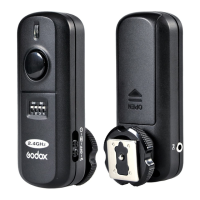
The Godox FT-16 Wireless Power-Control Flash Trigger is a versatile device designed to enhance your photography experience by offering remote control over your Godox flashes. This trigger set, comprising a transmitter (on-camera) and a receiver (on-flash), goes beyond basic flash triggering to provide a comprehensive suite of functions for adjusting flash settings wirelessly.
The primary function of the FT-16 is to wirelessly trigger your flashes, allowing for greater flexibility in studio or on-location setups. However, its capabilities extend significantly further. When used with Godox flashes equipped with a wireless control port, the FT-16 enables you to remotely adjust various flash parameters. This includes precisely controlling the flash power ratio, which is crucial for achieving desired lighting effects. You can also wirelessly toggle the on/off status of the flash's buzzer, providing audible feedback for flash readiness, and manage the modeling lamp or AF-assist beam, which aids in focusing in low-light conditions. The trigger set supports 16 channels for communication, ensuring reliable operation even in environments with multiple wireless devices. Furthermore, it incorporates a 16-grade Power-Control Group Select Dial, allowing you to control up to 16 distinct flash groups, each with its own power ratios and buzzer/modeling lamp settings. This grouping capability is particularly useful for complex lighting setups involving multiple flashes. The FT-16 also offers two power-ratio display modes (1/128~1/1 for shoe mount flashes and 5.0~10 for studio flashes), which can be switched to suit your preference and the type of flash being used.
Operating the FT-16 is straightforward, designed for ease of use in a professional setting. To begin, ensure both the transmitter and receiver are powered on and set to the same communication channel. The transmitter requires two AA batteries, while the receiver draws power directly from the flash unit's Wireless Control Port. The LCD display on the transmitter provides clear visual feedback, including a low battery indication when power drops below 2.2V, prompting you to replace batteries to avoid flash misfires or reduced workable distance.
Adjusting flash settings wirelessly is a core feature. After setting the channel and power-control group dial on both the transmitter and receiver to match, you can manipulate the flash's power ratio using the dedicated <-> and <+> buttons. The power range includes "OF" (Off), which effectively shuts down the flash triggering function for that particular flash. The Buzz Switch allows you to turn the flash's buzzer on or off, with an icon appearing on the LCD to confirm its status. Similarly, the Modeling Lamp / AF-Assist Beam Switch controls these features, with a corresponding icon on the display.
The "Set" button plays a crucial role in applying your adjustments; pressing it communicates the settings from the transmitter to the flash, indicated by a blinking icon on the LCD. Holding the "Set" button for 2 seconds allows you to switch between the two power-ratio display modes. For testing purposes, the "Test" button on the transmitter fires the flash, and both the transmitter and receiver indicators will blink to confirm. For actual shooting, the transmitter can be mounted on your camera's hot shoe, and pressing the camera's shutter-release button will trigger the flash. The system is designed to provide a workable distance of up to 50 meters (164 feet) in open areas, offering ample range for most photographic scenarios.
Proper maintenance of your Godox FT-16 trigger set will ensure its longevity and reliable performance. It is crucial to handle the device with care to prevent malfunctions from strong shocks or impacts. The FT-16 is not waterproof, so keeping it dry is essential. Exposure to water or high humidity can lead to rust, corrosion, and irreparable damage. Avoid sudden temperature changes, as this can cause condensation to form inside the device, potentially leading to malfunction. If moving the trigger set from a high-temperature environment to a cold one, it's advisable to place it in a handbag or plastic bag beforehand to allow for gradual temperature equalization. Finally, keep the trigger set away from strong magnetic fields, which can be generated by other electronic devices like radio transmitters, as these can interfere with its operation and cause malfunctions. Regularly checking and replacing batteries when the low battery indicator appears is also a key maintenance practice to ensure consistent performance and prevent signal loss or flash misfires, especially over longer distances. If troubleshooting issues arise, such as an inability to trigger the flash, always verify battery installation, power status, channel settings, and secure seating in the camera's hot shoe. For signal disturbances or short workable distances, changing the channel or replacing exhausted batteries are recommended steps.
 General
| Type | Wireless Flash Trigger |
|---|---|
| Frequency | 2.4 GHz |
| Channels | 16 |
| Sync Port | Yes |
| Hot Shoe | Yes |
| Compatibility | Canon, Nikon, Sony, Fujifilm, Olympus/Panasonic |
| Range/Maximum operating distance | 100 meters |
| Groups | 5 |
| Power Supply/Battery | 2 x AA batteries |

 To Next Page