EasyManua.ls Logo

Godox MS Series - User Manual

Godox MS Series
6 pages
Print Icon
To Next Page IconTo Next Page
Loading...
705-MS0000-00 Made In China
Instruction Manual
中英文双语
Chinese English Bilingual
地址/Add: 深圳市宝安区福海街道塘尾社区耀川工业区厂房21层至4层、41层至4
1st to 4th Floor, Building 2/ 1st to 4th Floor, Building 4, Yaochuan Industrial Zone,
Tangwei Community, Fuhai Street, Bao’an District, Shenzhen 518103, China
电话/Tel: +86-755-29609320(8062) 传真/Fax: +86-755-25723423
邮箱/E-mail: godox@godox.com http://www.godox.com
深圳市神牛摄影器材有限公司
GODOX Photo Equipment Co., Ltd.
MS SeriesCompact Studio Flash
Question and Answer IconNeed help?

Do you have a question about the Godox MS Series and is the answer not in the manual?

Overview

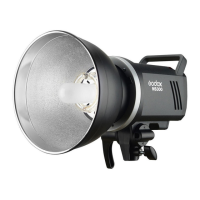
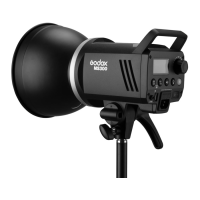
The Godox MS Series Compact Studio Flash is a lightweight, compact, and durable lighting solution designed for studio portraiture and e-commerce product photography. It is suitable for various applications including headshots, waist shots, certificate photography, and general product photography. The flash can also serve as high light, background light, or hair light in larger studios and workshops.

Function Description:

The MS series studio flash features a built-in Godox 2.4G wireless X system, allowing for remote control of flash power ratio, modeling lamp, and buzzer, as well as flash triggering, when used with optional X1, XT16, or FT-16 triggers. The flash provides precise output displayed on an LCD panel, with 50 steps of power adjustment from 1/32 to 1/1 (or 5.0 to 10.0). It offers outstanding output stability, with no more than 2% shifts under the same output. The anti-preflash function enables synchronization with cameras that have a one-preflash firing system. The device also includes an auto memory and recovery function for adjusted panel settings.

Important Technical Specifications:

The MS series comes in two models: MS200 and MS300.

  • Max Power (Ws): MS200 offers 200Ws, while MS300 offers 300Ws.
  • Guide Number (m ISO 100): MS200 has a guide number of 53, and MS300 has 58 (both with a highly effective reflector).
  • Color Temperature: 5600±200k.
  • Operating Voltage: AC110V-120V~60Hz or AC220-240V(50Hz).
  • Power Output Control: Adjustable from 5.0 to 10.0 (1/32 to 1/1).
  • Modeling Lamp (W): 150W.
  • Modeling Lamp Level: Adjustable from 5% to 100%.
  • Recycle Time: 0.1~1.3s (220V) / 0.1~1.8s (110V).
  • Triggering Method: Sync cord, Test button, Slave triggering, Wireless control port.
  • Flash Duration: 1/2000~1/800s.
  • Parameters Output from Sync Cord Jack: 5V.
  • Parameters Output from USB Port: 5V/200mA (only for Godox receiver).
  • Fuse: F8AL 250V.
  • Dimensions: Flash diameter 12.6cm, height of flash with handle 12.7cm, length of flash with lamp cover 28.3cm.
  • Net Weight: Approximately 2.6kg.

Usage Features:

  • Flash Preparation: Users need to install the modeling lamp and glass protection cover, then attach the flash unit to a light stand. The mounting bracket and direction adjusting handle allow for precise positioning.
  • Power Connection: Connect the flash to an AC power source using the provided power cord.
  • Modeling Lamp Control: The 150W modeling lamp can be set to OFF, PROP (power changes with flash power), or Percentage (manual brightness adjustment from 5% to 100%). It also features an auto-off function after 4 hours to prevent overheating. A long press of the modeling lamp button can toggle the function where the modeling lamp turns off when triggering the flash.
  • Power Output Control: The select dial allows free adjustment of power output from 1/32 to 1/1. The test button discharges power when output is adjusted from high to low.
  • Test Button: Used to fire the flash without taking a picture and to adjust flash brightness. Pressing the SET button and turning on the flash displays its version.
  • Sync Triggering: A 3.5mm sync cord jack allows synchronous firing with the camera shutter.
  • GR/CH Button: Short press to adjust the built-in wireless group (0 to F). Long press to adjust the built-in wireless channel (1 to 32).
  • Slave Trigger Model: Three modes are available:
    • No optical control: Slave triggering is off.
    • Optic S1 Secondary Unit Setting: In M manual flash mode, the flash fires synchronously with the main flash, ignoring pre-flashes.
    • Optic S2 Secondary Unit Setting: In M manual flash mode, the flash ignores a single "preflash" from the main flash and fires in response to the second, actual flash.
  • Buzz Function: Provides an audible reminder when the flash is fully charged and ready.
  • Alarm Display: Indicates errors like "E0" (temperature sensor error) or "E3" (inner capacitance and voltage too high). If these alarms occur, the device should be sent for professional maintenance.
  • Memory Function: The device remembers panel settings 3 seconds after adjustment and restores them upon next startup.
  • Over-Temperature Protection: The flash automatically turns off its firing function and displays a blinking temperature alarm when its inner temperature is too high. Functions resume when the temperature drops below 50°C.
  • Wireless Control Function: The built-in 2.4G wireless transmission allows remote control with X1 and XT16 flash triggers. Synchronously pressing the GR/CH and S1/S2 buttons activates/deactivates wireless transmission. Channel IDs can be changed to prevent signal interference.

Maintenance Features:

  • Immediate Shutdown: The device should be shut down immediately if it works abnormally to diagnose the issue.
  • Impact Avoidance: Avoid sudden impacts, and the lamp should be regularly dedusted.
  • Normal Warming: It is normal for the lamp to warm up during use. Continuous flashes should be avoided if unnecessary.
  • Authorized Maintenance: Maintenance must be performed by an authorized department using original accessories.
  • User-Replaceable Parts: The flash tube and modeling lamp are user-replaceable and can be obtained from the manufacturer.
  • Warranty: The product, excluding consumables like flash tubes and modeling lamps, comes with a one-year warranty. Unauthorized service voids the warranty.
  • Damage/Wetting: If the product has failures or was wetted, it should not be used until repaired by a professional.
  • Power Disconnection: Disconnect the power when cleaning the flash or changing the flash tube/modeling lamp.
  • Specifications Changes: Changes to specifications or designs may not be reflected in the manual.
  • Tube Replacement: To replace the flash tube, shut down the power, remove the power cord, and wear insulated gloves. Loosen the iron wire, gently pull out the old tube, transfer the feet casing to the new tube, and carefully insert the new tube into the copper outlets, securing it with the iron wire.

Godox MS Series Specifications

General IconGeneral
BrandGodox
ModelMS Series
CategoryCamera Flash
LanguageEnglish

Related product manuals