1/4
1/8
1/16
1/32
1/64
1/128
10
2
4
8
20
50
70
11
2
4
8
20
40
70
12-14
2
4
8
20
40
60
15-19
2
4
8
18
35
50
20-50
2
4
8
16
30
40
60-199
2
4
8
12
20
40
Hz
If the number of flashes is displayed as “--”, the maximum number of
flashes will be as shown in the following table regardless of the flash
frequency.
Flash Output
Number of Flashes
1/4
2
1/8
4
1/16
8
1/32
12
1/64
20
1/128
40
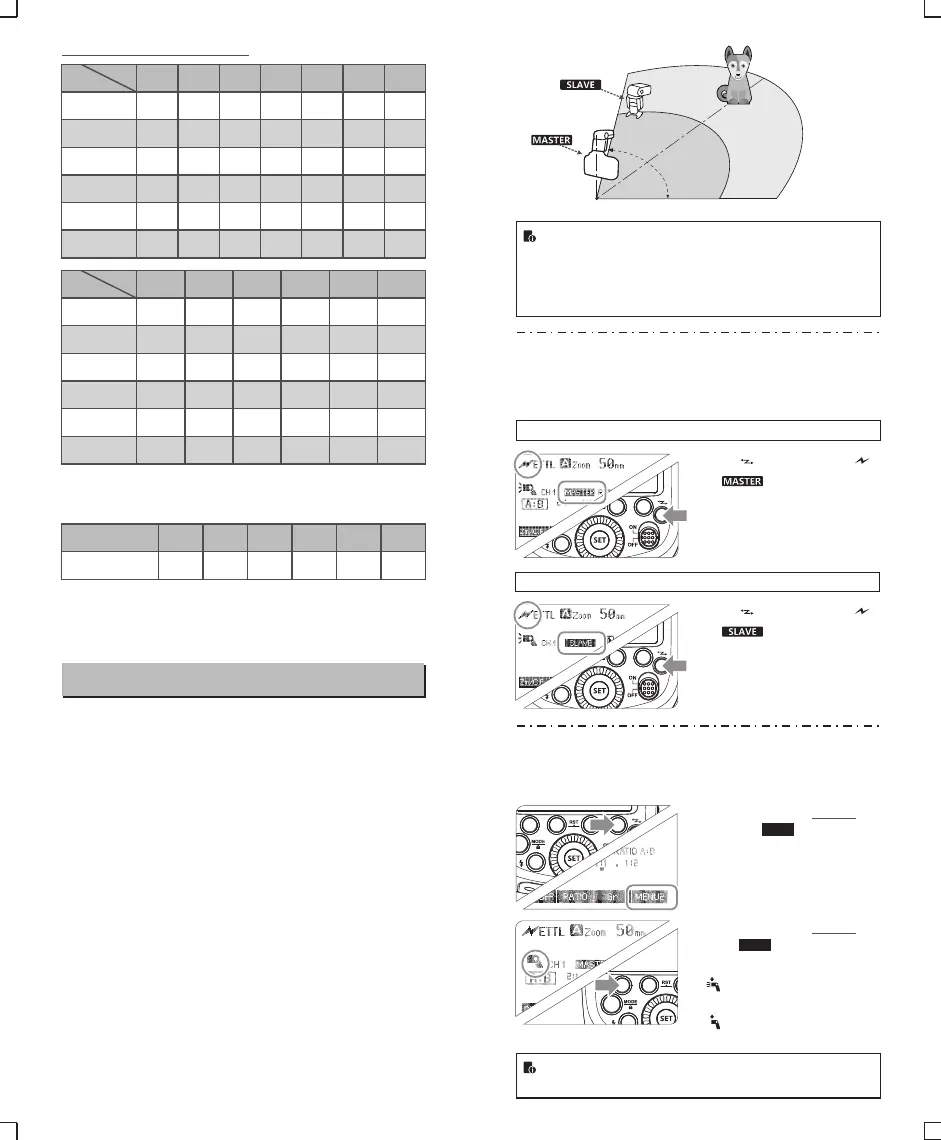
Wireless Flash Shooting: Optic Transmission
This product supports wireless flash application and functions
as either a master or a slave unit. As a master unit, it can control
Canon speedlites e.g. 580EXII, 600EX-RT via wireless. As a slave
unit, it can receive wireless signals of Canon speedlites e.g.
580EXII, 600EX-RT and commanders of Canon cameras e.g.
7D/60D/600D.
- 45 - - 46 -
Maximum Stroboscopic Flashes:
1/4
1/8
1/16
1/32
1/64
1/128
1
7
14
30
60
90
100
2
6
14
30
60
90
100
3
5
12
30
60
90
100
4
4
10
20
50
80
100
5
4
8
20
50
80
100
6-7
3
6
20
40
70
90
8-9
3
5
10
30
60
80
Flash
output
Hz
Flash
output
● You can set up two to three slave groups for E-TTL II autoflash
shooting. With E-TTL II autoflash, you can easily create various
lighting effects.
● Any flash settings (of flash exposure compensation, high-speed
sync, FE lock, FEB, manual flash, Multi flash) on the master unit
will be automatically sent to the slave units. So the only thing you
need to do is to set the master unit to ETTL mode without any
operation for the slave units at all during the shooting.
● This flash can work in ETTL autoflash, M manual flash, and Multi
stroboscopic flash modes when set as a master unit.
Positioning and Operation Range
MENU2
Slave Unit Setting
Master Unit Setting
● Even with multiple slave units, the master unit can control
all of them via wireless.
● In this user manual, “master unit” refers to the camera flash
on a camera and “slave unit” will be controlled by the
master unit.
1. Wireless Settings
You can switch between normal flash and wireless flash. For normal
flash shooting, be sure to set the wireless setting to OFF.
Indoors
Outdoors
15m(49.2ft)
10m(32.8ft)
80°
8m(26.2ft) 12m(39.4ft)
Press < > button so that < >
or < > are displayed on
the LCD panel.
Press < > button so that < >
or < > are displayed on
the LCD panel.
2. Master Unit’s Flash OFF
When the master unit is set to OFF, only the slave units will fire a
flash.
Press Function Button 4 so
1 that < > is displayed
on the LCD panel.
Press Function Button 1
2 < > to control the
ON/OFF of the master unit.
< >:The master unit flash
firing is ON.
< >:The master unit flash
firing is OFF.
Even if the master unit flash firing is disabled, it still fires a
preflash to transmit wireless signals.
ON/OFF


 To Next Page