GR
CH
Setting the Transmitter
Setting the Camera
To achieve FP flash, set “e1: flash sync speed” to “1/250s (Auto FP)” in the Nikon camera setting
to get a stable transition from standard sync mode to high speed sync mode. Do not use 1/320s
(Auto FP).
- 36 -
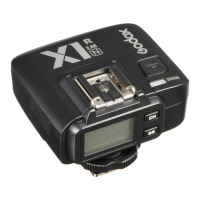
Setting the Receiver
Channel Setting
1. Short press the <CH> Button and the channel
amount will increase a step each time.
2. Long press the <CH> Button will enter quicker
adjustment mode. The channel amount will
increase fast in this mode.
3. Release the <CH> Button and the current channel
amount is confirmed.
GR
CH
Setting the Receiver
4. The channel amount will increase from 1 to 32. When the current channel is 32, press the
<CH> Button again and the channel 1 will be displayed on the panel.
Group Settings
1. Short press the <GR> Button and the group
amount will increase a step each time.
2. Long press the <GR> Button will enter quicker
adjustment mode. The group amount will increase
fast in this mode.
3. Release the <GR> Button and the current group
amount is confirmed.
4. The group amount will increase from A to E. When
the current group is E, press the <GR> Button
again and the group A will be displayed on the
panel.
Automatically Enter Power Saving Mode
1. The system will go into standby mode after the transmitter goes into standby mode. And the
displays on the LCD panel disappear now.
2. To wake up the system, press the <TEST> Button or the <GR> Button. Fully press the
<TEST> Trigger Button of the transmitter can also wake up the receiver’s system. If the
transmitter is attached to the NIKON DSLR camera, half press the camera shutter can also
wake up the system.
- 35 -


 To Next Page