1
2
3
CH 01
A
B
C
M
1/128
5
6
7
8 9
SYNC
V0.2
1/4
BLUE.T.
BEEP
ZOOM
114
10
4
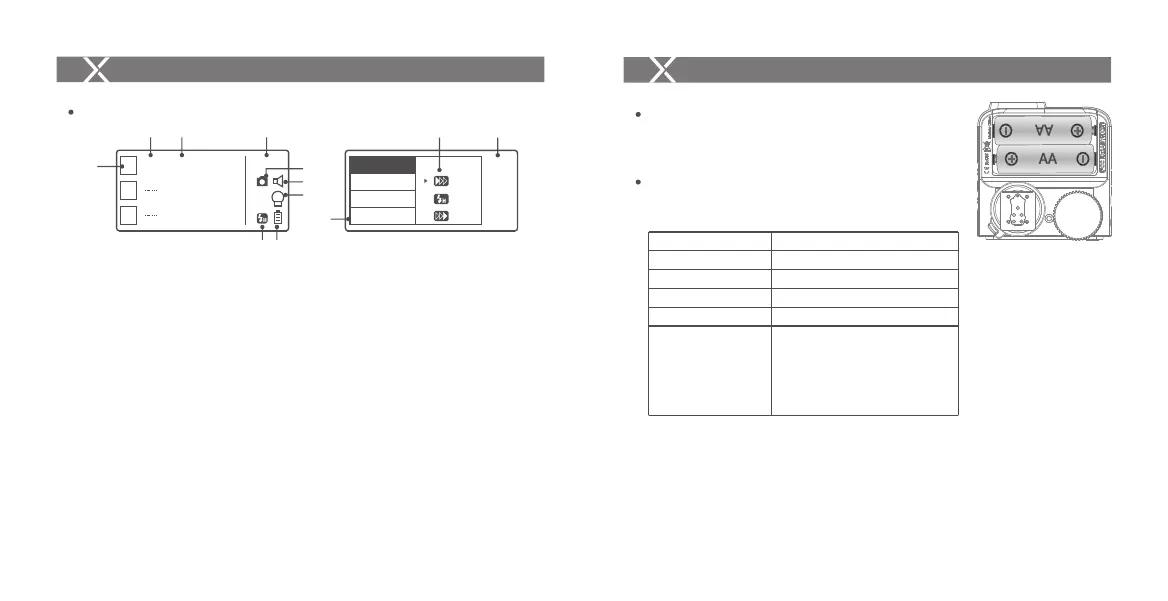
LCD Panel
1. Channel (32) 2. Camera Connection 3. Modeling Lamp Master Control
4. High-Speed/Rear Curtain Sync 5. Sound 6. Battery Level Indication
7. Group 8. Mode 9. Power 10. ZOOM Value 11. Version
Names of Parts
Installing Batteries
As shown in the illustration, slide the battery
compartment lid of the flash trigger and insert two
AA batteries separately.
Battery Indication
Check the battery level indication on the LCD panel
to see the remaining battery level during the usage.
Battery
AA alkaline batteries are recommended.
Battery Level Indication
3 grids
2 grids
1 grid
Blank grid
Blinking
Meaning
Full
Middle
Low
Low battery, please replace it.
< 2.5V The battery level is going
to be used out immediately (please
replace new batteries, as low power
leads to no flash or flash missing in
case of long distance).
The battery indication only refers to AA alkaline batteries. As the voltage of Ni-MH battery tends to be
low, please do not refer to this chart.
Group Display
Menu
- 27 - - 28 -



 To Next Page