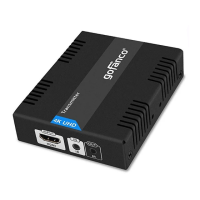
7
8 HDMI Out: Connect an HDMI display here
with an HDMI cable (cable not included)
Installation Requirements
1. HDMI source device (computer, DVD
player, etc)
2. HDMI display device (SDTV/Monitor,
HDTV/Monitor, projector, etc.)
3. UTP/STP CAT5e/6 cable following
IEEE-568B wiring standard
Hardware Installation
1. Power off all devices including your HDMI
source and HDMI display(s).
2. Connect your HDMI source device to the
Transmitter's HDMI Input connector with
an HDMI cable (HDMI cable not included).
3. Optional: Connect an HDMI display to the
Transmitter's HDMI out connector with an
HDMI cable (cable not included). This
connection is needed only if you need local
monitoring of the HDMI signal.


 To Next Page