20
EN
DE
IT
USING THE REMOTE CONTROL
All the functions and features available on
the DS-10 can be adjusted using the SKC
and the remote. To use the remote, simply
| REMOTE CONTROL
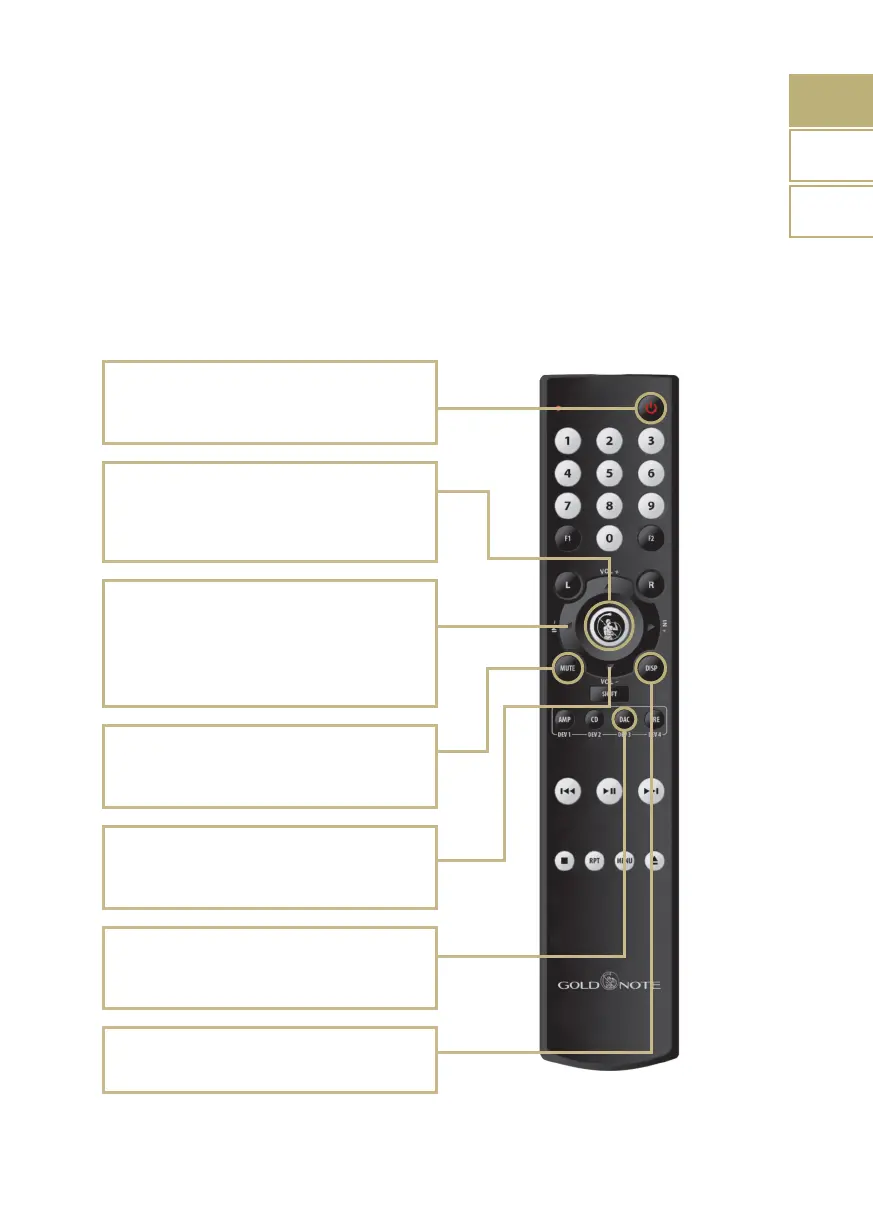
Power ON/OFF
Use POWER ON/OFF to turn ON and OFF the
DS-10.
Volume control
Use VOL+ and VOL- to adjust the volume level by
1 step at a time.
Enter
Activates the SELECTION FRAME and selects the
functions, just like you would do by pressing the
knob.
Mute
Use MUTE to instantly mute the DS-10. The input
selection is disabled while DS-10 is in MUTE.
DAC
To control DS-10 press the button DAC on the
remote control.
Display
Dimmer in 4 steps: Full, 50%, 25%, OFF
Input selection
Use IN+ and IN- to change the selected input.
Use IN+ and IN- when the SELECTION FRAME is
red (active selection) to change the function and
set the desired value.
press the Enter key to activate the selection
frame and the IN+ and IN- buttons to move
the frame around the display.



 To Next Page