EasyManua.ls Logo

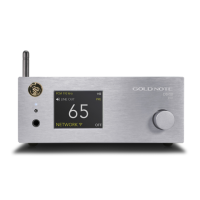
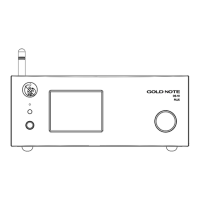
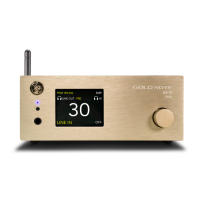
Gold Note DS-10 - User Manual

Gold Note DS-10
96 pages
Print Icon
To Next Page IconTo Next Page
Loading...
USER
MANUAL
DS-10
DS-10 PLUS
EN
DE
IT

Other manuals for Gold Note DS-10

Questions and Answers

  • V
    Valerie FordJul 28, 2025
    What to do if the app can't find Gold Note Media Player DS-10 in the network?
    • R
      ryanvaldezJul 28, 2025
      If the App is unable to find the Gold Note Media Player DS-10 on the network, there are a few potential causes. First, ensure that the DS-10 is properly connected to your network via Ethernet cable or Wi-Fi. If using Wi-Fi, verify that the RF antenna is correctly installed, as the DS-10 may not function correctly without it. Also, confirm that the DS-10 is connected to the correct WLAN and that you have entered the correct password, if required by your network setup.
  • J
    James SimsAug 3, 2025
    Why my Gold Note Media Player DS-10 is connected to Wi-Fi but the app and Roon can’t find it?
    • K
      Kimberly HurstAug 3, 2025
      If your Gold Note Media Player DS-10 is connected to Wi-Fi but the App and Roon are unable to find it, the issue may stem from complex network protocols and router behavior. To resolve this, reboot your router and the DS-10. This will refresh the network and address any network errors that may have occurred.
  • J
    jessica16Aug 8, 2025
    How to make Gold Note remote control work with Media Player DS-10?
    • B
      brandon51Aug 9, 2025
      If the Gold Note remote control is not working with the DS-10, select DAC mode on the remote. The “DAC” button is located in the upper part of the remote.
  • W
    whitecoryAug 14, 2025
    Why Gold Note Stereo System remote control doesn't control the DS-10?
    • N
      Nancy WalkerAug 15, 2025
      If the Gold Note Stereo System's remote control isn't controlling the DS-10, it might be because the remote is set to the wrong mode. The Gold Note remote can manage multiple units, so ensure the correct mode is selected. To resolve this, select 'DAC' mode on the remote, using the 'DAC' button located in the upper part of the remote.
  • S
    Sydney RobersonAug 21, 2025
    What to do if the app can't find the Gold Note Amplifier DS-10 in the network?
    • J
      Jessica HunterAug 21, 2025
      If the app cannot find the DS-10 in the network, ensure the DS-10 is connected to the WLAN or LAN via Ethernet cable or Wi-Fi. Also, make sure the RF antenna is correctly installed, as Wi-Fi use may be impossible without it. When using Wi-Fi, verify that the DS-10 is connected to the correct WLAN and that you've entered the password if required by your network setup.

Summary

Important Safety Informations

Chameleon Mode

Overview of Chameleon Mode

Introduces the DS-10's Chameleon mode, a feature for fine-tuning DAC performance with three parameters.

The Chameleon DAC

Explains the Chameleon mode, a special feature to fine-tune DAC behavior using three parameters for 192 setups.

Quick Installation

Plug and Play Setup

Details the plug&play setup process for the DS-10, connecting it to a power amplifier or active speakers.

Technical Specifications

Main Features

Details main audio features like D/A Converter, frequency response, THD, dynamic range, and preamp control.

Digital Inputs

Details the types and specifications of digital inputs: RCA, TOS-Link, AES/EBU, USB-B, and USB-A.

Network Connectivity

Details LAN/WLAN (WiFi) and Bluetooth specifications for network connection.

Front Panel

Rear Panel

Select Functions

Turning On and Off the DS-10

Instructions on how to power the DS-10 on and off using the SKC or the remote control.

How to Select Functions

Step-by-step guide on navigating and selecting functions using the SKC or remote control.

Network Setup

Chameleon Parameters

PCM EQ

Details the PCM EQ parameter (Equalisation Curve) with 6 available settings for low-pass filtering.

DEE

Explains the DEE parameter (De-emphasis Curve) for optimizing roll-off at high frequencies, with 4 options.

DAC PWR

Details the DAC PWR parameter (DAC Power/current) with 8 values to adjust sound warmth and analysis.

Connecting Other Sources

Control App

Download the App

Instructions on how to download the GN Control app for managing the DS-10 and streaming music.

Remote Control

Using the Remote Control

Explains how to use the remote control to operate all functions and features of the DS-10.

Firmware Update

Firmware Update Process

Instructions on keeping the Gold Note unit up to date by updating the latest firmware via QR-Code and website.

Troubleshooting

Gold Note DS-10 Specifications

General IconGeneral
DACAKM AK4493
Weight4 kg
StreamingRoon Ready, Tidal, Qobuz, Spotify
InputsOptical, Coaxial
OutputsRCA, XLR
Supported Sample RatesPCM up to 384kHz, DSD256
Supported Bit Depths16-bit, 24-bit, 32-bit
Power SupplyExternal power adapter
TypeDAC, Streamer, Preamplifier
Dimensions220mm W x 80mm H x 260mm D

Related product manuals